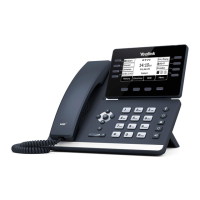
PLACING AND ANSWERING CALLS
MANAGE MULTIPLE CALLS:
+ PLACE A SECOND CALL: Tap MORE > NEW CALL
+ ANSWER A SECOND CALL: Hear Call Waiting Tone, second call appears on display.
Tap ANSWER (first call automatically holds). You are connected to second call.
Tap the flashing new call window to see call icons (answer, forward, silence and reject) for second call.
AA CALL:
ANSWER A CALL
+ Phone rings, indicator flashes, available commands appear on the
display.
+ Lift Handset or press SPEAKER Key or tap ANSWER .
+ TO FORWARD TO ANOTHER SUBSCRIBER: Tap FORWARD,
enter the extension number and tap FORWARD again.
+ To view the line and features keys, tap DSSKEY.
+ TO SEND RINGING CALL TO VOICEMAIL: Tap REJECT.
PLACE A CALL
+ Internal: Enter EXTENSION number.
+ External: Enter the10-digit number.
+ Active Keypad appears
+ Lift Handset or tap CALL on the Active Keypad or
press the SPEAKER Key.
Tap to answer the second call.
Tap to reject the second call and send
it to voicemail.
Tap to merge the incoming call with the
active call.
Tap to show/hide merge and forward
icons.
Tap to forward the incoming call to another
number.
Second call window
Need support? Connect with us at www.northland.net/get-support or
Dial 4357 (HELP) or 315-671-6262 to speak to a Northland Representative Page 6



 To Next Page
 Loading...