EasyManua.ls Logo

YOKOGAWA Total Insight series - User Manual

YOKOGAWA Total Insight series
54 pages
Print Icon
To Next Page IconTo Next Page
Loading...
User's
Manual
IM01U10A00-00EN-R, 2nd edition, 2017-08-29
ROTA
MASS
Total Insight
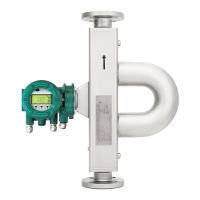
Coriolis Mass Flow and Density Meter
Quick Reference Instruction Manual

Questions and Answers

  • D
    David CaseAug 16, 2025
    Why is the output signal deviating from the measured quantity in my YOKOGAWA Total Insight?
    • Y
      yjohnsAug 16, 2025
      If the output signal is deviating from the measured quantity in your YOKOGAWA Measuring Instruments, it could be due to: * An incorrect parameter setting. Check the parameter LRV and URV of the corresponding output signal, and correct if necessary. * An incorrect measured quantity being output. Check the measured quantity output and, if necessary, correct; check parameter Sel.
  • D
    Dominique QuinnAug 19, 2025
    Why is the flow rate displayed deviating from the actual flow rate in my YOKOGAWA Total Insight Measuring Instruments?
    • R
      Richard RussoAug 19, 2025
      If the flow rate displayed on your YOKOGAWA Measuring Instruments is not matching the actual flow rate, there might be several reasons: * The zero point may be set incorrectly, requiring you to set the zero point correctly. * The highest and lowest values for mass flow could be set incorrectly. Ensure you match the settings of the flow meter and reading system, and check the LRV and URV process parameters. * The measuring tubes may not be completely filled with the medium. Ensure correct installation. * There might be bubbles in the medium, which requires checking the pipe and installation. * For remote types, the connecting cable might be incorrectly connected. Check the cable connections and correct them if necessary.
  • D
    dayjamesAug 31, 2025
    What to do if the display on my YOKOGAWA Measuring Instruments transmitter is not functioning?
    • J
      Julie SuarezAug 31, 2025
      If the display on your YOKOGAWA Measuring Instruments transmitter is not functioning, check the following: * Ensure that the unit is properly connected to the power supply. * Inspect the cable connections between the display and the main board. If necessary, check cable connections between display and main board and connect properly.
  • K
    Kimberly GutierrezSep 4, 2025
    What to do if the field communicator is not detected by YOKOGAWA Total Insight?
    • N
      nbeardSep 4, 2025
      If your field communicator is not being detected by YOKOGAWA Measuring Instruments, it could be due to the following reasons: * The HART or Modbus DD may not be installed on the field communicator. Save the HART or Modbus DD file on the field communicator. * The field communicator may not be properly connected. Connect the field communicator with Rotamass Total Insight.
  • J
    Jennifer OrtizSep 8, 2025
    How to make settings if IR switches are not working on YOKOGAWA Total Insight?
    • K
      Kevin WolfeSep 8, 2025
      If you cannot make settings via the IR switches on your YOKOGAWA Measuring Instruments, it may be due to incorrect settings in the write-protect menu item. Switch off the write-protect menu item via digital communication or hardware switch.
  • J
    John JonesNov 11, 2025
    What to do if the zero point is unstable on YOKOGAWA Measuring Instruments?
    • M
      Malik SmithNov 11, 2025
      If the zero point on your YOKOGAWA Measuring Instruments is unstable, consider these potential causes: * The measuring tube may not be completely filled with the medium. Check that the measuring tube in the sensor is completely filled. * There may be bubbles or solids in the medium. Check the pipe and sensor installation and correct the installation if necessary. * There might be no electrical grounding. Ground the transmitter and sensor, and check the correct connection of the connecting cable shield on the transmitter. * The flow meter may be installed in proximity to facilities with a strong electromagnetic field. Ground the transmitter and sensor and install the flow meter as far away as possible from these electric devices. * Mechanical strain from traction or pressure may ...
  • J
    Jennifer BennettNov 23, 2025
    What to do if the density displayed is deviating from the actual density in YOKOGAWA Measuring Instruments?
    • S
      sarahsmithNov 23, 2025
      If the density displayed on your YOKOGAWA Measuring Instruments is deviating from the actual density, consider the following potential causes: * The density unit, highest, and lowest value for density may be set incorrectly. Match the settings of the flow meter and reading system, and check the LRV and URV process parameters. * A fixed density might be selected. Check whether the Val sel parameter is set correctly. If a fixed value is selected, ensure that the Fix val parameter is set correctly. Otherwise, set the Val sel parameter to Meas val. * The analog output trim might have been performed incorrectly, requiring you to correctly perform trimming. * There might be no electrical grounding. Ground the transmitter and sensor, and check the correct connection of the connecting cab...
  • B
    Brian FrancoNov 27, 2025
    What to do if the temperature displayed deviates from the actual temperature on YOKOGAWA Total Insight?
    • I
      Ian ChoiNov 27, 2025
      If the temperature displayed on your YOKOGAWA Measuring Instruments is deviating from the actual temperature, check the following: * Ensure the temperature unit, highest and lowest value for temperature are set correctly by matching the settings of the flow meter and reading system and checking the LRV and URV process parameters. * Verify if a non-adjustable temperature is selected. Check whether the Func sel parameter is set correctly. If a fixed value is selected, ensure that the Fix val is set correctly. Otherwise, set the Func sel parameter to Inter val. * If the analog output trim was performed incorrectly, correct it by performing trimming correctly. * Check if the connecting cable is incorrectly connected for remote type and correct the cable connections if necessary. * F...

Summary

Safety

General safety instructions

Provides critical safety guidelines for handling, installation, and operation to prevent hazards.

Installation

Sensor Installation

Covers general rules for sensor installation, avoiding noise, and specific connection types.

Transmitter Installation

Details integral and remote type transmitter mounting, housing rotation, and display orientation.

Wiring

General Wiring Rules

Essential safety precautions and general guidelines for wiring the flow meter.

Grounding Connections and Sensor Circuits

Explains proper grounding connections for safety and signal integrity.

Transmitter Connection Terminals

Illustrates terminal box layout for I/O outputs and power supply connections.

Output Signals

Explains active and passive current outputs, pulse outputs, and status outputs.

Input Signals

Describes active and passive current inputs and status inputs for external devices.

Connecting Power Supply and External Devices

Provides instructions and warnings for connecting power supply and external devices.

Commissioning

Troubleshooting

YOKOGAWA Total Insight series Specifications

General IconGeneral
Measurement RangeVaries by model
ResolutionVaries by model
Response TimeVaries by model
Output4-20 mA
DimensionsVaries by model
WeightVaries by model

Related product manuals