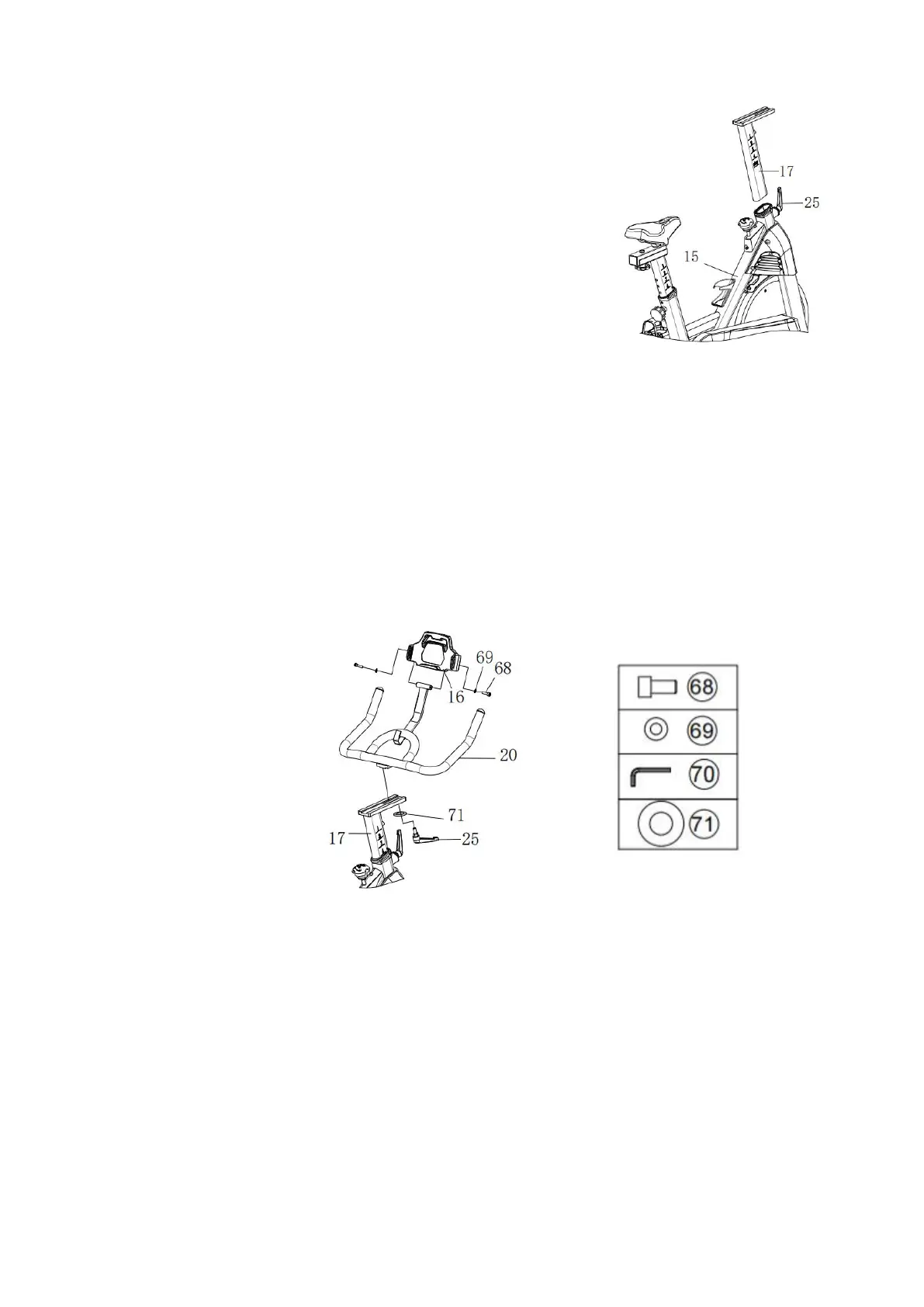
STEP 5. Install the Handlebar Post
Required parts:
#17-Handlebar Post
1. Unscrew #25-L Knob counter-clockwise, and insert the
#17-Handlebar Post to the handlebar tube.
2. Adjust the #17-Handlebar Post height to a suitable
location and screw down clockwise the #25-L Knob.
Step 6. Install Handlebar & iPad Holder
Required parts:
#20-Handlebar #16-iPad Holder #25-L Shape Knob
#68-Inner Hexagon Screws #69-Plain Washer #70-Inner Hexagon Spanner
#71-Plain Washer
1. Secure #20-Handlebar to the #17-Handlebar Post with #71-Plain Washer and
#25-L Shape Knob.
2. Attach #16-iPad Holder on the #20-Handlebar by using #68-Inner Hexagon
Screws and #69-Plain Washer, tighten and secure with #70-Inner Hexagon
Spanner.


 To Next Page