EasyManua.ls Logo

Yueming CMA0604-B-A - User Manual

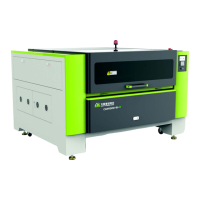
Yueming CMA0604-B-A
57 pages
Print Icon
To Next Page IconTo Next Page
Loading...
I
Product Operation Manual
Applicable models: CMA0604-B-A/CMA1309-B-A/CMA1610-B-A/CMA1309-T-A/CMA1610-T-A
Version: 1.0

Table of Contents

Questions and Answers

  • A
    Andrea RobinsonAug 12, 2025
    What to do if my Yueming Cutter cutting graphics and drawing size do not match?
    • M
      matthewmackAug 12, 2025
      If the cutting graphics and drawing size on your Yueming Cutter do not match, there are several potential causes. First, there may be a program input error, so check the procedures according to the figure. Second, the synchronous belt may be loose, in which case you should tension it. Finally, the control system could be damaged; inspect the stepper motor and drive, and replace them if necessary.
  • A
    Aaron BradfordAug 16, 2025
    What to do if Yueming CMA0604-B-A equipment crashes and is carving?
    • K
      Kenneth TurnerAug 16, 2025
      If your Yueming Cutter is crashing and carving, it could be due to a few reasons. The laser tube (high voltage) might be discharging to the housing and sparking; if so, reconnect the high-voltage line of the laser tube. Alternatively, the board may not be grounded or there may be other interference. Ensure you properly connect the ground wire and eliminate any interference.
  • E
    Emily MckinneyAug 20, 2025
    What to do if the laser tube can’t work on Yueming Cutter?
    • D
      Donald ParkerAug 20, 2025
      If the laser tube on your Yueming Cutter isn’t working, first ensure the water-cooling system is turned on normally by turning on the water circulation system. Also, check if the chiller is working properly and press the laser power button. If these steps don't solve the issue, the laser power supply may be damaged, and you should replace it with a switching power supply of the same specifications.
  • C
    Courtney HamptonAug 25, 2025
    What to do if the Yueming CMA0604-B-A equipment can’t be turned on?
    • K
      Karen RodriguezAug 25, 2025
      If your Yueming Cutter equipment won’t turn on, make sure to release the emergency stop button. Also, reset the main contactor and ensure that the front cover and back cover are properly in place.
  • E
    Elizabeth HallAug 27, 2025
    What to do if I get the wrong figure size on my Yueming Cutter?
    • J
      Joseph Bell MDAug 27, 2025
      If you're getting the wrong figure size with your Yueming Cutter, and you are using PLT output in CorelDraw software, ensure the PLT plotter unit out from CorelDraw software matches the resolution of SmartCarve software lead-in PLT option. Also, confirm that the zooming in the page option is set to 100%. Ensure you set to the correct resolution or equivalent. Other possible causes include failing to connect earthing for the mainboard or other interferences, in which case you should connect earthing to eliminate the interference. Finally, over high temperature can cause a crash to the mainboard, so add more measures for lowering temperature.
  • W
    Willie RussellAug 31, 2025
    Why does the laser pause during working on my Yueming CMA0604-B-A?
    • G
      Gregory Ochoa MDAug 31, 2025
      If the laser pauses during operation on your Yueming Cutter, you should clean the water tank and dredge the water hose. Additionally, install a stabilizer to the input power supply.
  • M
    Mr. Edwin EdwardsSep 4, 2025
    Why is there reverse direction of motor shaft movement in Yueming CMA0604-B-A Cutter?
    • A
      alvarezjasonSep 4, 2025
      To address reverse direction of motor shaft movement in your Yueming Cutter, check electric earthing and drive parameter settings.
  • M
    Mr. Jeffrey CurrySep 8, 2025
    What to do if the motor shaft fails in movement or twitters during movement on my Yueming CMA0604-B-A?
    • M
      Mr. Joel SchultzSep 8, 2025
      If the motor shaft fails to move or twitters during movement on your Yueming Cutter, it could be due to improper setting of motor parameters, so set to the correct movement parameters. Alternatively, the drive or motor may be damaged, requiring you to change the drive or motor. Finally, reconnect the motor and drive line.

Summary

Copyright

Disclaimer and Responsibility Statement

Foreword

Safety Precautions

Chapter 1 Equipment Introduction

1.1 Equipment Introduction

Overview of CMA series laser cutting machines and their applications.

1.2 Product parameters

Technical specifications and parameters for CMA series laser cutting machines.

1.3 Operating environment

Recommended environmental conditions for operating the laser cutting machine.

1.4 Equipment compositions

Details of the machine's various components and their arrangement.

1.5 Auxiliary parts

Information on essential auxiliary components like blowers, air pumps, and water tanks.

1.6 Equipment parameters

Details on how to find and understand equipment parameters via the nameplate.

1.7 System configuration

List of components and their roles in the machine's system configuration.

1.8 Suitable materials

Information on materials compatible and incompatible with the laser cutting machine.

1.9 Applicable fields

Industries and applications where CMA series laser equipment is suitable for use.

1.10 Description of warning labels

Explanation of various warning labels and their meanings for safe operation.

Chapter 2 Safety Rules

2.1 Product safety

Conditions required for safe operation and adherence to safety guidelines.

2.2 Safe equipment

Guidelines for using safety equipment and handling equipment malfunctions.

2.3 Safety awareness

Prohibited actions and awareness points for safe operation of the equipment.

2.4 Requirements for personnel

Training and qualification requirements for operators and maintenance personnel.

2.5 Special product risks

Overview of potential hazards associated with the laser cutting machine.

Chapter 3 Equipment Installation And Debugging

3.1 Equipment Installation

General guidelines and steps for installing the laser cutting equipment.

3.2 Equipment buttons description

Description of the machine's buttons, including power and emergency stop.

3.3 Equipment debugging

Procedures for debugging and testing the machine after installation.

Chapter 4 System Maintenance

4.1 Mechanical maintenance

Routine maintenance for mechanical parts like guide rails, screws, and belts.

4.2 Light route maintenance

Proper procedures for cleaning and maintaining the laser light route and optical components.

4.3 Auxiliary parts maintenance

Maintenance procedures for auxiliary components like water chillers and pumps.

4.4 Maintenance cycle

Recommended schedule for routine maintenance tasks on the equipment.

4.5 Runtime maintenance

Daily and weekly checks and maintenance tasks to perform during machine operation.

4.6 Maintenance of long-term shutdown

Procedures for storing and maintaining the machine during extended periods of inactivity.

Chapter 5 Troubleshooting

Chapter 6 Appendix

6.1 Electrical system diagram

Diagram illustrating the electrical system layout and connections of the machine.

Postscript

Yueming CMA0604-B-A Specifications

General IconGeneral
BrandYueming
ModelCMA0604-B-A
CategoryCutter
LanguageEnglish

Related product manuals