5
1.2. Diesel operation setting-up
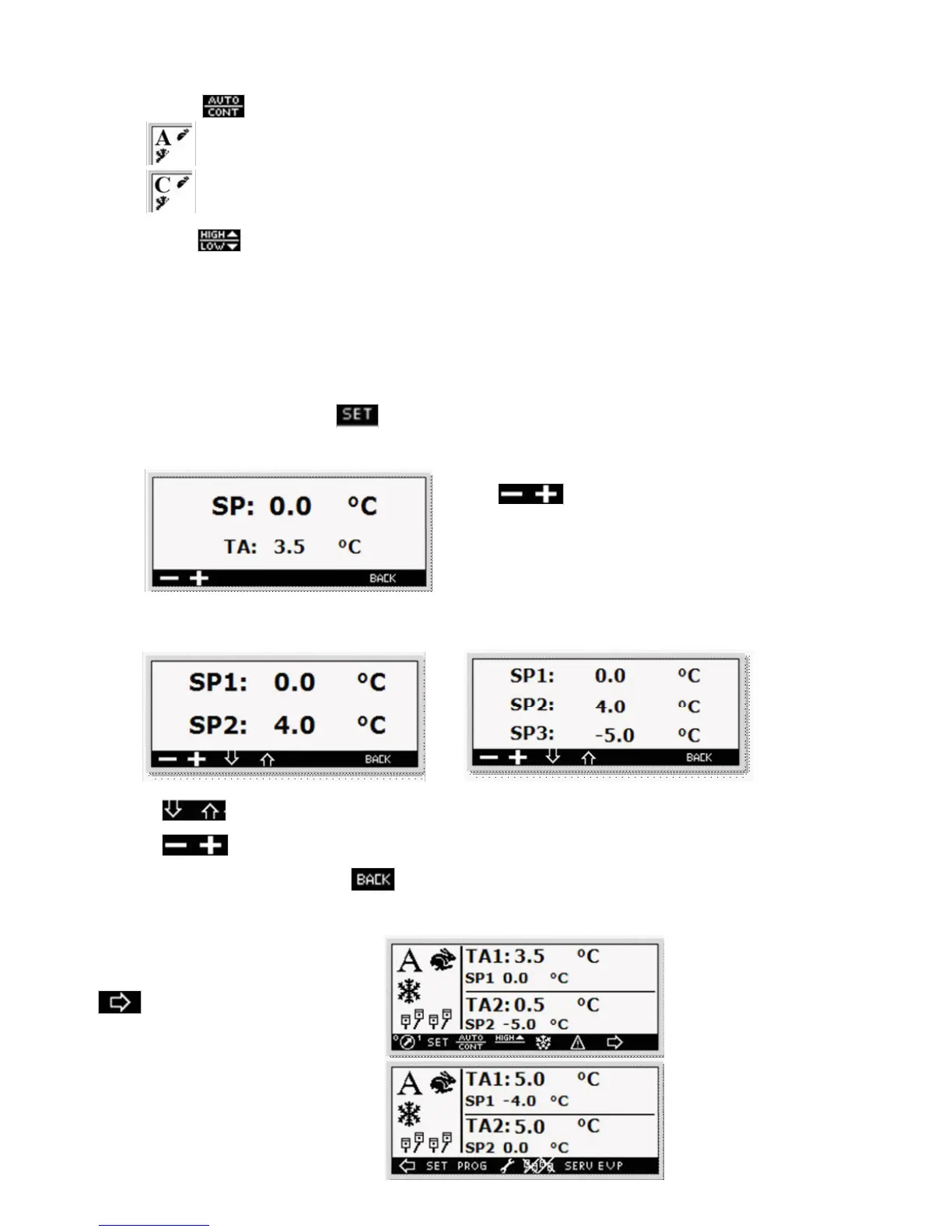
By pressing the key you can select the type of operation:
• Automatic (start/stop); the unit switches on/off in accordance with the preset temperature (Setpoint).
• Continuous; the temperature is kept without switching off the motor.
By pressing the
key you can select high or low speed (only for the start/stop operation).
ATTENTION
The switching from diesel to electric is automatically performed any time the machine is connected to the electrical
mains and is powered. If during the electrical operation a power failure occurs after about 5 minutes the machine
restarts by diesel.
1.3. Setting-up of the operation set point
To set up the operation set press the key, the screen will be displayed:
Standard
Press the keys to decrease or increase the value
Multi-temperature
n° 2 Evaporators n° 3 Evaporators
Press the Keys to move among the Set point (SP..)
Press the keys to decrease or increase the value.
To return to the main screen press the key.
1.4. Evaporator enable and disable (only Multi-temperature Version)
To enable or disable an evaporator press the
key.
To move to the side screen



 To Next Page