7
1.7. Alarms
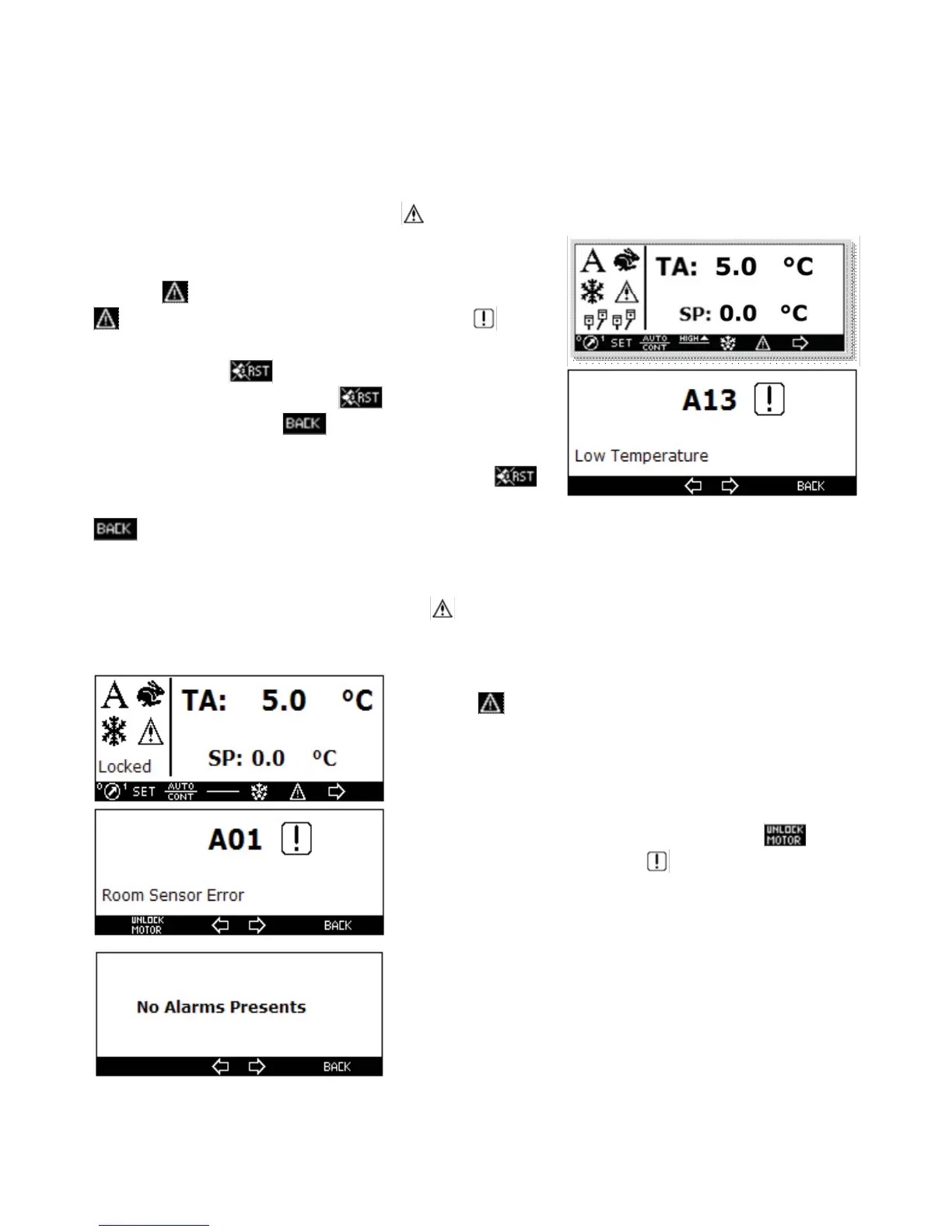
There are three types of alarm signalling:
1) Display Only
2) Blockage with automatic restoring
3) Blockage with manual restoring
1) When a display only alarm occurs the icon is displayed on the main display to indicate the presence of
an alarm as shown. The alarm is also signalled through the buzzers loca-
ted on both the unit and the controller.
Press the key once to deactivate the controller buzzer. Press the
key again to display the type of alarm signalled. The icon indi-
cates the alarm state, if the alarm is still active. To de-activate the buzzer
of the unit press the key. To de-activate the display signalling,
restoring the default state, press the state again. To return
to the main screen press the Key . If the alarm automatically
ceases the acoustical signalling is de-activated but the display signalling
remains active, to reset enter the alarm screen and press the ,
key, to restore the default state. To return to the main screen press the
key.
2) When an automatic restoring alarm occurs all of the above display only alarm is valid, but the refrigerating
automatically stops and restarts if the alarm ceases.
3) When a manual restoring alarm occurs the icon and the Blocked wording are displayed. Also in this case
the buzzers are activated.
• Press the key two times to access the screen where the type of
alarm is signalled.
• When the cause of the alarms ceases. By pressing the key
the “no alarm” screen is displayed The icon in the blocked state
remains lit even when the alarm ceases.



 To Next Page