
 Need help?
Do you have a question about the Zaxcom NOVA and is the answer not in the manual?
Explains the function of dedicated keys like Record, Stop, Play, TC/Bank, Tracks/Trim, ZNET, and Back.
Details the operation of F1-F11 multi-function keys.
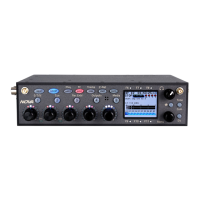
Describes the faders, LEDs, and the main LCD screen.
Covers the Menu knob, Tone/Com key, SLT key, and antennas.
Details audio outputs, inputs, media slot, and power switch on the left side.
Covers RF, data, analog inputs, and power connectors on the right side.
Outlines internal receiver modules and cooling vents on the rear.
Introduces the main menu and its primary sub-menu categories.
For assigning hardware faders to inputs.
For assigning names to recorded tracks.
For saving and loading setup parameters.
For creating and naming headphone presets.
For adjusting engineering and operational settings.
Defines how to route inputs to faders/banks and navigate banks.
Guides on manually naming tracks or using presets.
Explains saving/loading setups, clearing assignments, and factory reset.
Guides on setting up, naming, and inverting phase for headphone presets.
Enable and configure input/output compressors.
Adjusts slate mic levels and extra input gain.
Manages audio output levels for TA5 output connectors.
Sets audio sample rate and configures the prerecord buffer.
Configures TC modes like Normal and Auto Load.
Adjusts display brightness, slate source, and multi-trim.
Allows playing recorded tracks to output busses.
Configures remote roll switch and punch-in recording.
Adjusts tone frequency/level and peak meter hold.
Sets transport key modes and enables phase inversion.
Allows editing of preset track names.
Edit note presets and adjust headphone amplifier gain.
View system details and configure warning alerts.
Configure analog inputs, temperature scale, and fan speeds.
Adjusts panning behavior and display refresh rate.
Guides for updating bootloader and IFB module firmware.
Enables logging and configures slate mic behavior.
Adjusts the decay time and hold time of meters.
Delays the visual time code slate display.
Sets the duration for shifted key functions.
How to navigate the input configuration menu and its options.
Details trim, type, compressor, phantom power, delay, HPF, etc.
Explains linking compressors for stereo/surround signals.
How to jam TC/UB from external sources or internal clock.
Process for manually entering TC and user bits.
Sets TC running modes and configures the frame rate.
Sets TC display source and output connector source.
Configures UB increment and date format for user bits.
Manually sets the device's internal clock and calendar.
How to display and freeze the visual time code slate.
How to assign inputs to tracks using the matrix.
Defines the routing for recording cross points.
Turns ZaxNet on/off, sets frequency, and group codes.
Adjusts transmitter power and transport control modes.
Configures transmitter power management during recording.
Manages transmitter standby status and ERX audio delay.
Configures TC output embedding and IFB test tone.
Explains updating IFB module firmware and debug options.
How to input scene, take, and note data.
Guides on selecting notes from a preset list.
Instructions for playing back audio segments and scrubbing.
Guides on remotely auditioning and re-recording audio.
How to enable tracks for recording on primary/mirror cards.
Routes analog, digital, and receiver inputs to output busses.
Defines signal routing to output busses.
Overview of media settings like Mirror Mode and Sound Reports.
Configures file mirroring behavior (Off, On, Continuous).
Creates sound reports from recorded file metadata.
Selects the folder for recording files.
Deletes last segment or erases the current folder.
Process for formatting the primary compact flash card.
Adjusts signal attenuation for ISO tracks.
Allows naming of the current record folder.
Selects file mirroring behavior (Off, On, Continuous).
Specifies target folder and start/end segments for mirroring.
Sets file format and bit depth for mirrored files.
Defines naming conventions for recorded files.
Links mirror folder to primary folder changes.
Configures mirror mode persistence after power cycles.
Sets TC offset for mirror files and formats the card.
Displays frequency, battery, transport status, and RF signal.
Shows audio levels, peak hold, and signal validity.
Searches the spectrum for clear operating frequencies.
Sets the center frequency for the receiver's front-end filter.
Accesses firmware updates for QRX modules.
Guides on using the TRIM key to adjust input levels.
Explains remote gain adjustment for Zaxcom transmitters.
Routes tone to output busses or card tracks.
Modifies the tone generator's frequency and output level.
Activates or deactivates the tone generator.
Guides on using the onscreen keyboard for text input.
Selects different headphone monitoring configurations.
Allows listening to inputs before the fader level.
Options to mark a take as a false start or delete it.
Advises on compatible CF card brands and sizes.
Outlines how to test CF cards for reliability.
Addresses jitter issues and recommended slate sync settings.
Details pinouts for audio inputs/outputs, slate mic, and headphones.
Details pinout for the 4-pin Hirose power connector.
Explains the pinout for the AES digital I/O connector.
Step-by-step guide to update the Nova unit's firmware.
Instructions for updating receiver modules via transmitter.
Links for registration, firmware, manuals, technical support, and forums.
Details analog/digital input/output levels, dynamic range, and AES specs.
Specs for ZaxNet RF interface and QRX212 receiver modules.
Details track count, sample rates, storage, and effects parameters.
Covers timecode, power requirements, dimensions, weight, and display.
Outlines the warranty period, coverage, and limitations.
Procedures for obtaining repair service and contacting support.
Covers product use conditions and limitations on damages and liability.
 General
| Bit Depth | 24-bit |
|---|---|
| Recording Media | Internal SSD |
| Supported File Formats | .WAV |
| Power Source | External DC |
| Wireless Control | ZaxNet |

 To Next Page