
 Need help?
Do you have a question about the Zaxcom ZMT4 and is the answer not in the manual?
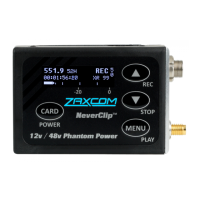
Operation of the card/power button.
Description of the device's display screen.
Function of the menu and playback key.
Details of increment and record key functions.
Outlines decrement and stop key functions.
Identification of the 3-pin Lemo microphone input.
Identification of the SSMA antenna connector.
Details on inserting and removing the micro SD card.
Explanation of NP50 battery usage and handling.
Explains frequency, ZaxNet, and transport status displays.
Describes power level, battery, and audio meter displays.
Details segment count, gain, group/unit codes, and time left.
Shows how to view time code and frame rate.
How to set the microphone gain level.
How to set the UHF transmit frequency.
How to configure phantom power for microphones.
How to activate and use the transmitter key lock.
Lists the six available sub menu groups.
Instructions for accessing and moving through menu items.
Steps for exiting the menu system.
Setting the time code frame rate.
Choosing the source for time code input.
Setting the TC jam mode for recording.
Controls when time code is broadcast over ZaxNet.
Automatically sets frame rate based on ZaxNet input.
Adjusts the UHF transmit power output.
Sets the modulation format for UHF transmission.
Configures record-only or normal transmit modes.
How to format the micro SD card for recording.
Performing partial format for file structure issues.
How to play back recorded audio segments.
Shows remaining and used record time on the card.
Configures recorder to start automatically on power-up.
Sets behavior for low battery to prevent corruption.
Sets ZaxNet transceiver to OFF, RX, or TX mode.
Sets frequency for receiving ZaxNet commands and time code.
Sets frequency for transmitting ZaxNet audio and time code.
Assigns transmitter to a ZaxNet group for control.
Assigns unique unit code for transmitter identification.
Enables switching to a stronger ZaxNet signal.
ZaxNet transceiver only receives, does not transmit.
ZaxNet transceiver only transmits, does not receive.
Receives time code before transmitting audio.
Configures when ZaxNet transceiver searches for time code.
Enables audible beep confirmation for recording.
Adjusts the high pass filter to reduce low frequencies.
Engages 2K notch filter to remove RF interference.
Explains the parameters of the compressor/expander.
Sets phantom power options for microphones.
Uses tone generator for gain staging.
Sets transmitter power mode on boot-up.
Configures key lock behavior after booting.
Procedures for updating receiver firmware.
Adjusts OLED brightness and display dimming.
Shows firmware, serial number, and DSP version.
Hides or displays encryption menu for navigation.
Sets encryption codes for secure audio transmission.
Hides or displays transmitter naming menu.
Renames transmitter for file identification.
Guidance on selecting and testing micro SD cards.
Details card capacity and segment limits.
Explains .zax format and ZaxConvert tool.
Step-by-step guide to update the ZMT4 firmware.
How to use ZMT4 to update ERX firmware.
Configuration for two and three-wire lavalier microphones.
Pin assignments for XLR and Lemo microphone connectors.
Covers ZaxNet remote control and time code frequencies.
Details UHF audio frequency ranges for ZMT4 models.
Detailed technical specifications for the transmitter.
Technical details for audio input and processing.
Details on time code reader/generator capabilities.
Specifications related to media and recording format.
Technical details for the 2.4 GHz ZaxNet receiver.
Physical dimensions and weight of the device.
Information on power output, consumption, and battery life.
Standard warranty period and terms.
Procedures for seeking repair services.
Limitations on remedies, damages, and exclusions.
Conditions affecting warranty coverage based on product use.
 General
| RF Power Output | 50 mW |
|---|---|
| Input Impedance | 10 kΩ |
| Encryption | AES-256 |
| Battery Type | Lithium-Ion |
| Modulation | Digital |
| Frequency Response | 20 Hz to 20 kHz |
| Operating Temperature | -20°C to +55°C |
| Frequency Range | 470-698 MHz |

 To Next Page