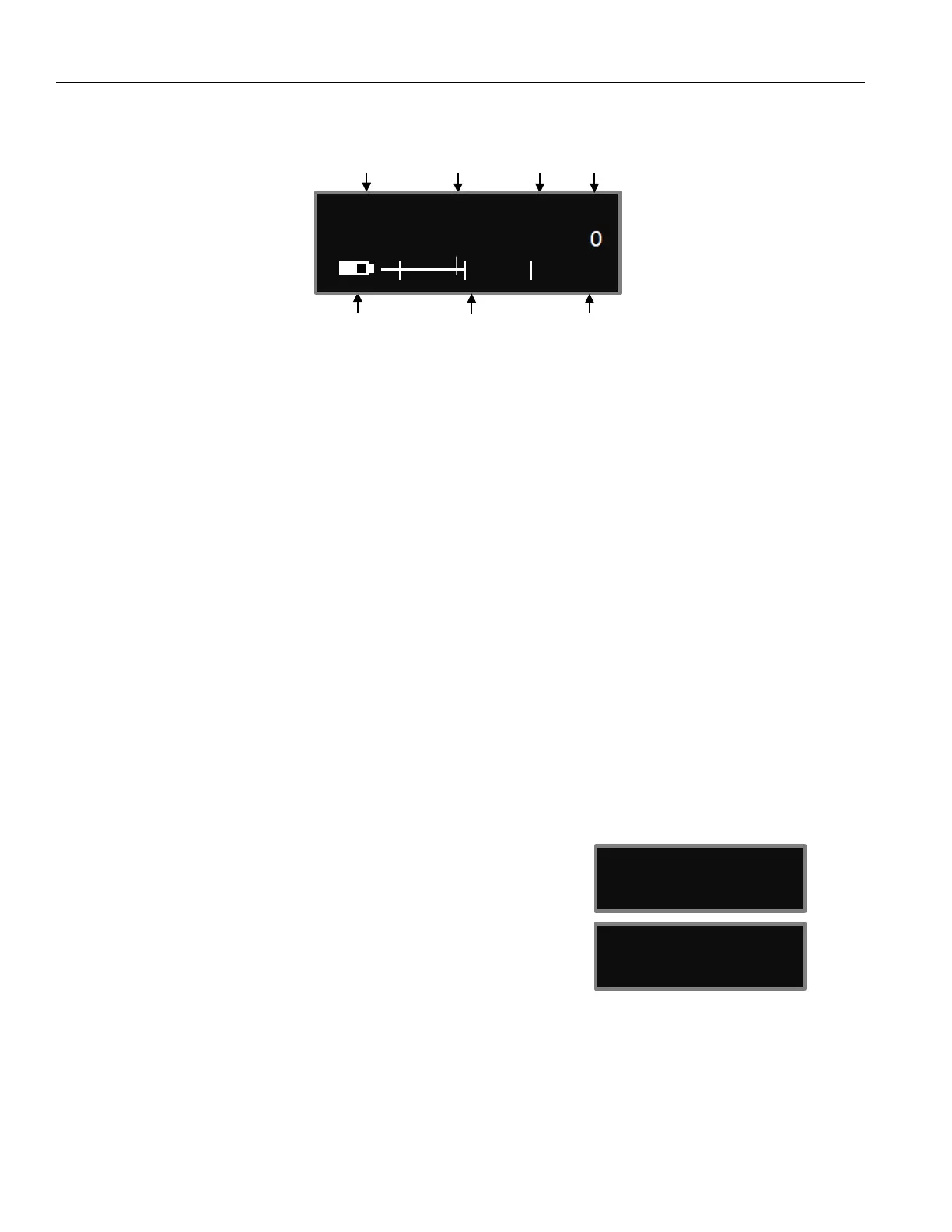
Zaxcom ZMT4 Home Screen
6
Home Screen
Frequency - This is the transmit frequency of the ZMT4.
If the ZMT4 is being used in RECORD ONLY mode “NOTX” will be displayed.
ZaxNet Status
• IFB RX - The ZMT4 is receiving ZaxNet.
• IFB TX - The ZMT4 is transmitting ZaxNet.
Transport Status – Displays the current mode of the recording feature.
• STOP - Recording / Playback is stopped
• LREC - ZMT4 is recording in LOOP RECORD mode.
• REC - ZMT4 is recording in NON-LOOP RECORD mode.
• PLAY - ZMT4 is playing back a recorded audio file.
Power Level - Displays the transmit power level.
Battery - This displays the battery type and the approximate percentage of remaining battery power.
Audio Meter - Displays the modulation of the inputted audio signal.
SEG - Displays the number of recorded segments on the micro-SD card. Please note that regardless of
the size of the card it is limited to 500 segments.
Gain - “G” Appears when the transmitter is receiving change of gain commands via ZaxNet.
Group and Unit Code - Pressing the INC key while in the
home screen will display the group and unit code and the
record time remaining on the card.
Time Code and Frame Rate - Pressing the DEC key while in
the home screen will display the time code and frame rate of
the time code generator.
GROUP:1 UNIT:1
TIME LEFT 24H
ZaxNet Status Transport Power
Frequency Modulation Status Level
attery Level Audio Meter Gain
Indicators at -20, -10, 0 dBFS
LION ZHD96 SEG 001
G
TC: 09:18:05:00
23.98 (AUTO)


 To Next Page