Zaxcom ZMT4 Transmitter
4
ZMT4 Transmitter
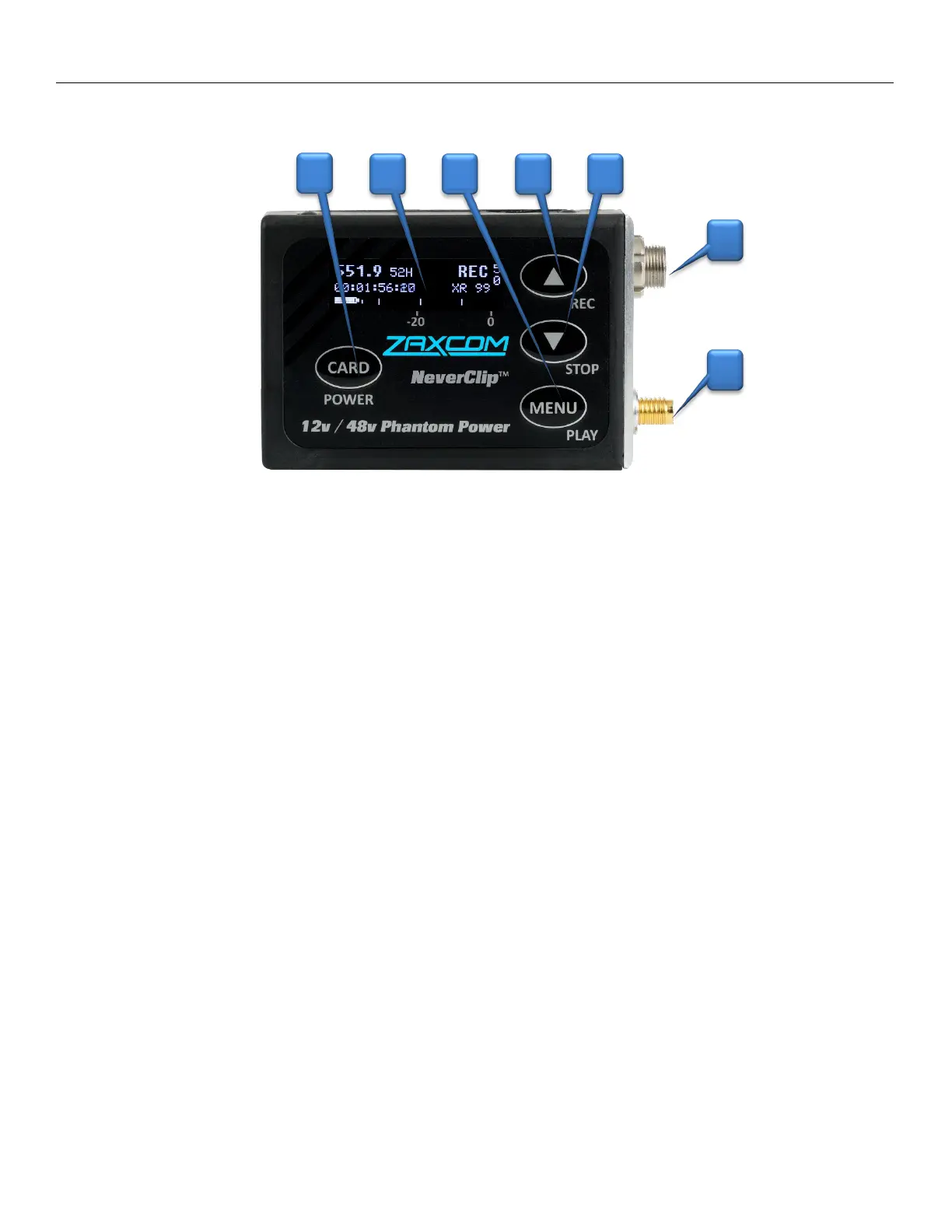
1. Card / Power Key
• Push and hold for 2 seconds to power on.
• Push and hold 3 seconds followed by a quick press of the MENU key to power off.
• Press 3 times quickly to access the sub menus.
• Press 3 times quickly to return to the home screen.
2. OLED Display
3. Menu / Play Key
• Press it to access the next menu item.
• Press it with the CARD key to playback a segment.
4. INC / Record Key
• Increases the parameters of a menu item.
• When in the home screen pressing INC with the CARD key will put the transmitter into record.
• When in the transport control screen while not recording will cause the transmitter to playback.
• Pressing while playing back will advance playback, multiple presses will cause playback to advance in
larger increments.
• Press and hold while in the transport control screen will advance to the next segment.
• Press it while in the home screen will display the group and unit code and the time left on the card.
5. DEC / Stop Key
• Decreases the parameters of the menu items.
• When in the home screen pressing DEC with the CARD key will stop the recording.
• When playing back in the transport control screen will cause the transmitter to stop playback.
• Press and hold while in the transport control screen will jump back to the previous segment.
• Pressing it three times quickly while in the home screen will access the sub menu.
6. Microphone Connector (3 pin Lemo)
7. SSMA Antenna Connector
7
3
1
2
6
4 5


 To Next Page