Cancer Institute Microscopy Core Facility
V1.0
1) SWITCHING ON
CHECK MICROSCOPE LOG BOOK OR WITH PREVIOUS USER PRIOR TO SWITCHING ON. 30 MINUTES MUST
HAVE PASSED BETWEEN TURNING OFF REFLECTED LIGHT LAMP AND TURNING BACK ON IN ORDER FOR
MERCURY BULB TO COOL.
a) Switch on mercury lamp control and Microscope power boxes located
proximally to main microscope stage. Turn on Microscope switch (located
behind 1
st
focusing wheel)
b) Turn on computer and Activate AxioVision Program
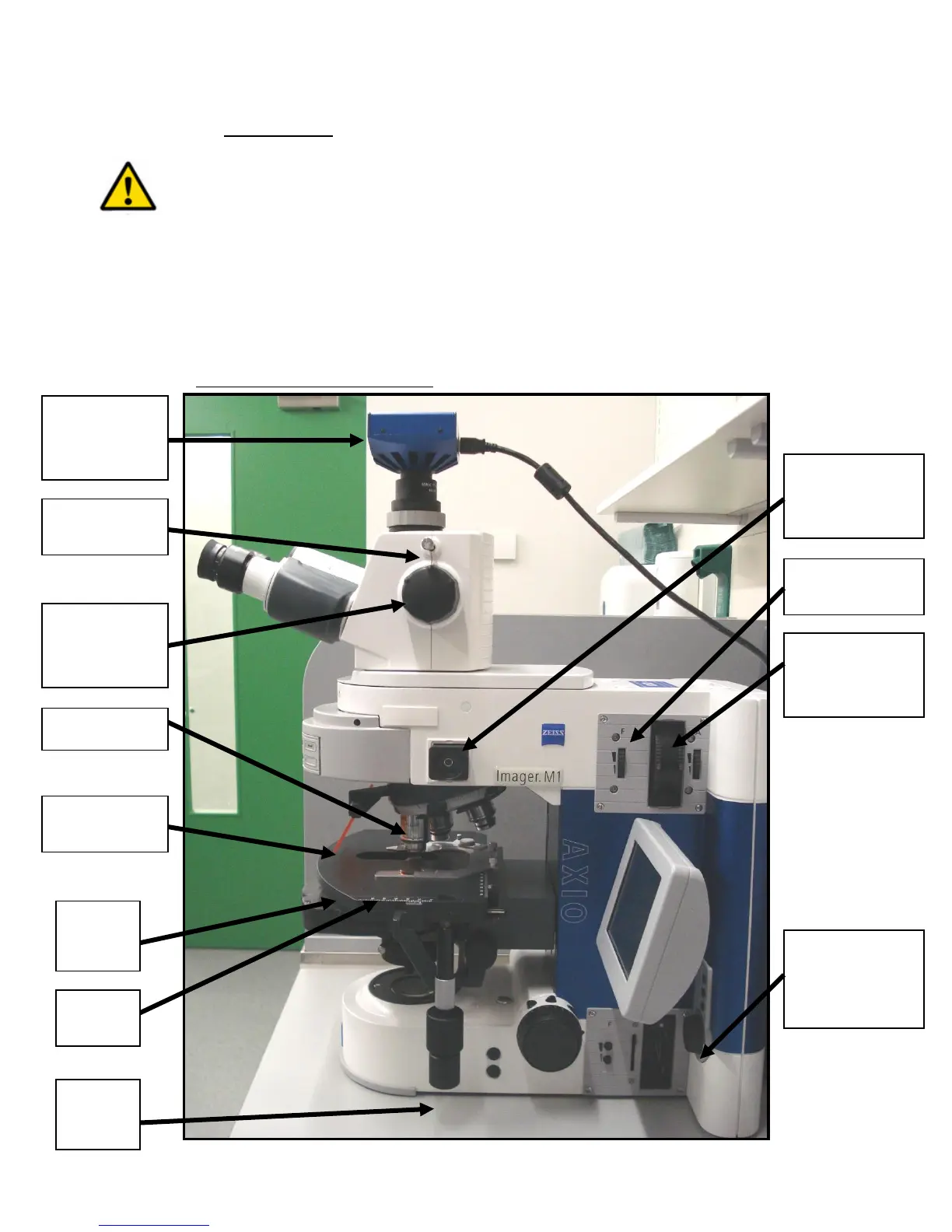
Fig 2 – Side View of Microscope
Axiocam
CCD image
capturer
RL Natural
Density filter
wheels
Reflected light
(RL) centering
bulb
Transmitted
Light (TL)
adjustment
wheel
Ocular
Viewer
height adjust



 To Next Page