19
HDMI
®
connection
The cinemizer
OLED
multimedia video glasses are supplied with a cinemizer-
HDMI
®
adapter. Using this adapter the video glasses can be connected, e.g.
to games consoles, Blu-ray players or other playback devices with an HDMI
®
interface.
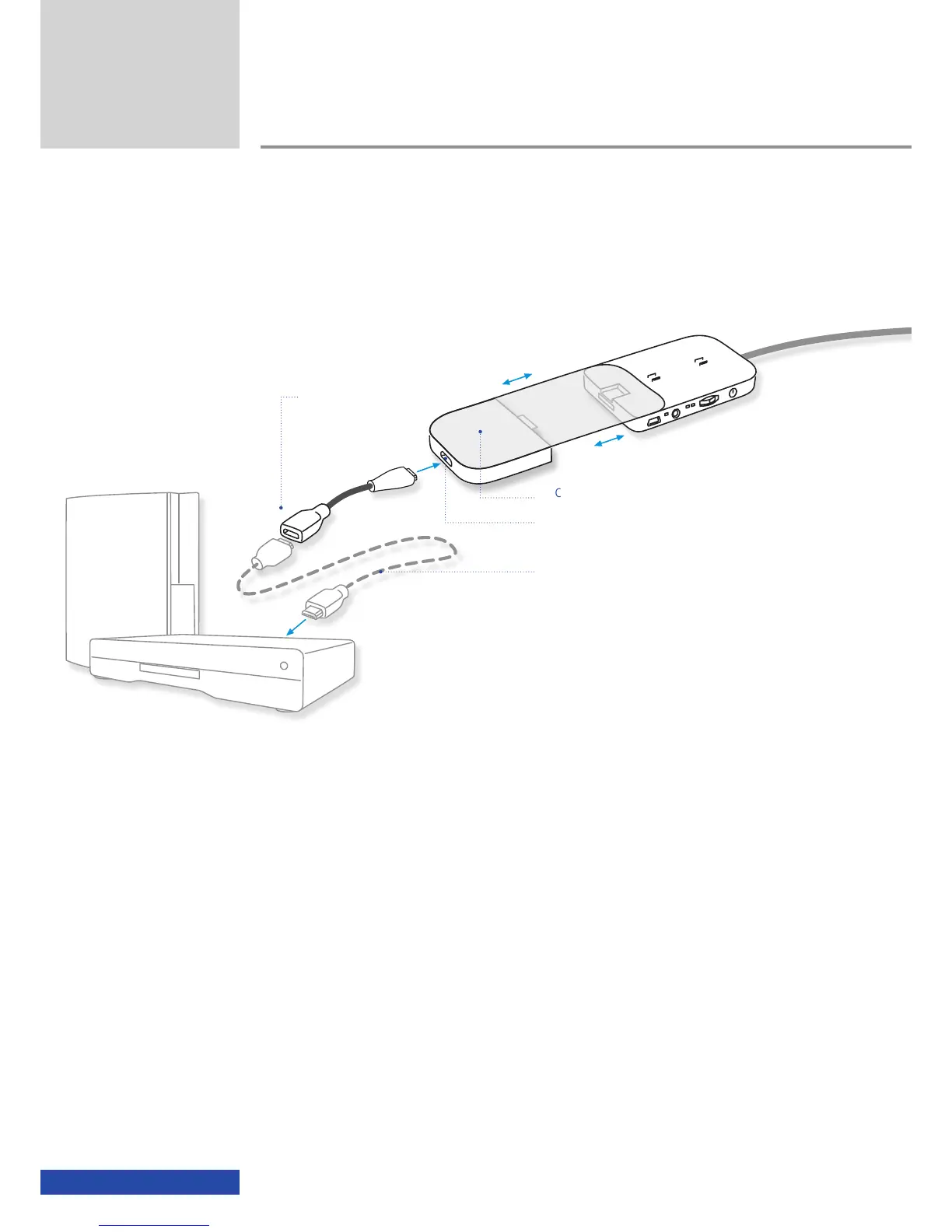
Connect the HDMI
®
adapter to the battery box for the cinemizer
OLED
and
connect your playback device using an appropriate HDMI
®
cable. The jack on
the cinemizer-HDMI
®
adapter is compliant with the mini HDMI
®
specifica-
tion (type C). Please check the type (A, C or D) of HDMI
®
jack on the play-
back device before you purchase an HDMI
®
cable. Suitable HDMI
®
cables or
adapters are available in any online electronics shop or electronics dealer.
The cinemizer-HDMI
®
adapter supports the following resolutions:
480p/576p
1280 x 720p 50/60Hz
1920 x 1080i 50/60Hz
1920 x 1080p 50/60Hz
1920 x 1080p 24Hz
In addition the 3D mode as per the HDMI
®
1.4 specification for the resolu-
tions 720p and 1080p is supported.
Games console
Blu-ray player
Usage
cinemizer-HDMI
®
adapter
HDMI
®
mini jack (type C)
HDMI
®
cable
(is not included!)
Connector type is dependent on the
playback device
HDMI
®
to mini HDMI
®
adapter cable


 To Next Page