29
Navigation in the OSD
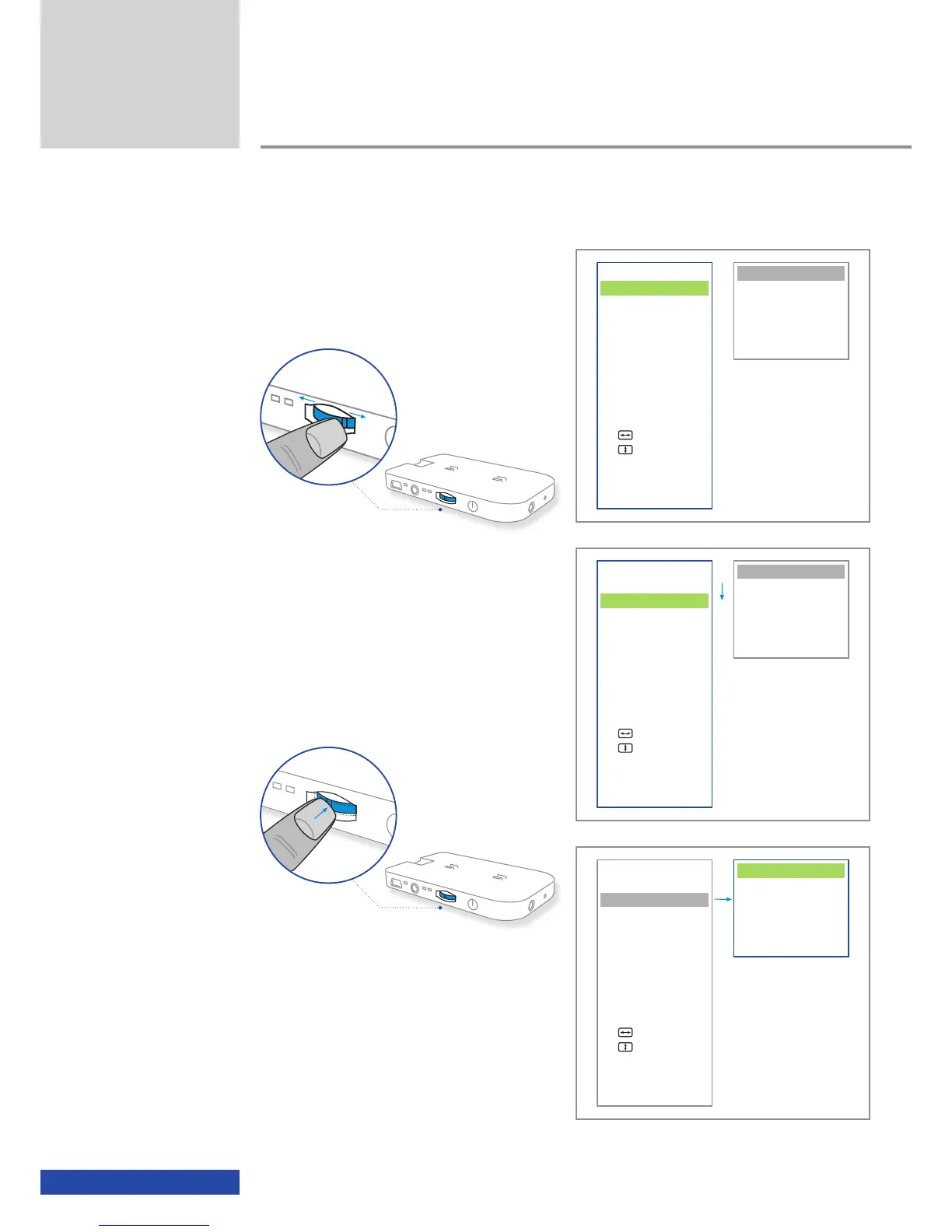
After activation of the OSD you can navigate up
and down on the main menu by pushing the
multifunction switch in the appropriate direction.
As you navigate up and down on the main
menu, the current setting on the settings menu
is displayed marked by a light-blue bar.
To make settings in a specific menu item, please
navigate to this point on the main menu and
then press the multifunction switch.
The cursor then jumps from the main menu to
the settings menu. Make the necessary settings
on the settings menu by pushing the multifunc-
tion switch in the appropriate direction. The
setting is applied by pressing once. With the ex-
ception of the two menu items "Horizontal Man.
Adjust" and "Vertical Man. Adjust", the active
cursor then changes back to the main menu.
Additional functions
VIDEO
3D-Mode
Aspect
Contrast
INFO
Connection
Status
ADVANCED
Auto Adjust
Man. Adjust
Man. Adjust
Brightness Bal
EXIT
VIDEO
3D-Mode
Aspect
Contrast
INFO
Connection
Status
ADVANCED
Auto Adjust
Man. Adjust
Man. Adjust
Brightness Bal
EXIT
VIDEO
3D-Mode
Aspect
Contrast
INFO
Connection
Status
ADVANCED
Auto Adjust
Man. Adjust
Man. Adjust
Brightness Bal
EXIT
Side-by-Side (L/R)
Side-by-Side (R/L)
Top/Bottom (L/R)
Top/Bottom (R/L)
ttt Back
Auto
16 : 9
4 : 3
Zoom
ttt Back
Auto
16 : 9
4 : 3
Zoom
ttt Back


 To Next Page