25
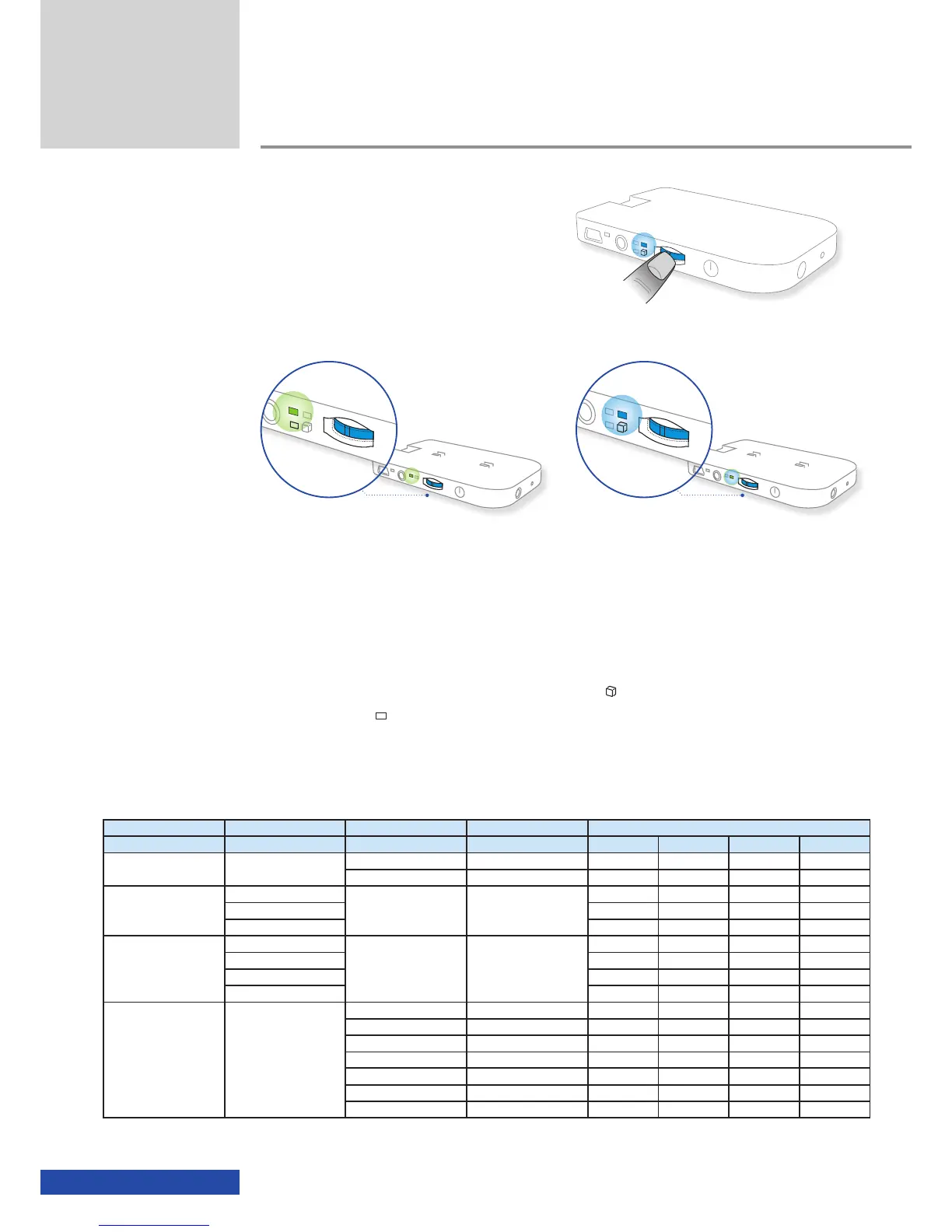
After powering on the 2D video mode
is set by default. You can change between
the 2D and 3D video mode by pressing the
multifunction switch for approx. 3 seconds.
The 3D mode is signalled by the blue mode LED.
If a device is connected via the HDMI
®
interface and this playback device
is able to provide 3D via HDMI
®
1.4 (frame packing), it is not possible to
switch manually between 2D and 3D in the cinemizer
OLED
glasses. In this
case the playback device takes over the signalling of 2D or 3D content and
the cinemizer
OLED
switches over automatically. You must set whether you
want 2D or 3D on the playback device, e.g. Blu-ray player, PS3 etc.
After switching over to the 3D mode, the 3D mode LED (
) illuminates and
the 2D mode LED (
) goes out.
The following table shows the type of playback that supports 3D formats and
the recommended formats.
Connection Video source Resolution Video mode 3D format
Side-by-side Top/bottom Line interleave HDMI
®
1.4
External AV In 3.5 mm
720 x 576i PAL composite
✓
- - -
720 x 480i NTSC composite
✓
- - -
iPod/iPhone adapter
iPhone (1G)
720 x 576i
720 x 480i
Component interlaced
576i / 480i
✓
- - -
iPod touch 1G
✓
- - -
iPod 5th gen
✓
- - -
iPod/iPhone adapter
iPhone 3G/3Gs
720 x 576p
720 x 480p
Component progressive
576p / 480p
✓ ✓
- -
iPhone 4
✓ ✓
- -
iPod touch 2G/3G
✓ ✓
- -
iPod nano 3G - 5G
✓ ✓
- -
HDMI
®
adapter HDMI
®
playback device
480p/576p SD
✓ ✓
- -
1280 x 720p 50/60Hz HD ready 720p
✓ ✓
- -
1920 x 1080i 50/60Hz HD 1080i interlaced
✓
- - -
1920 x 1080p 50/60Hz Full HD 1080p -
✓ ✓
-
1920 x 1080p 24Hz Full HD 1080p24 (cinema) - - - -
1920 x 1440p 60Hz HDMI
®
1.4 720p frame - - -
✓
1920 x 2160 24Hz HDMI
®
1.4 1080p frame - - -
✓
Table 1 - 3D formats supported by the cinemizer
OLED
multimedia video glasses (recommended 3D formats ✓)
Additional functions
2D mode 3D mode


 To Next Page