114 CM1001-001_v01
14
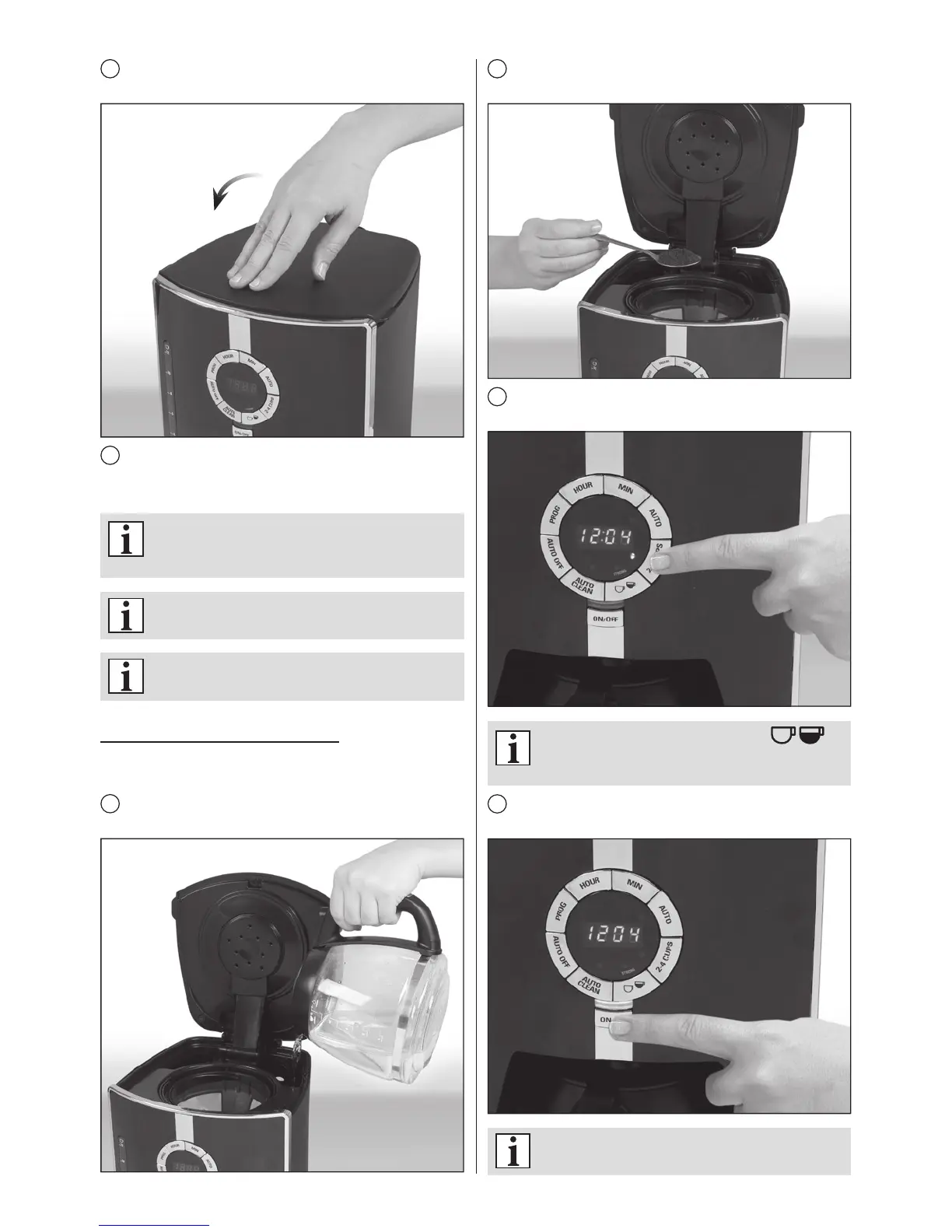
Remove paper lter from the lter holder as soon as the
coffee grounds have cooled, and then close the lid.
15
The coffee maker will keep your coffee warm for 1-4
hours and will switch off automatically after this time (see
section KEEP WARM FEATURE – AUTO OFF).
IftheAUTOOFFfunctionhasnotbeenmodied,
theappliancewillswitchoffautomaticallytwo
hoursafterbrewing.
Youcanswitchofftheapplianceanytimeby
pressingtheON/OFFbutton.
Always unplug the appliance if you do not
intendtouseitforanextendedperiodoftime.
BREWING 2-4 CUPS OF COFFEE
This function makes the brewing process slower for better,
more intensive coffee avour.
1
Fill the water tank with water in the amount required to
brew 2-4 cups of coffee.
2
Spoon the desired amount of ground coffee into paper or
permanent lter.
3
Press 2-4 cups button. The indicator light over the button
will come on once the function has been selected.
The strength adjustment option is
notavailable inthis mode.Thedefaultcoffee
strengthisNORMAL.
4
Press the ON/OFF button. The indicator light will come
on and brewing will start.
Press 2-4 cups button again to cancel this
function.


 To Next Page