70 Rev.C 71 Rev.C
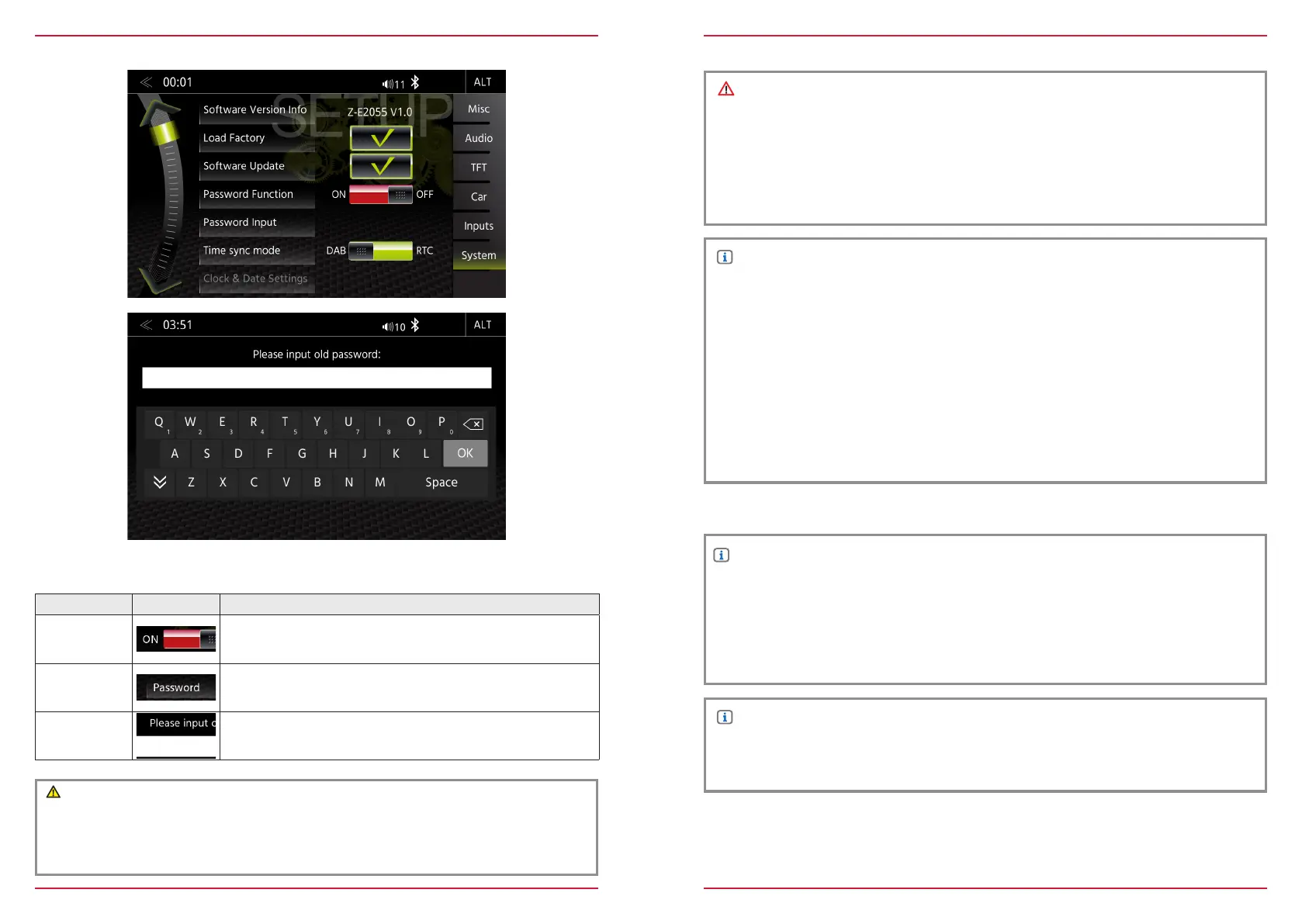
PASSWORD
Function Icon Operation
Password
Function
OFF = password protection disabled
ON = password protection enabled
Password
Tap and confirm to store a password*
Standard password ”12345”
Input Keypad
Enter the desired password
In the System Setup menu page under Password function, you can activate and deactivate the pass-
word protection.
CAUTION
* If you protect you ZENEC system with a Passwort make sure, you have access to this password
anytime.
Lost or forgotten Passwords require the device to be uninstalled and sent in to ZENEC Service
Centre. Device unlocking is not free of charge.
REMOVAL WORK AND PREPARATION
INSTALLATION NOTES
NOTE
● Make sure that all connectors at the rear of the ZENEC system have sufcient room and are
not bent.
● Connectors without a retaining mechanism must be additionally secured with insulating tape.
CAUTION
● The installation of the ZENEC system should be carried out by an authorized installer. Specic
knowledge and tools are required to do the installation. Incorrect installation can cause damage
to the vehicle and the ZENEC system.
● Correct functioning can only be guaranteed when you use the ZENEC original accessories
included in the kit or those optionally available. The ZENEC system and the original accessories
must under no circumstances be modied or altered in any way. Inappropriate actions can
cause damage to the vehicle and the ZENEC system.
NOTE
● The ZENEC system is not compatible with vehicles, which are equipped with a hybrid or electro
drive ex factory.
● The ZENEC Z-E2055 is equipped with an integrated DAB+ receiver. To make use of this you
will need a suitable DAB antenna (not included in kit) that must be connected to the ZENEC
system.
● If the target vehicle is already equipped with an original DAB antenna, it is still possible to use it
in combination with the ZENEC system.
● Software updates to the ZENEC system are installed with a USB memory device. Therefore
when tting the system make sure that the USB connection of the ZENEC system will still be
accessible later (installation of USB extension cable or USB hub).
● If you have questions or problems relating to the ZENEC system, please contact the dealer from
whom you purchased it.
NOTE
1. Remove the ignition key and keep it outside the car until the installation is finished.
2. Please wait for ca. 10 minutes until the CAN bus system is completely shut down, before
you start with the deinstallation of the original device.
3. Start with the deinstallation of the original device.
4. Please switch on the ignition only, when all work steps are done and the ZENEC system is
completely mounted.



 To Next Page