bLUETOOTH MODE
BLUETOOTH OPERATION
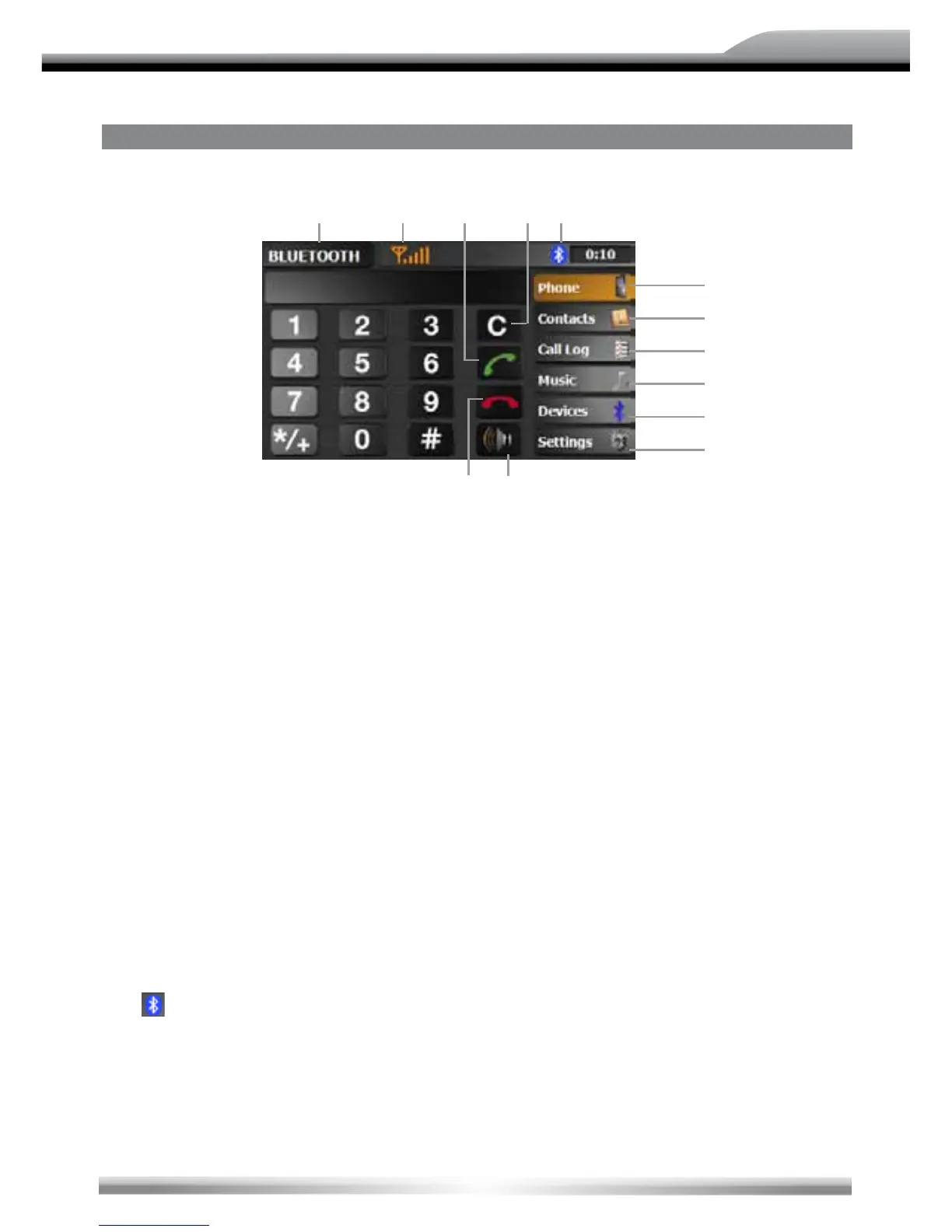
1. Current playing source: Bluetooth. Touch to go back to the main menu.
2. Bluetooth icon.
3. Open the dialling function.
4. Open the phone book.
5. Open the call log.
6. Open the A2DP mode.
7. Open the pairing function.
8. Voice transfer back from the unit to the mobile phone.
9. Display the signal strengh of the paired mobile phone.
10. Open the Bluetooth setup.
11. Accept resp. start a phone call.
12. Dismiss resp. stop a phone call.
13. Delete your number input.
NOTE:
■ It's possible to set the volume of the Bluetooth mode with the PUSH/VOL rotary knob during a
call. The adjusted volume will be saved.
THE BLUETOOTH ICON
■ If Bluetooth is activated in the setup, there is a Bluetooth icon on the of the screen
[ ].
■ The Bluetooth icon is gray, if Bluetooth is activated, but no mobile phone is connected.
■ The Bluetooth icon is blue, if Bluetooth is activated and a mobile phone is connected.
NOTE:
■ If no Bluetooth icon is visible, the Bluetooth function is deactivated in the setup menu.
3
5
6
bl
1 bm bo 2
bn 8
4
9
7



 To Next Page