EasyManua.ls Logo

ZENEC ZE-NC2040 - User Manual

ZENEC ZE-NC2040
80 pages
Go to English
Print Icon
To Next Page IconTo Next Page
Loading...
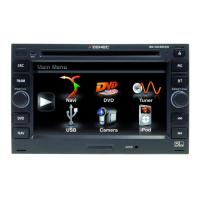
CAR SPECIFIC NAVICEIVER FOR VW CARS
MODEL N0:
INSTRUCTION MANUAL
1 CH DVB-T TUNER
ZE-DVBT1 0
MODEL NO:

Other manuals for ZENEC ZE-NC2040

Questions and Answers

  • A
    Ashley RodriguezAug 15, 2025
    Why is there no sound coming from my ZENEC ZE-NC2040?
    • A
      Allison RoachAug 16, 2025
      There could be several reasons for no or low audio output from your ZENEC Car Video System. Check the following: * Ensure the audio output connection is properly wired. * Increase the volume level. * Verify the mute function is off. * Check the balance and fader adjustments. Additionally, inspect the speakers for damage and replace if necessary. Also, ensure speaker wiring is not in contact with any metal parts of the car; if it is, insulate the connections or replace the speaker cable.
  • E
    Ellen CuevasAug 18, 2025
    How to fix a ZENEC ZE-NC2040 that won't turn on?
    • S
      sotosaraAug 19, 2025
      If your ZENEC Car Video System is not powering on, the radio or car battery fuse may be blown. Replace the blown fuse with a new fuse that has the correct rating. If this doesn't work, the system might be in an illegal operation state; in this case, press the RESET button.
  • N
    nancypearsonAug 21, 2025
    What to do if my ZENEC Car Video System has no image?
    • K
      Kelly DaviesAug 21, 2025
      If your ZENEC Car Video System is displaying no image, it could be due to a few reasons. First, make sure the parking brake is engaged. If it is not, stop the vehicle in a safe place and apply the parking brake. Also, check the parking wire connection and connect it correctly if it was wrong or not connected. Lastly, the "Monitor off"-function may be activated; touch the monitor to activate the display.
  • G
    Gabriel GarzaAug 25, 2025
    Why is the sound quality poor or distorted on my ZENEC ZE-NC2040 Car Video System?
    • J
      Jeffrey GibsonAug 25, 2025
      Poor sound quality or distortion on your ZENEC Car Video System can occur if you are using an unauthorized disc. Use an original disc. It can also happen if the speaker power rating is not compatible with the unit, so connect proper speakers. Finally, check the speaker connections to ensure the speaker is not shorted.
  • C
    Cody SmithAug 27, 2025
    How to improve weak station searching on my ZENEC ZE-NC2040?
    • E
      Elizabeth RamseyAug 27, 2025
      Weak station searching on your ZENEC Car Video System may be due to several factors. Ensure the auto antenna cable is properly connected. Also, check if the REG function is activated and turn it off. Verify that the antenna power cable is properly connected. Finally, make sure the AF function is activated.
  • K
    kathy41Aug 30, 2025
    Why won't my ZENEC Car Video System play the disc?
    • D
      Diane WilliamsAug 30, 2025
      If your ZENEC Car Video System won't play a disc, it could be due to several reasons: * The disc may be warped or scratched. Use a disc in good condition. * The disc may be dirty or wet. Clean the disc with a soft cloth. * The disc may be incompatible. Use a compatible disc. * The disc rating may exceed the parental lock rating limit. Change parental lock settings to lower restriction. * The disc region code may not be compatible with the unit. Use a disc with the proper region code. * The disc may be inserted upside down. Insert the disc with the label side up.
  • G
    Gary AndersonSep 2, 2025
    How to fix prolonged image or improper height/width ratio on ZENEC Car Video System?
    • W
      Walter LewisSep 2, 2025
      If you are experiencing a prolonged image or an improper height/width ratio on your ZENEC Car Video System, it is likely due to an improper aspect ratio setup. Use the correct aspect ratio setting to resolve this issue.
  • A
    Amy PrinceSep 5, 2025
    What to do if my ZENEC Car Video System cannot insert a disc?
    • L
      Lisa TorresSep 6, 2025
      If your ZENEC Car Video System cannot insert a disc, it is possible that there is already a disc inside the unit. Eject the current disc before attempting to insert a new one.
  • R
    Rachel BrowningSep 8, 2025
    Why are the ID3 tags shown incorrectly on my ZENEC Car Video System?
    • J
      Joshua RojasSep 9, 2025
      If the ID3 tags are shown incorrectly on your ZENEC Car Video System, it may be because the message is longer than the LCD can display, or the ID3 tag is not compatible. Use proper ID3 tag information to resolve this issue.
  • T
    Trevor HollandSep 12, 2025
    What does 'Error' mean on my ZENEC ZE-NC2040 and how to fix it?
    • B
      Brian DeanSep 12, 2025
      If your ZENEC Car Video System displays an 'Error' message, it indicates an illegal mechanism operation. Press the EJECT key for 5 seconds to reset the loading mechanism.

Summary

Safety Instructions

Safety Precautions

Covers essential safety precautions for using the unit, including installation and operation.

Basic Operation

Powering On;Off and Source Selection

Instructions for turning the unit on/off and selecting different playing sources.

Setup Menu

Setup Menu Navigation

Explains how to enter and navigate the main setup menu and its submenus.

Anti-Theft Security

Setting the Anti-Theft Code

Procedure to set and activate a four-digit anti-theft code for security.

Radio Functionality

Radio Mode Interface

Explains the display elements and controls for the radio mode.

DVD Playback

DVD Controls and Playback

Describes the on-screen controls for DVD playback, including repeat, language, and subtitle options.

Media Playback (CD;MP3;WMA)

Media Playback Interface

Explains the interface and controls for playing CDs, MP3, and WMA files.

SD Card Operation

SD Card Usage

Instructions for inserting and operating SD/SDHC cards, noting interface similarities and limitations.

USB Operation

USB Device Usage

Guide to inserting and operating USB devices, including compatibility and power requirements.

iPod Operation

iPod Connection and Control

Instructions for connecting an iPod and navigating its content via the unit.

Bluetooth Connectivity

Bluetooth Operation

Explains the Bluetooth interface, controls for dialing, phone book, and call logs.

Phone Book Sync and Search

Details on automatic phone book synchronization and searching for entries.

Phone Book Search

How to use the keypad to search for specific entries in the phone book.

Bluetooth Pairing Procedure

Instructions for pairing a mobile phone with the unit, including search and connection methods.

Bluetooth Configuration

Configuration for Auto Connect, PIN Code, Microphone, Mic-Gain, and Version.

Navigation System

External Source Operation

Troubleshooting Guide

Unit Troubleshooting

Solutions for common problems like no power, low audio output, and poor sound quality.

Warranty Details

ZENEC ZE-NC2040 Specifications

General IconGeneral
Display Size6.2 inches
Resolution800 x 480 pixels
TouchscreenYes
NavigationYes
BluetoothYes
SD Card Reader/SlotYes
Radio TunerFM/AM
DVD PlayerYes
CD PlayerYes
Video PlaybackYes
Audio PlaybackYes
Steering Wheel ControlYes
Rear View Camera InputYes
Supported Video FormatsAVI
Supported Audio FormatsMP3, WMA
Amplifier4 x 50 Watts
Operating SystemWindows CE

Related product manuals