SR23 - 923-03509 1-4 CS - GENERAL
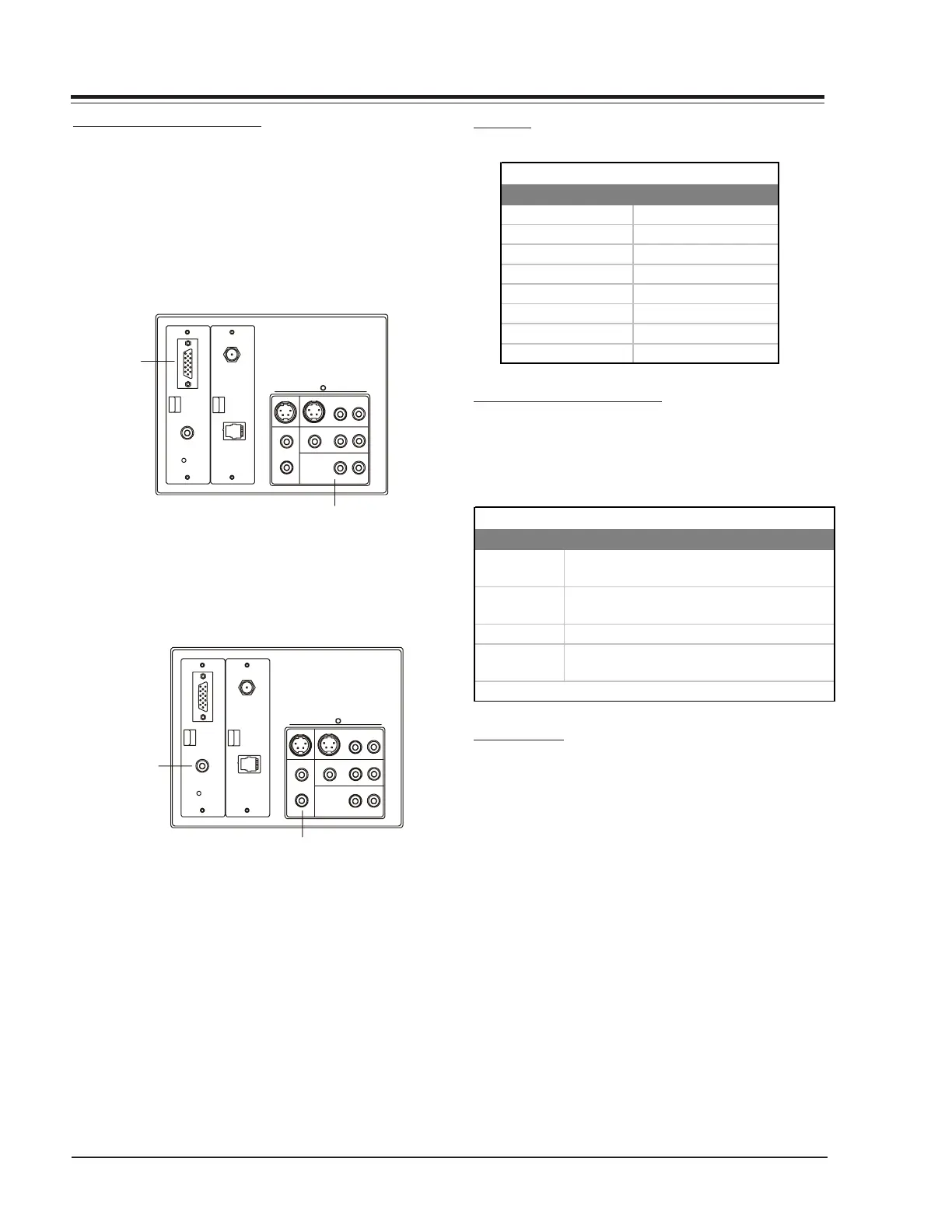
CONNECTING TO A COMPUTER
Installed in the certain units is the PCZTV internal scan
converter, provided by FOCUS Enhancements, Inc. This
allows the receiver/monitor to be used as a large screen
device to view VGA video output of a PC or Macintosh
format computer. In order to view these computer im-
ages, connect the computer to the Super Port input,
turn on the receiver/monitor, set it to the appropriate
source and activate your computer.
S-VIDEO O UT
S-VIDEO IN
RL
R
L
C
O
M
P
U
T
E
R
I
N
ANTENNA
CABLE
M. P. I.
VIDEO
COMPUTER
AUDIO
AUX IN
AUDIO OUT
VIDEO OUT
--AUDIO --
RL
--AUDIO --
RL
--AUDIO--
Connect to the
video output on
the computer
(DB 15).
Connect to the audio output
on the com
uter.
In addition, the computer images may also be recorded
onto video tape if a VCR is connected in as shown in the
illustration.
S-VIDEO OUT
S-VIDEO IN
RL
R
L
C
O
M
P
U
T
E
R
I
N
ANTENNA
CABLE
M. P. I.
VIDEO
COMPUTER
AUDIO
AUX IN
AUDIO OU T
VIDEO OUT
--AUDIO--
RL--AUDIO--
RL
--AUDIO--
Connect to the video
input on the VCR.
Connect to the audio
in
ut on the VCR.
FORMATS
CABLE AND ACCESSORIES KIT
Included with this new receiver/monitor is an accesso-
ries kit which provides the necessary items for connect-
ing a computer to the Super Port jack. The kit includes
the following:
CONNECTIONS
If the computer provides video out via a DB15 jack (15
pins aligned in two rows), the HD DB 15 to DB15 adapter
will have to be used. Plug the DB15 side of the adapter
into the DB15 video out of the computer. Then connect
the 15-foot video cable, between the HD DB15 side of
the adapter and the HD DB15 jack of the Super Port.
CONNECTIONS
Quantity Accessory Item
1
15 foot VGA interconnect cable. HD DB15
Male to HD DB15 Male.
1
10 inch Computer Video interconnect cable.
Male phone to Male phono (Cable C).
1 HD DB15 Female to DB15 Male adapter.
1
3½ floppy disk: Accessory Video driver
software.
Accessories Kit
(Instructions included separately)
Resolution Refresh
640 x 480 60 Hz
640 x 480 72 Hz
800 x 600 60 Hz
800 x 600 67 Hz
1024 x 767 60 Hz
DOS TEXT 70 Hz
640 x 480 67 Hz
832 x 768 67 Hz
Compatible Video Formats



 To Next Page