WHAT YOU SHOULD DO FIRST
(_ SELECT YOUR LANGUAGE
The on-screen menus can appear in one of three languages;
English, Spanish or French. Select the language that you
would be most comfortable with. Note that the word LAN-
GUAGE always appears in English regardless of which lan-
guage is chosen.
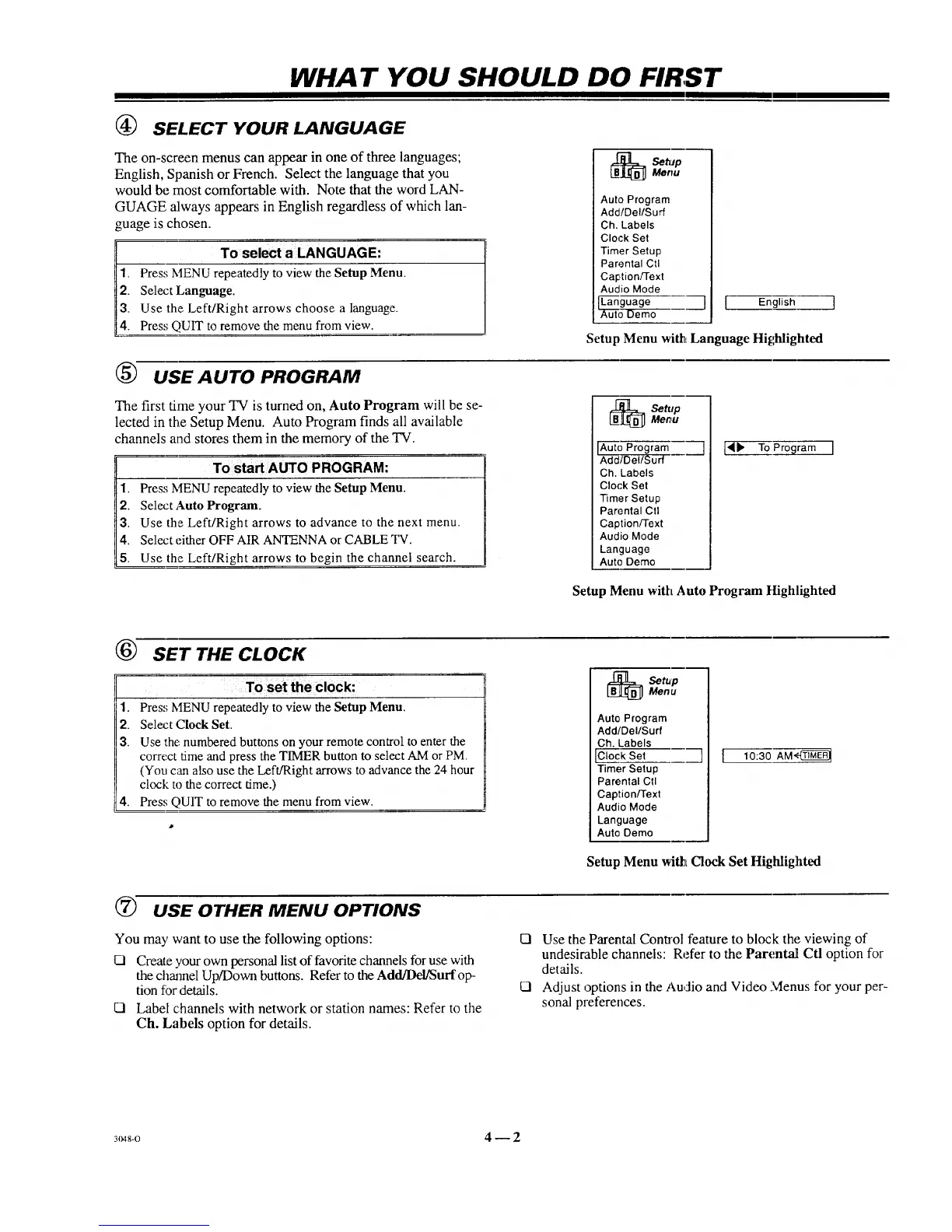
To select a LANGUAGE:
Press MENU repeatedly to-view the Setup Menu.
Select Language.
Use the Left/Right arrows choose a language.
Press QUIT to remove the menu from view.
Auto Program
Add/Del/Surf
Ch. Labels
Clock Set
Timer Setup
Parental Ctl
Caption/Text
Audio Mode
uto Demo
] [
English
Setup Menu with Language Highlighted
(_ USE AUTO PROGRAM
The first time your TV is turned on, Auto Program will be se-
lected in the Setup Menu. Auto Program finds all available
channels and stores them in the memory of the "IV.
To start AUTO PROG RAM:
1. Press MENU repeatedly to view the Setup Menu.
2. Select Auto Program.
3. Use the Left/Right arrows to advance to the next menu.
4. Select either OFF AIR ANTENNA or CABLE TV.
5. Use the Left/Right arrows to begin the channel search.
_ etupMenu
Add/Del/Surf
Ch. Labels
Clock Set
Timer Setup
Parental Ctl
Caption/Text
Audio Mode
Language
Auto Demo
['_b" To Program I
Setup Menu with Auto Program Highlighted
®
SET THE CLOCK
To set the clock:
1. Press MENU repeatedly to view the Setup Menu.
2. Select Clock Set.
3. Use the numbered buttons on your remote control to enter the
correct time and press the TIMER button to select AM or PM.
(You can also use the Left/Right arrows to advance the 24 hour
clock to the correct time.)
4. Press QUIT to remove the menu from view.
[_ Set.pMenu
Auto Program
Add/Del/Surf
Ch. Labels
ICloekSet
Timer Setup
Parental Ctl
Caption/Text
Audio Mode
Language
Auto Demo
] [
10:30 AM'_
Setup Menu wilt Clock Set HighliglMed
T_ USE OTHER MENU OPTIONS
You may want to use the following options:
0 Create your own personal list of favorite channels for use with
the channel Up/Down buttons. Refer to the Add/Dd/Suffop-
tion for details.
O Label channels with network or station names: Refer to the
Ch. Labels option for details.
El Use the Parental Control feature to block the viewing of
undesirable channels: Refer to the Parentalt Ctl option for
details.
El Adjust options in the Audio and Video Menus for your per-
sonal preferences.
3048-0 4 -- 2



 To Next Page