m
QUICK REFERENCE TO ON-SCREEN MENUS
AVAILABLE MENUS
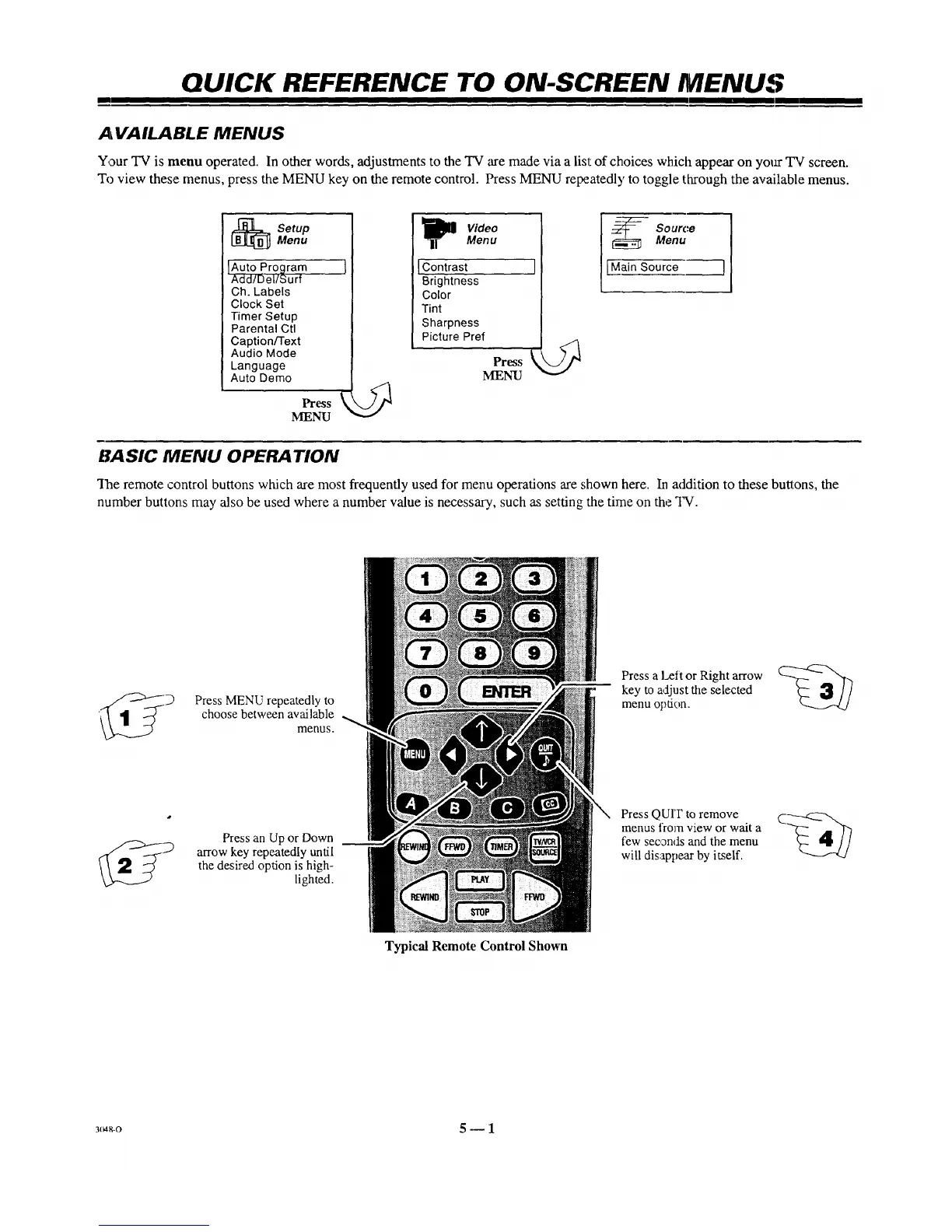
Your TV is menu operated. In other words, adjustments to the TV are made via a list of choices which appear on your TV screen.
To view these menus, press the MENU key on the remote control. Press MENU repeatedly to toggle through the available menus.
_j SetupMenu
IAuto Program j
Add/Del/Surf
Ch. Labels
Clock Set
Timer Setup
Parental Ctl
Caption/Text
Audio Mode
Language
Auto Demo
Pressk
MENU
I i_ [ Video
Menu
IContrast I
Brightness
Color
Tint
i Sharpness
Picture Pref
Press
MENU
SourceMenu
[Main Source ]
BASIC MENU OPERATION
"Iqaeremote control buttons which are most frequently used for menu operations are shown here. In addition to these buttons, the
number buttons may also be used where a number value is necessm7, such as setting the time on the TV.
Press MENU repeatedly to
choose between available
menus.
Pressan Up or Down
_ arrow key repeatedly undl
the desired option is high-
lighted.
Typical Remote Control Shown
Press a I_,eftor Right arrow
key to adjust the selected
menu opdon.
Press QUrF to remove
menus from view or wait a
few seconds and the menu
will disappear by itself.
3_8-o 5 m 1



 To Next Page