SETUP MENU
I
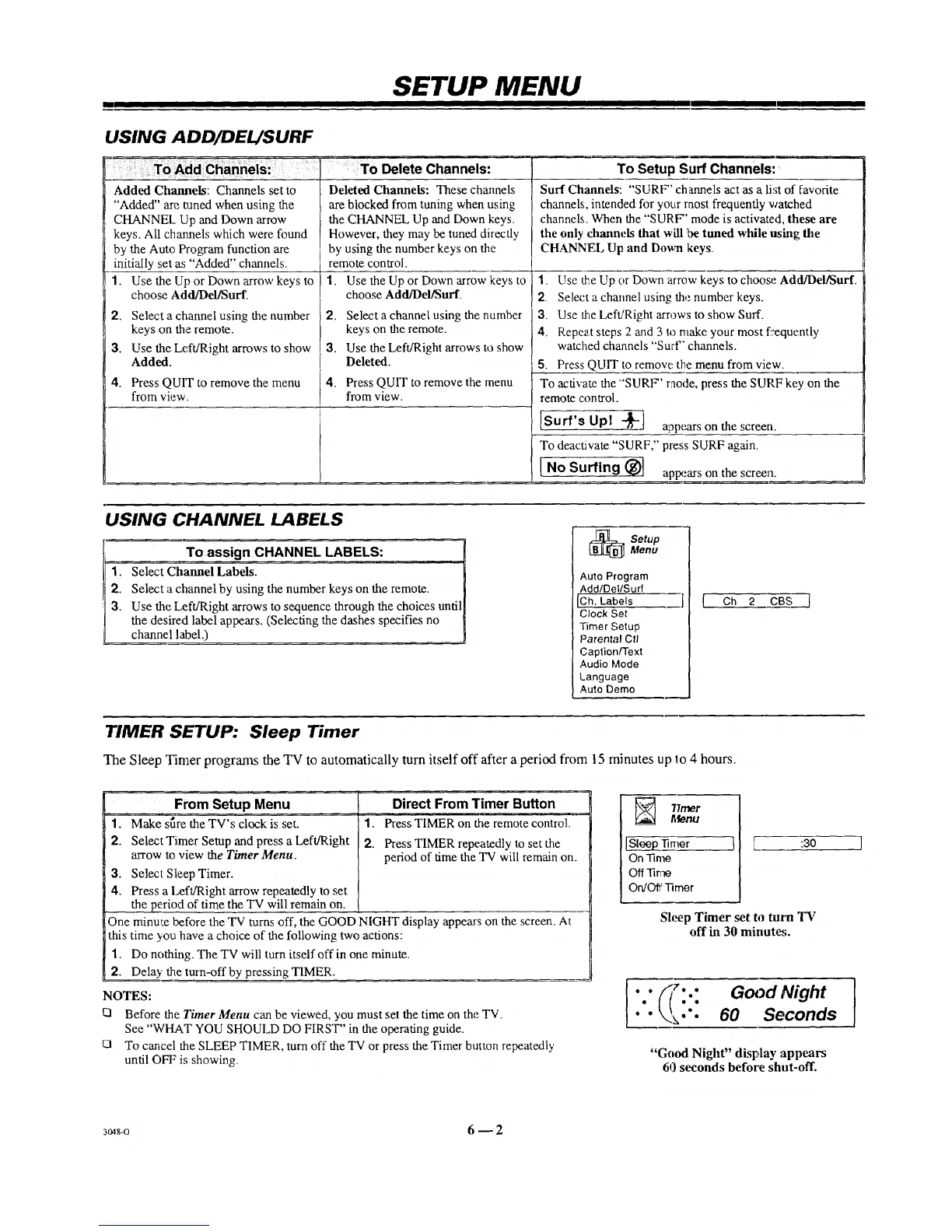
USING ADD/DEL/SURF
Delete Channels:
Added Channels: Channels set to
"Added" are tamed when using the
CHANNEL Up and Down arrow
keys. All channels which were. found
by the Auto Program function are
initially set as "Added" channels.
1. Use the Up or Down arrow keys to
choose Add/Del/Surf.
2.
3.
4.
Select a channel using the number
keys on the remote.
Use the Left/Right arrows to show
Added.
Press QUIT to remove the menu
from view.
Deleted Channels: These channels
are blocked from tuning when using
the CHANNEL Up and Down keys.
However, they may be tuned directly
by using the number keys on the
remote control.
1. Use the Up or Down arrow keys to
choose Add/DeliSurf.
2. Select a channel using the number
keys on the remote.
3. Use the Left/Right arrows to show
Deleted.
4. Press QUIT to remove the menu
from view.
To Setup Surf Channels:
Surf Channds: "SURF' channels act as a list of favorite
channels, intended for your raost frequently watched
channels. When the "SURF' mode is activated, these are
the only channels that will be tuned while itsing the
CHANNEL Up and Down keys.
1. Use the Up or Down arrow keys tochoose Add/Del/Surf.
2. Select a chmmel using the number keys.
3. Use fireLeft!Right arrows to show Surf.
4. Repeat steps 2 and 3 to make your most f:equently
watched channels "Surf" channels.
5. Press QUIT to remove the menu from view.
To activate the "'SURF' raode, press the SURF key on the
remote control.
[Surf's Opl -_1 appoarson the screen.
To deact:wate "SURF," press SURF again.
I
I No Surfing (_l apr_.'arson the screen.
USING CHANNEL LABELS
1.
2.
3.
To assign CHANNEL LABELS:
Select Channel Labels.
Select a channel by using the number keys on the remote.
Use the Left/Right arrows to sequence through the choices until
the desired label appears. (Selecting the dashes specifies no
channe I label.)
_ etup
Menu
Auto Program
Add/Del/Surf
C.h. Labels ] (
Clock Set
Timer Setup
Parental Ctl
Caption/Text
Audio Mode
Language
Auto Demo
Ch 2 CBS ]
TIMER SETUP: Sleep Timer
The Sleep Timer programs the TV to automatically turn itself off after a period from 15 minutes up lo 4 hours.
From Setup Menu
1. Make s_re the TV's clock is set. 1.
2. Select Timer Setup and press a Left/Right 2.
arrow to view the Timer Menu.
3. Select Sleep Timer.
4. Press a I.,eft/Right arrow repeatedly to set
the period of time the "IV will remain on.
One minute before the TV turns off, the GOOD NIGHT display appears on the screen. At
this time you have a choice of the following two actions:
1. Do nothing. TheTV will turn itself offin one minute.
2. Delay the turn-off by pressing TIMER.
NOTES:
UI Before the Timer Menu can be viewed, you must set the time on the TV.
See "WHAT YOU SHOULD DO FIRST" in the operating guide.
O To cancel the SLEEP TIMER, turn off the TV or press the Timer button repeatedly
until OFF is showing.
Direct From Timer Button
Press TIMER on the remote control.
Press TIMER repeatedly to set the
period of time the TV will remain on.
77mer
Menu
On time
Off-ri_e
On/Off lqmer
[ :30 ]
Shmp Timer set to turn TV
off in 30 minute;.
G }d Night
60 Seconds
"Good Night" display ;appears
60 seconds before shut-off.
1
3048-o 6 _ 2



 To Next Page