STANDARD CONNECTIONS FOR YOUR TV
I
CONNECTION CENTER
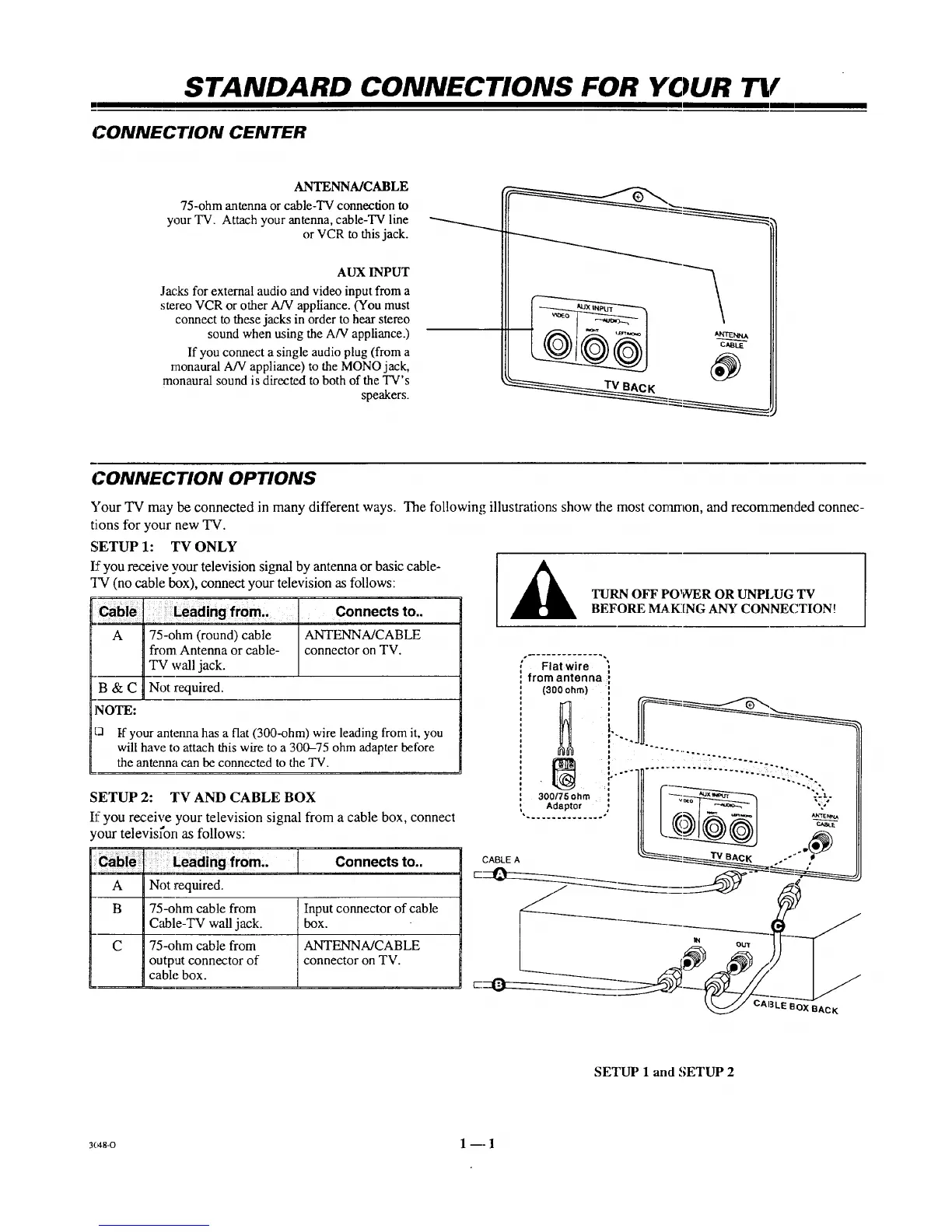
ANTENNA/CABLE
75-ohm antenna or cable-TV connection to
your TV. Attach your antenna, cable-TV line
or VCR to thisjack.
AUX INPUT
Jacks for external audio and video input from a
stereo VCR or other A/V appliance. (You must
connect to these jacks in order to hear stereo
sound when using the A/V appliance.)
If you connect a single audio plug (from a
monaural A/V appliance) to the MONO jack,
monaural sound is directed to both of the TV's
speakers.
CONNECTION OPTIONS
5"our TV may be connected in many different ways. The following illustrations show the most coramon, and recommended connec-
tJons for your new TV.
SETUP 1: TV ONLY
I:_you receive your television signal by antenna or basic cable-
TV (no cable box). connect your television as follows:
Leading from,, Connects to..
" A '1 7;_ohm'iround)cable IANTENNA/CABLE
Hfrom Antenna or cable- I connector on TV.
I TV ,vail jack. I
B & C I Not required.
NOTE:
t3 tf your antenna has a flat (300-ohm) wire leading from it, you
will have to attach this wire to a 300-75 ohm adapter before
the antenna can be connected to the TV.
SETUP 2: TV AND CABLE BOX
If you receive your television signal from a cable box, connect
your televisl'on as follows:
................................... : : ........ [ Connects to..
A Not required.
B 75-ohm cable from Input connector of cable
C_Ie-TV wall jack. box.
C 75-ohm cable from ANTENNA/CABLE
output connector of connector on TV.
cable box.
TURN OFF POWER OR UNPLUG TV
BEFORE MAK[NG ANY CONNECTION!
Flat wire ,
from antenna ;1
(300ohm) :
i
@
"...............IlL I[I
our
EOXBAcK
SETUP 1 and SETUP 2
3c48-o 1 -- 1



 To Next Page