STANDARD CONNECTIONS FOR YOUR TM
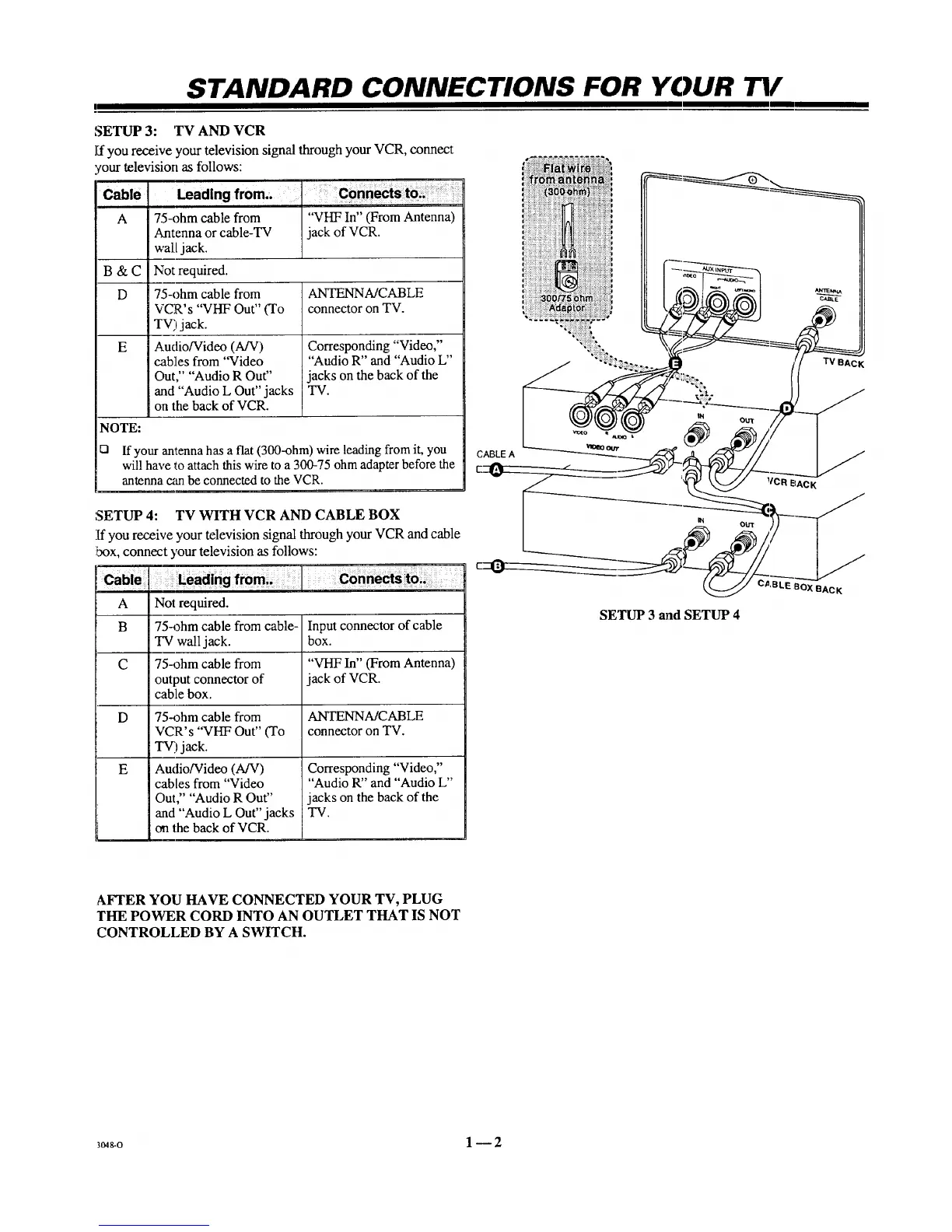
SETUP 3: TV AND VCR
ff you receive your television signal through your VCR, connect
'our television as follows:
Leading from.,Cable
A "VHF In" (From Antenna)
jack of VCR.
B&C
D ANTENNA/CABLE
connector on TV.
E
75-ohm cable from
Antenna or cable-TV
wall jack.
Not required.
75-ohm cable from
VCR's "VHF Out" (To
TV) jack.
Audio/Video (A/V)
cables from "Video
Out," "Audio R Out"
and "Audio L Out" jacks
on the back of VCR.
Corresponding "Video,"
"Audio R" and "Audio L"
jacks on the back of the
TV.
NOTE:
Q If your antenna has a flat (300-ohm) wire leading from it, you
will have to attach this wire to a 300-75 ohm adapter before the
antenna can be connected to the VCR.
SETUP 4: TV WITH VCR AND CABLE BOX
If you receive your television signal through your VCR and cable
box, connect ),our television as follows:
A Not required.
B 75-ohm cable from cable-
TV wall jack.
C 75-ohm cable from
output connector of
cable box.
D
E
75-ohm cable from
VCR's "VHF Out" (To
_) jack.
Audio/Video (A/V)
cables from "Video
Out," "Audio R Out"
and "Audio L Out" jacks
on the back of VCR.
Input connector of cable
box.
"VHF In" (From Antenna)
jack of VCR.
ANTENNA/CABLE
connector on TV.
Corresponding "Video,"
"Audio W' and "Audio L"
jacks on the back of the
TV.
_BOX BACK
SETUP 3 and SETUP 4
AFTER YOU HAVE CONNECTED YOUR TV, PLUG
THE POWER CORD INTO AN OUTLET THAT IS NOT
CONTROLLED BY A SWITCH.
3o48-o 1 _ 2



 To Next Page