SETUP MENU
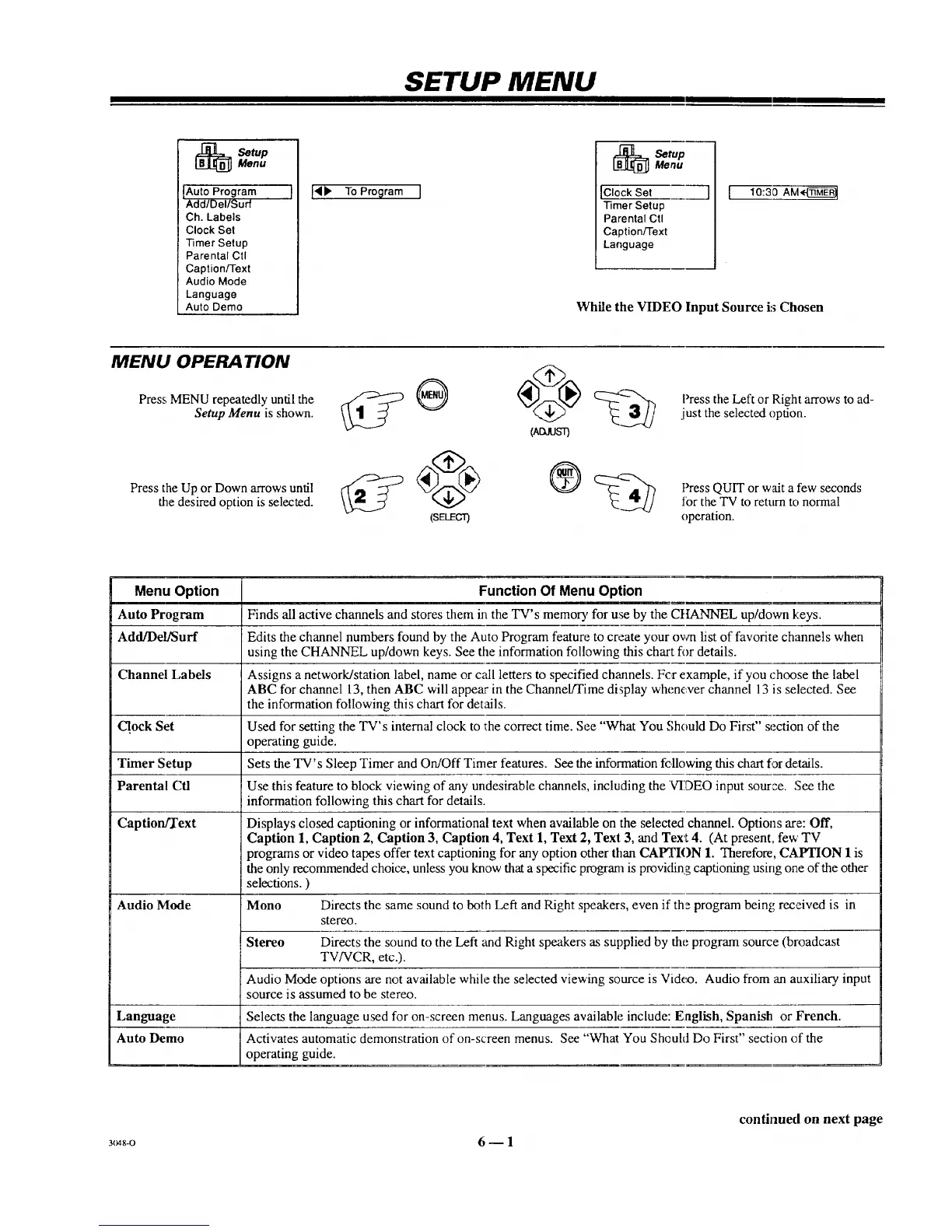
SetupMenu
IAuto Program I
Add/Del/Surf
Ch. Labels
Clock Set
Timer Setup
Parental Ctl
Caption/Text
Audio Mode
Language
Auto Demo
l'4b" To Program I
_ etupMenu
[Clock Set
Timer Setup
Parental Ctl
Caption/Text
Language
l [
10:39 AM_
While the VIDEO Input Source is Chosen
MENU OPERA TION
Press MENU repeatedly until the
Setup Menu is shown.
Press the Up or Down arrows until
the desired option is selected.
(ADJUST)
(SELECT)
Press the Left or Right arrows to ad-
just the selected option.
Press QUIT or wait a few seconds
for the TV to return to normal
operation.
Menu Option Function Of Menu Option
Auto Program Finds all active channels and stores them in the TV's memory for use by the CHANNEL up/down keys.
Add/De!/Surf Edits the channel numbers found by the Auto Program feature to create your own list of favorite channels when
using the CHANNEL up/down keys. See the information following this chart for details.
Channel Labels Assigns a network/station label, name or call letters to specified channels. Fc,r example, if you choose the label
ABC for channel 13, then ABC will appear in the Channel/Time display whenever channel 13 is selected. See
the information following this chart for details.
Clock Set Used for setting the TV's internal clock to the correct time. See "What You Should Do First" section of the
operating guide.
Timer Setup Sets the TV's Sleep Timer and On/Off Timer features. See the information following this chart for details.
Parental Cfl Use this feature to block viewing of any undesirable channels, including the VIDEO input source. See the
information following this chart for details.
Caption/Text Displays closed captioning or informational text when available on the selected channel. Options are: Off,
Caption 1, Caption 2, Caption 3, Caption 4, Text 1, Text 2, Texl 3, and Tex't 4. (At present, few TV
programs or video tapes offer text captioning for any option other than CAPTION 1. Therefore, CAPTION 1 is
the only recommended choice, unless you know that a specific program is providing captioning using one of the other
selections. )
Audio Mode Mono Directs the same sound to both Left and Right speakers, even if the program being received is in
stereo.
Stereo Directs the sound to the Left and Right speakers as supplied by the program source (broadcast
TV/VCR, etc.).
Audio Mode options are not available while the selected viewing source is Vidc_o. Audio from an auxiliary input
source is assumed to be stereo.
Language Selects the language used for on-screen menus. Languages available include: English, Spanish or French.
Auto Demo Activates automatic demonstration of on-screen menus. See "What You Sheuld Do First" section of the
operating guide.
3(_-o 6 -- 1
continued on next page



 To Next Page