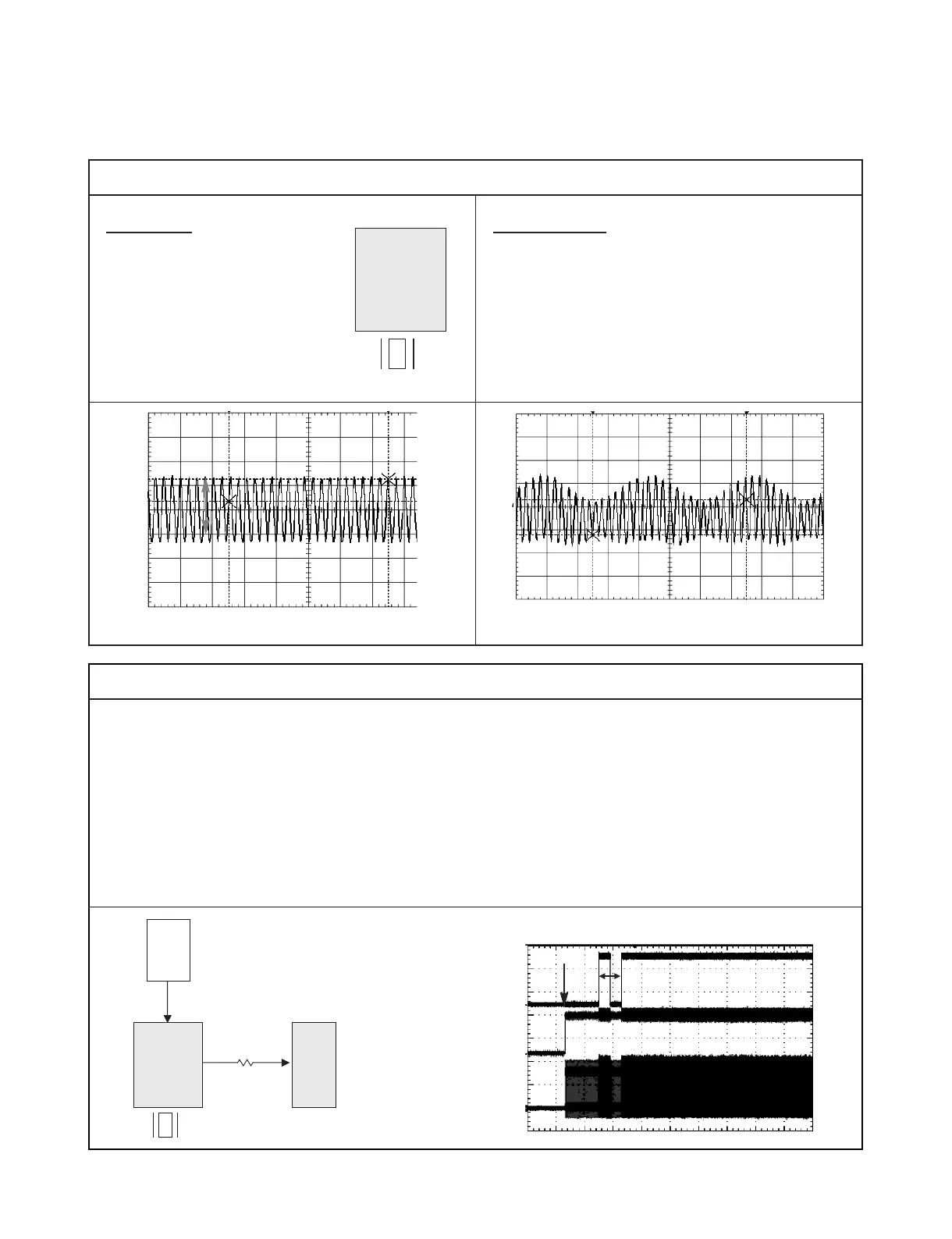
NORMAL
1) MPEG IC start oscilating
after being installed VCC
ABNORMAL
1) Logo Picture doesn’t appear
2) Initial step fail
* Initial step : power cord in -> green LED ->
red LED -> power key input -> Logo picture
6.5 Vp-p
X601 : 27 Mhz X601 : there is distortion
1) MPEG IC start oscilating(27Mhz)after being
installed VCC
2) MPEG IC and RF IC get the MRESET signal
from VCR front µ-com and they are initialized.
3) And then, MPEG IC generate SMI_CLK and
send to SDRAM
4) MPEG IC and SDRAM are synchronized by
SMI_CLK, they communicate between.
If oscilation(27Mhz) don’t appear, check
The X-TAL and VCC and replace MPEG IC.
If SMI_CLK don’t appear, first cut the SMI_CLK
line (remove R693) and recheck.
Don’t appear -> check MPEG IC or replace
Appear -> check the SDRAM or replace
/M-RESET
Reset Time
Power
Cord in
X601
(27 Mhz)
SMI_CLK
(133 Mhz)
2. Initializing between MPEG and SDRAM



 To Next Page