14
7.0 REMOTE CONTROL FUNCTIONS
7.1 SWITCHING BETWEEN FLIGHT MODES
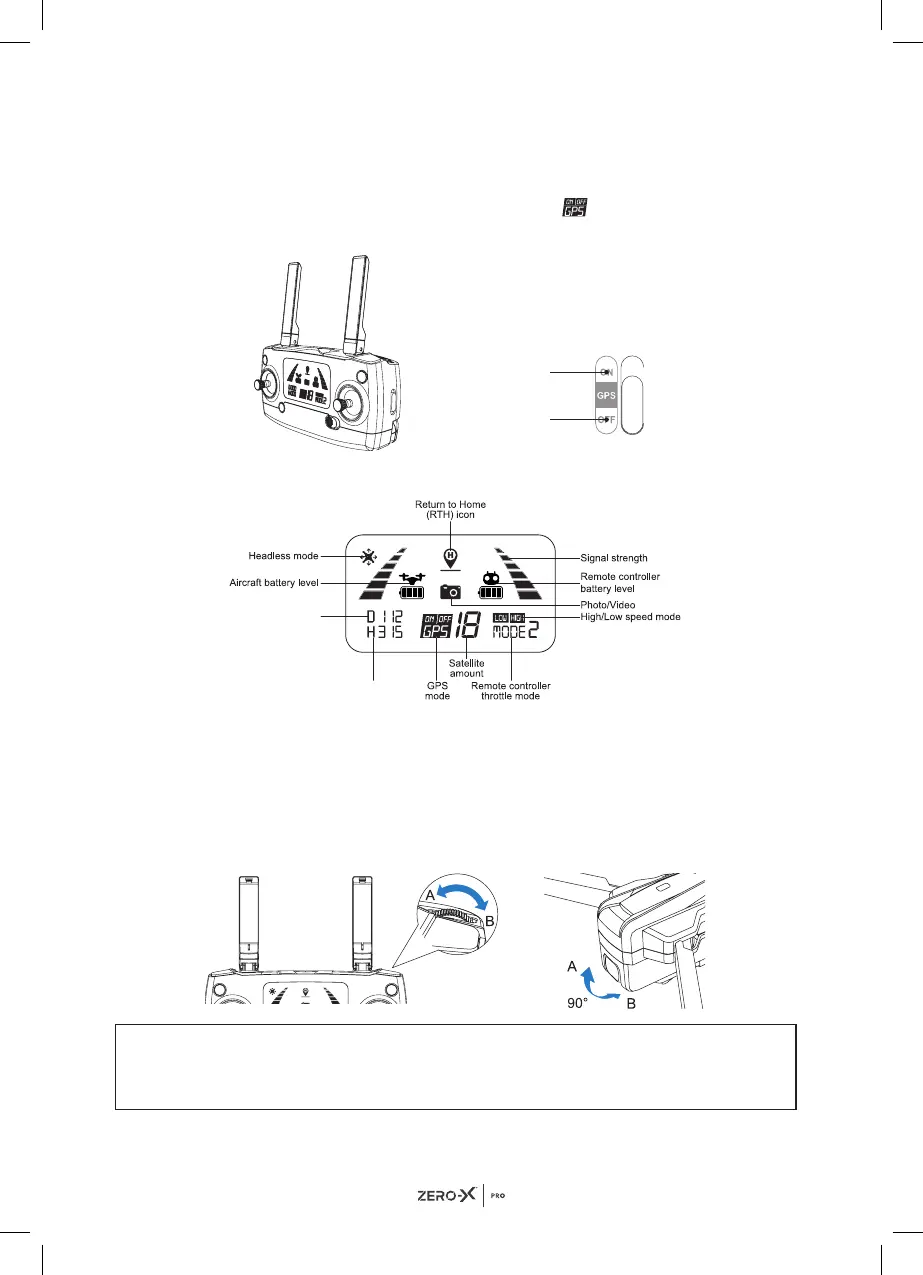
To choose which mode to fly your drone in, switch the GPS button to either
the ON or OFF positions. The ON flight mode
is shown on the LCD
display.
7.2 LCD SCREEN DISPLAY
7.3 CAMERA ANGLE ADJUSTMENT
You can adjust the angle of your camera within a 90° range by using the
gimbal trimmer. Adjusting the camera angle can help in obtaining a better
aerial experience. To tilt the camera upwards, scroll the gimbal trimmer to
the left (in the direction of 'A' in the diagram). To tilt the camera downwards,
scroll the gimbal trimmer to the right (in the direction of 'B' in the diagram).
WARNING:
PLEASE DO NOT MOVE THE CAMERA MANUALLY AS IT CAN
DAMAGE THE GIMBAL AND CAMERA.
GPS mode ON
GPS mode OFF
Distance from
Home Point
Altitude from
Home Point


 To Next Page