14
零度智控(北京)智能科技有限公司
25-50%
50-75%
75-100%
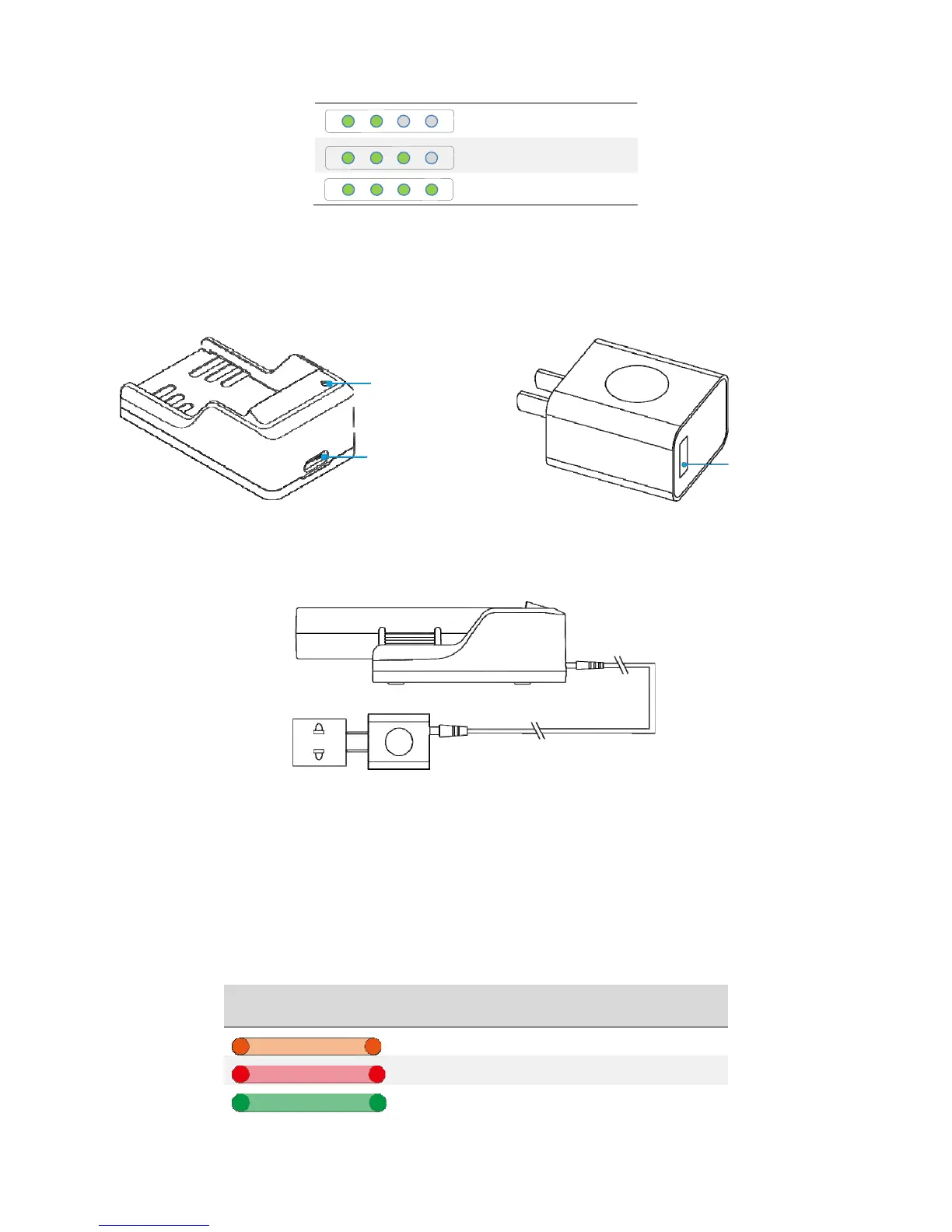
ChargingtheBattery
Thebatterycomeswithacharger,adapter,andaUSBcable.
ChargeStatusIndicatorLight
Charger
Type‐CPort
Adaptor
USBPort
Plugthebatteryintothecharger.UsetheUSBcabletoconnectthechargertotheadaptor.Plugtheadaptorintoa
power‐pointandthedevicewillbegincharging.
The charger uses high speed technology. Using it together with the accompanying adaptor allows for fast
charging. The charge status indicator light will turn orange during fast charge. If you don’t use the provided
adaptor,thedevicemayonlybeabletoachieveslowcharge.Thechargestatusindicatorlightwillturnredduring
slowcharge.
Ifthechargestatusindicatorlightturnsgreen,thismeansthebatteryisfullycharged.Pleaseturnoffthepower
sourceandremovethebatteryfromthecharger.Thechargestatusindicatorlight’sstatusandtheircorresponding
meaningsareasfollows:
ChargeStatus
IndictorLight
Colour Meaning
OrangeLight FastCharge
RedLight SlowCharge
GreenLight FullyCharged



 To Next Page