19
零度智控(北京)智能科技有限公司
App
ThissectionwillcoverthemainpartsoftheDo.Funappandtheset‐upmethod.
Summary
TheDo.FunappisspecificallydevelopedtobeusedwithDOBBY.UserscanuseDo.Funasaremotecontrollerfor
flightcontrolandphoto‐shooting.YoucandownloadtheappbyscanningtheQRcodeonZerotech’sofficial
websitewww.zerotech.com,oryoucandownloaditfromtheappstoreonyourmobiledevice.
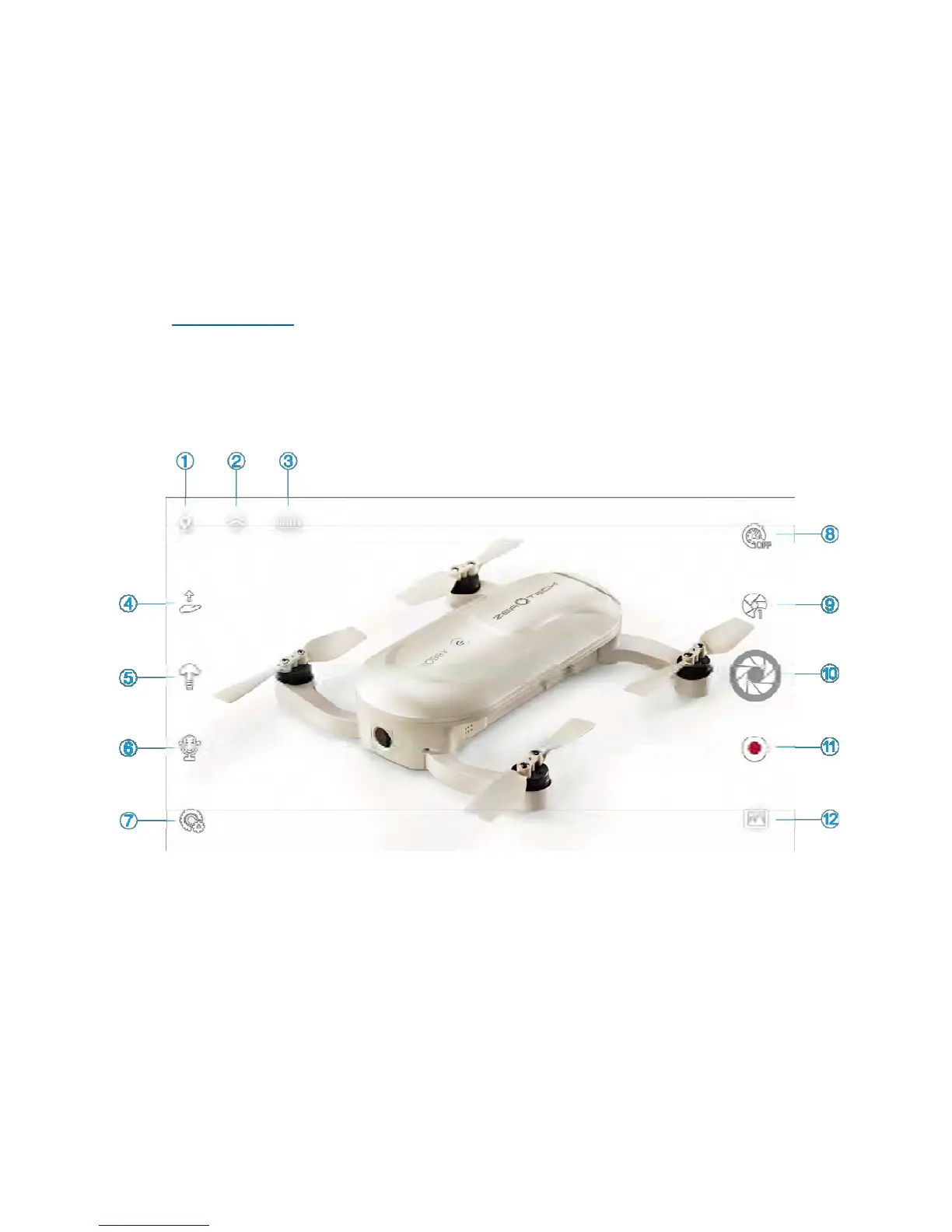
MainUserInterface
Allthenecessarystatusindicatorsandmainfunctioniconsareonthemainuserinterface.Thelayoutisasfollows:
1.
PositioningStatus
2.
ConnectionStatus
3.
AircraftCharge
Status
4.
PalmTake‐off/Landing
5.
OneClickTake‐off/Landing
6.
VoiceControl
7.
Settings
8.
TimedPhoto
9.
Mode/Parameter
/Settin
s
10. Shutter 11. Record 12. MediaLibrary
Abriefdescriptionofthesestatusindicatorsandfunctioniconsisbelow.Formoredetailsonflightcontroland
cameraoperation,pleaserefertothe“UsingtheAppforFlight/PictureTaking”onpage2.



 To Next Page