Handleiding Internet van Ziggo 74
4.8.2 USB Basic settings
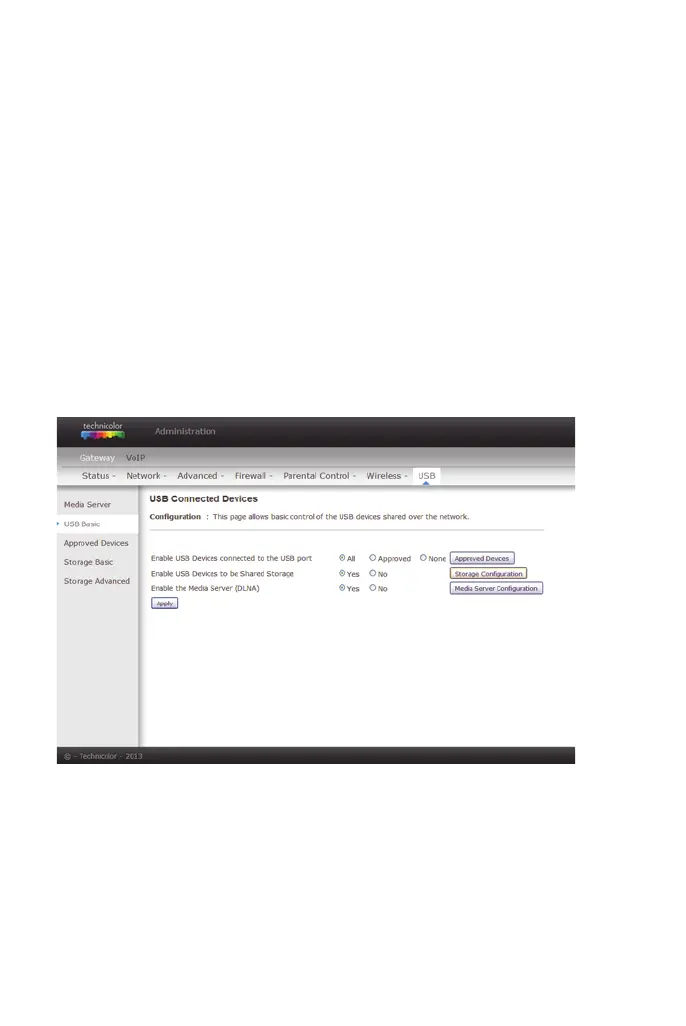
This page allows basic control of the USB devices shared over the network.
figure 58: Gateway/USB/USB Basic
Enable USB
Devices
connected to
the USB port:
This field controls which USB device (Key or Hard Disk) can
be connected to the Gateway. All will authorize all USB
devices. Approved will authorize devices that have been
previously approved on this gateway. None will block any
USB Device on the Gateway. To approve devices (PC), click
on the button Approved Devices.
Enable USB
Devices to be
Shared Storage
Yes or No to decide if you share or not the content of the
USB device. Click on Storage Configuration button to
access the web pages to configure the Storage Device.
Enable the Media
Server (DLNA)
Yes or No to activate or the not the DLNA Server (DLNA:
Digital Living Network Alliance). To configure the DLNA
server, click on the button Media Server Configuration.


 To Next Page