29
8010001002
X Series User’s Manual Chapter 2 Installation & Operation
Indicator Lights
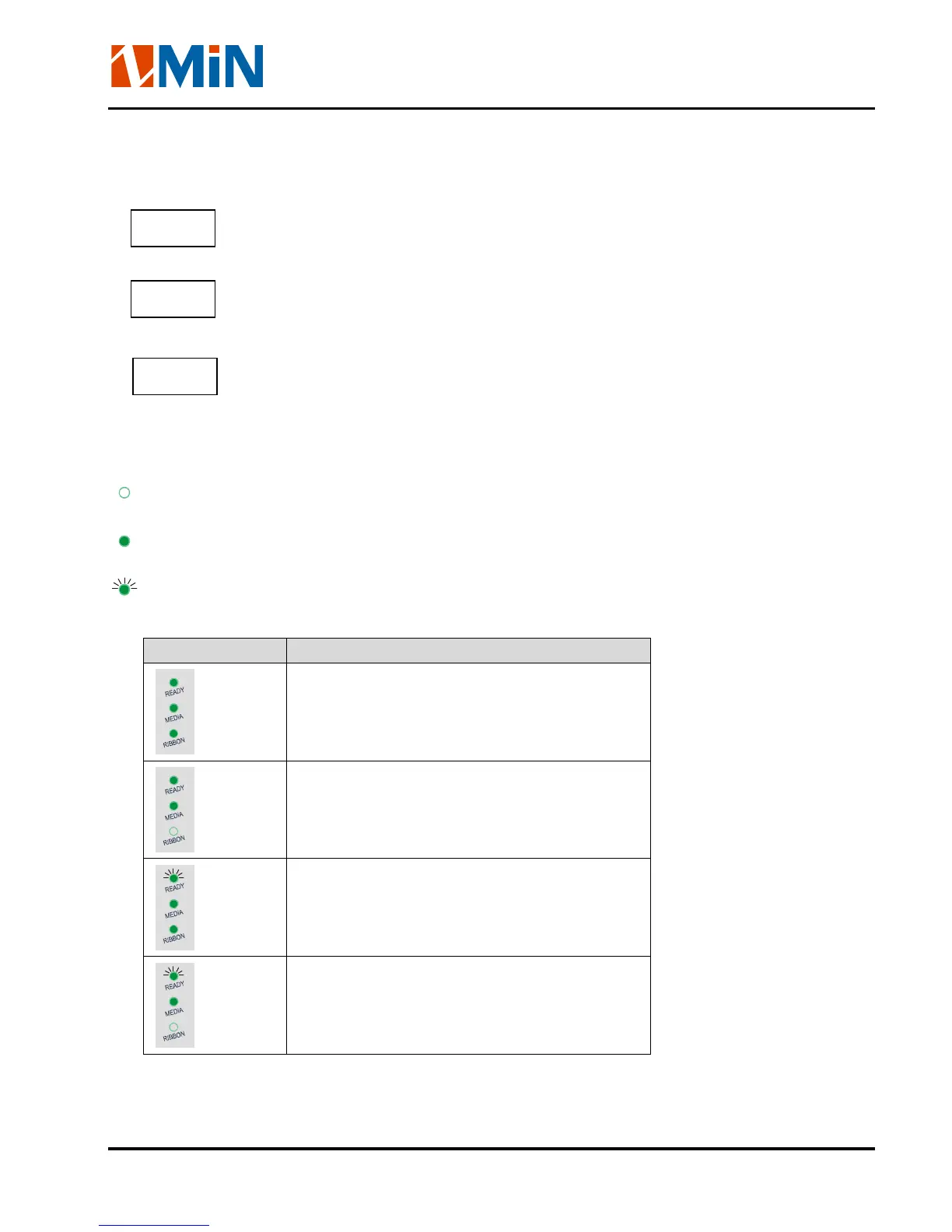
The three Lights indicate the status of the printer (please refer to Chapter4 for error indications)
- On: Indicates the printer is in the normal state;
- Flashing: Indicates the printer is in the ‘PAUSE’ state.
- On: Indicates the printer is in the normal state;
- Flashing simultaneously with READY: Running out of media;
- On: Indicates thermal transfer printing;
- Off: Direct thermal printing (no ribbon requirements);
- Flashing simultaneously with READY: Running out of ribbon.
The Indicator lights combinations indicate the status of the printer as follows:
:The Indicator lights is Off
:The Indicator lights is On
:The Indicator lights is Flashing
Status Indication
In Thermal Transfer Mode:
Printer is in the normal state
In Direct Thermal Mode:
Printer is in the normal state
In Thermal Transfer Mode:
Printing pause operation;
Error printing data is found;
In Direct Thermal Mode:
Printing pause operation;
Error printing data is found;
READY
MEDIA
RIBBON


 To Next Page