8
2.2.3 Filling the lter
• Remove the bolts and washers holding the translucent cover shroud. Set aside.
• Remove the shroud, the cover and its seal. Set aside.
• Check that the diuser, the manifold and its strainers are in good posion and correctly posioned.
• Unscrew the diuser and replace with the protecve cap provided.
• Fill the lter with one third of water so as to cover the strainers.
Tip: protect the bolt threading
Cover the bolts with adhesive tape to protect them and make the cover easier to close.
• Carefully pour in the coarse grain lter media up to the required level (take care not to damage the manifold and its
strainers).
• Level the lter media as it is poured in.
• Then pour in the ne grain lter media up to the required level.
See the label on the lter for the amounts of lter media to use.
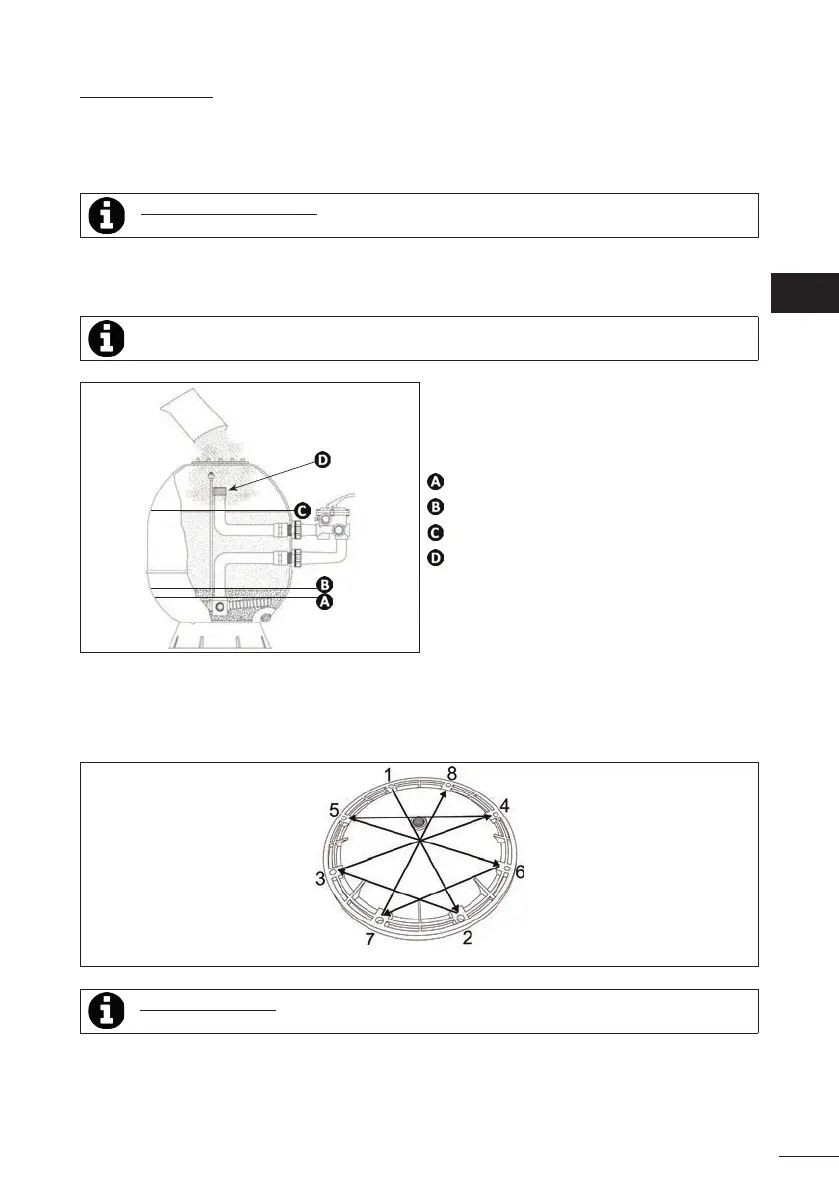
: Inial wall ll level
: Coarse grain lter media ll level
: Fine grain lter media ll level
: Protecve cap
• Remove the protecve cap and screw the diuser back in place.
• Clean of any remaining lter media around the groove of the seal and the bolts (if necessary, take the protecon o
the bolts).
• Posion the cover and its gasket on the opening.
• Fit the washers and nuts on the bolts. Tighten the 8 nuts diagonally to obtain a hermec seal.
• Fit the protecve caps provided on the nuts.
Order for ghtening the cover
Tip: ghtening the nuts
• The nuts must be screwed with a ghtening torque of 6 to 7 nm.
EN




 To Next Page