10
3.4 I Adjusng the water ow
• The ltraon pump must be operang.
• Check the water ow regularly to ensure the best possible cleaning performance and to make it easier for the cleaner
to climb the sides.
• The cleaner is equipped with a ow regulator valve which automacally adjusts the water ow through the cleaner. It
indicates whether the water ow is ok or excessive: YELLOW = ow ok / RED = ow excessive
: Flow regulator valve
: Control
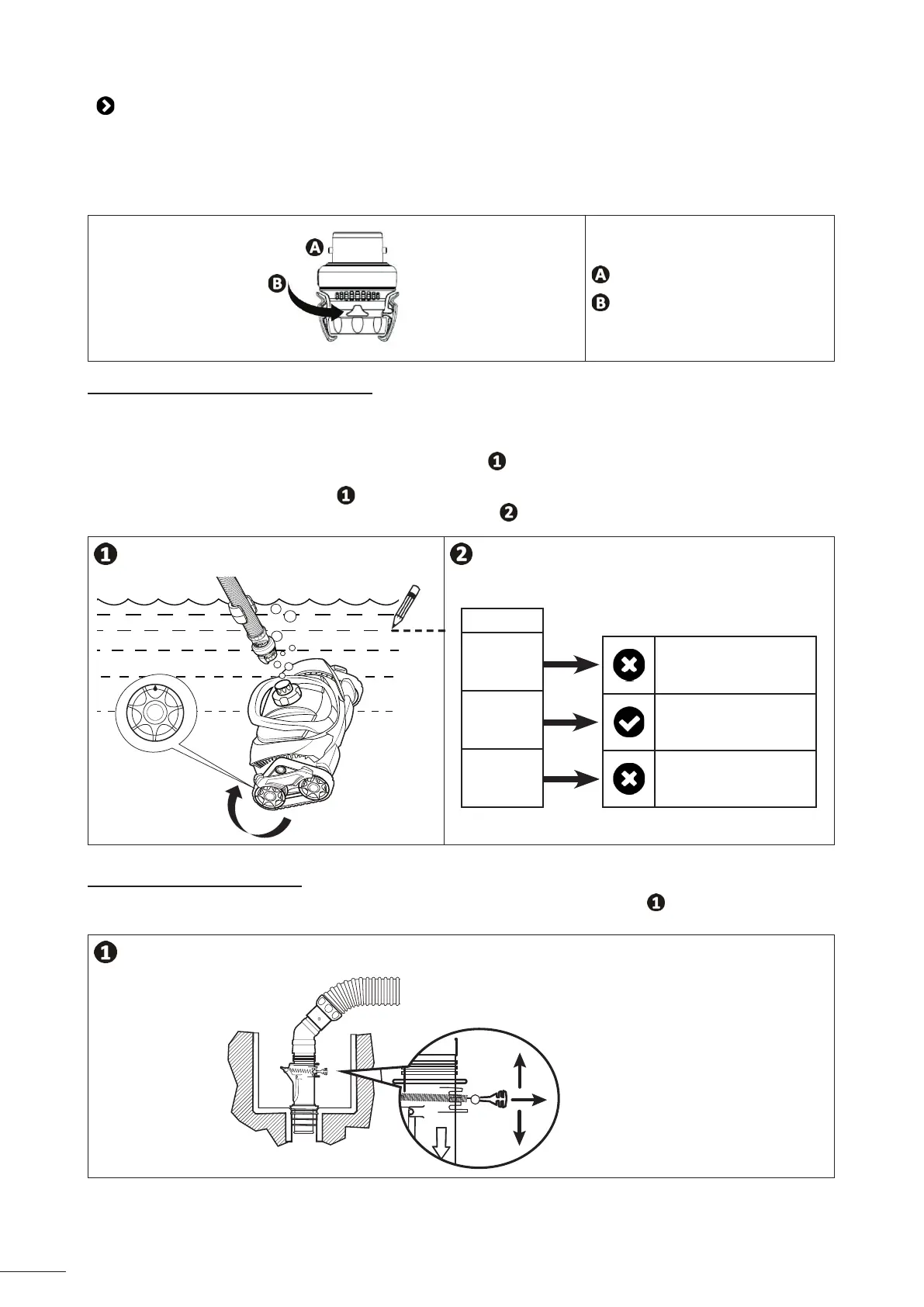
3.4.1 Checking the wheel rotaon speed
• The ltraon pump must be operang.
• Switch on the ltraon pump (have a stopwatch ready).
• Raise the cleaner to below the surface of the water, keeping it submerged.
• Note the yellow indicator on the rear right wheel (see image ).
• For MX8 - MX8 PRO - MX9 - MX930 - MX10: Wait unl the wheels change direcon and log the me unl the wheels
have performed 10 turns (see image
).
• Adjust the water ow according to the me logged (see image ).
10 tours
Seconds
26-50
20-25
10-19
Increase the ow
Flow ok
Reduce the ow
3.4.2 Adjusng the water ow
• Adjust the water ow using the owkeeper valve provided with the device (see image ), or from the pool valves.
(+) Increase the ow
(-) Reduce the ow


 To Next Page