9
EN
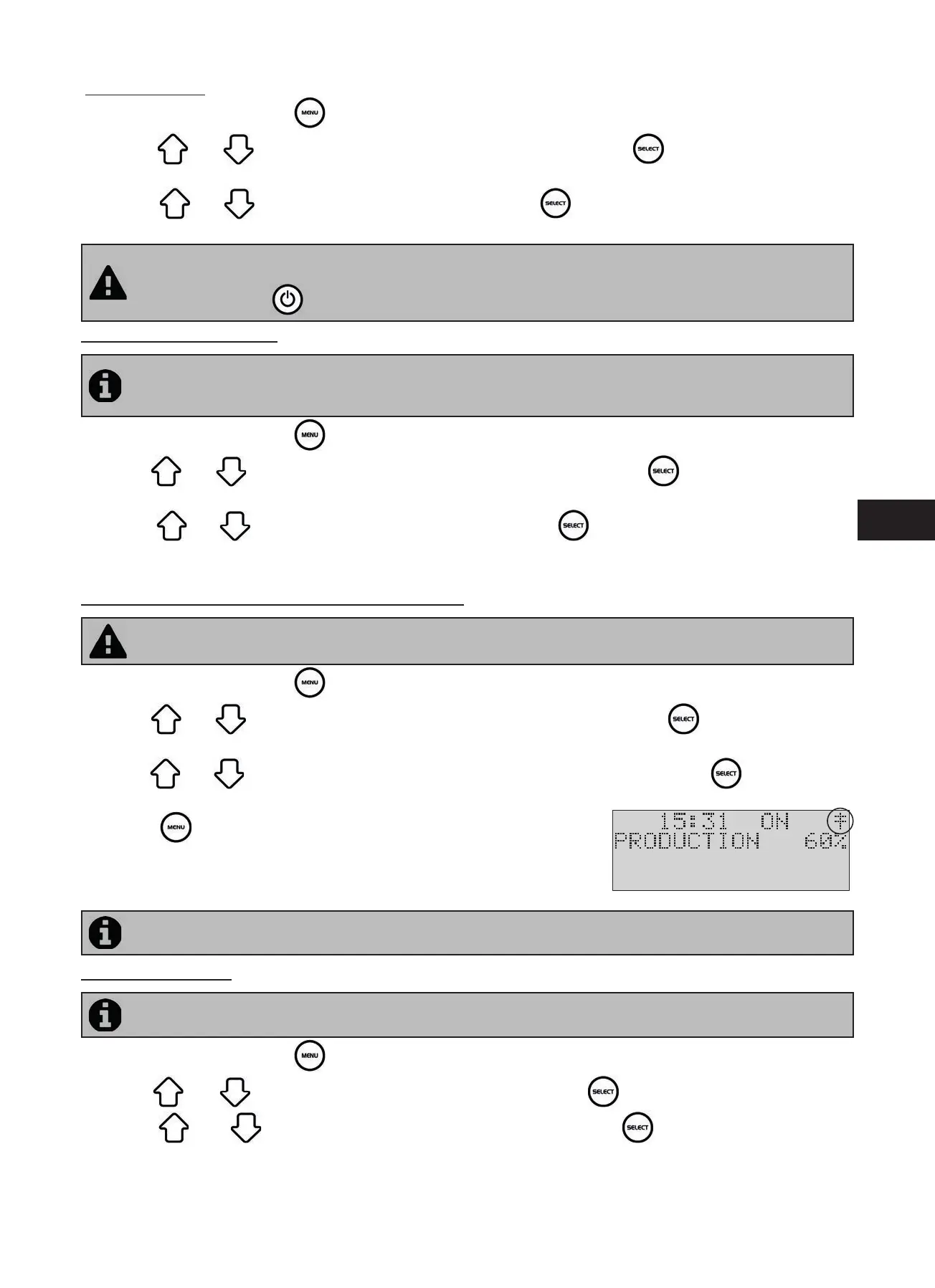
Dele ng a “Timer”:
• On the home screen press the
bu on.
• Use the
and bu ons to reach the “PROGRAMMING” line, then press to display the programming
se ngs menu.
• Use the
and bu ons to reach “RAZ TIMERS”, then press . A message confi rming the dele on will be
shown on the screen.
The electrolyser is ed with a safety device to prevent chlorine overproduc on. It switches off the appliance
a er 30 hours of con nuous chlorina on (no “Timers(s)” memorised and ltering in con nuous mode (manual
mode)). Pressing the
bu on will restart chlorine produc on if necessary.
3.2.3 Troubleshoo ng menu
The electrolyser automa cally no fi es you of any problems using error messages. To help with the understanding
of these messages the appliance has a troubleshoo ng assistance menu which gives the meanings and the ac on
to take to solve the problem.
• On the home screen press the
bu on.
• Use the
and bu ons to reach the “TROUBLESHOOTING” line, then press to display the list of error
messages.
• Use the
and bu ons to select the error message, then press .
• A certain number of sugges ons and solu ons will automa cally be scrolled to explain what to do. Once the automa c
scrolling is complete, the electrolyser automa cally returns to the “TROUBLESHOOTING” menu.
3.2.4 External controller menu (Automa on/Domo cs)
The automa on system must impera vely have its se ngs posi oned before the connec on becomes ac ve
(external controller switched off , see “2.5.2 Connec on to an electric roll-on shu er”).
• On the home screen press the
bu on.
• Use the
and bu ons to reach the “EXTERNAL CONTROLLER” line, then press to display the diff erent
models.
• Use the
and bu ons to select the version of the external controller used, then press to memorise the
choice. The electrolyser will then automa cally return to the main menu.
• Press the
bu on to return to the home screen.
• Switch on the automa on system and wait for the “‡” symbol to appear in
the top right hand corner of the electrolyser home screen, meaning that the
connec on was successful.
By default the electrolyser is set to be connected to a Zodiac AquaLink TRi® system.
3.2.5 Language Menu
By default the electrolyser is set to display in French. Seven languages are available: English, French, Spanish,
German, Italian and Dutch.
• On the home screen press the
bu on.
• Use the
and bu ons to reach the “LANGUAGES” line, then press to display the list of languages.
• Use the
and bu ons to select the required language, then press to memorise the choice. The
electrolyser will then automa cally return to the main menu.




 To Next Page