7
EN
3. Use
3.1 User interface presentation
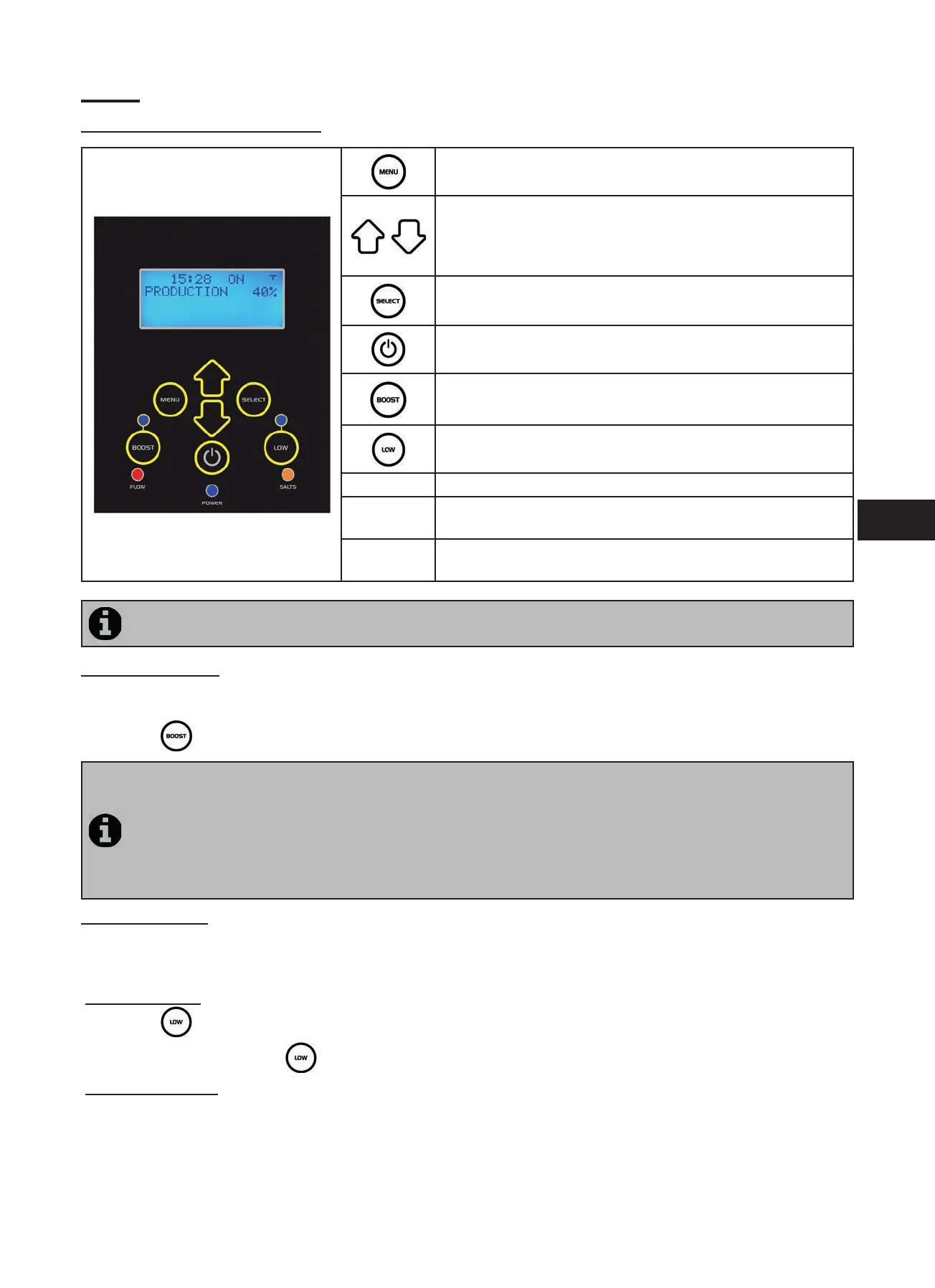
Access the user menu
or return
From the home screen: increase or reduc on in chlorine
produc on.
On the user menu: naviga on in the menu op ons and value
changes when a choice is proposed.
Validate a selec on
or access a sub-menu
Start or stop chlorine produc on
Ac vate super-chlorina on for a total period of 24 hours (blue
indicator on)
Blocks chlorine produc on at 10% (blue indicator on)
FLOW Red indicator showing the absence of fl ow
POWER
Blue indicator showing chlorine produc on (fl ashes if an error
message is displayed, see “5. Troubleshoo ng”)
SALT
Orange indicator showing a water conduc vity problem (not
enough salt, water too cold, etc.)
If the language displayed on the screen when the electrolyser is fi rst powered is not appropriate, see “3.2.5 Lan-
guage Menu”.
3.1.1 “Boost” mode
In certain cases your pool may need higher than normal chlorina on (stormy weather, high number of bathers, etc.). The
“Boost” mode is used to quickly increase chlorine levels.
• Press the
bu on: “BOOST” is displayed on the screen and 100% chlorine produc on starts.
• When the “Boost” mode is ac vated, the rated chlorine produc on se ngs are temporarily overridden and
the electrolyser will operate for a total of 24 hours at a 100% chlorine produc on level. The number of days will
then depend on the opera ng mes (see “3.2.2 Programming Menu (Timers)”).
• The “Boost” mode cannot be started or stopped in the following condi ons:
- if the electrolyser is stopped,
- if the electrolyser is connected to an automa on system (the “Boost” mode is then driven from the automa on
system user interface).
3.1.2 “Low” mode
If your pool has a covering system (shelter, shu er, cover, etc.), “Low” mode is designed to adapt chlorine produc on to
situa ons where the pool is covered (lower needs).
This mode is also called “Shu er” or “Winter” mode. Its eff ect is to limit chlorine produc on to 10%.
Manual ac va on (shelter, cover, winter use, etc.):
• Press the
bu on: “LOW MODE 10%” is displayed on the screen and chlorine produc on is reduced to 10%.
• To stop this mode: press the
bu on again.
Automa c ac va on (compa ble electric roll-on cover):
• Make sure the cover is compa ble and connected to the electrolyser (see “2.5.2 Connec on to an electric roll-on
shu er”).
• “Low” mode will automa cally be ac vated when the shu er is closed.
• “Low” mode will stop as soon as the cover is completely open (a er a mer of a few minutes).




 To Next Page