H0360700.D - EN - 2016-0210
3.4 I Addi onal func ons
3.4.1 Se ng the setpoint on UAP
To display and modify the set point value, press or .
3.4.2 Opera on of the circula ng pump on UAP 35-70-120
• When the circula ng pump is powered up, the light comes on.
• When the circula ng pump is opera ng, it displays the electrical consump on in Wa s:
• The display may switch on even if the power supply is disconnected, if the circula ng pump's wheel is ac vated by
the water fi lling up, for example.
Tips: restar ng the circula ng pump a er a long shutdown period
• The circula ng pump is equipped with an self-cleaning system designed to minimise the eff ects of fouling.
• If a blockage occurs, lights appear on the circula ng pump, see § “5.2 I Error code display”.
Tips: choosing the right opera ng mode
• By default, the circula ng pump is programmed to "propor onal speed 2 pressure". We recommend that
you keep this mode, which is suitable for most installa ons.
• If, however, your appliance is close to the boiler, you may lower the speed to speed 1 (see § “3.4.3
Circula ng pump opera ng modes on UAP 35-70-120”.
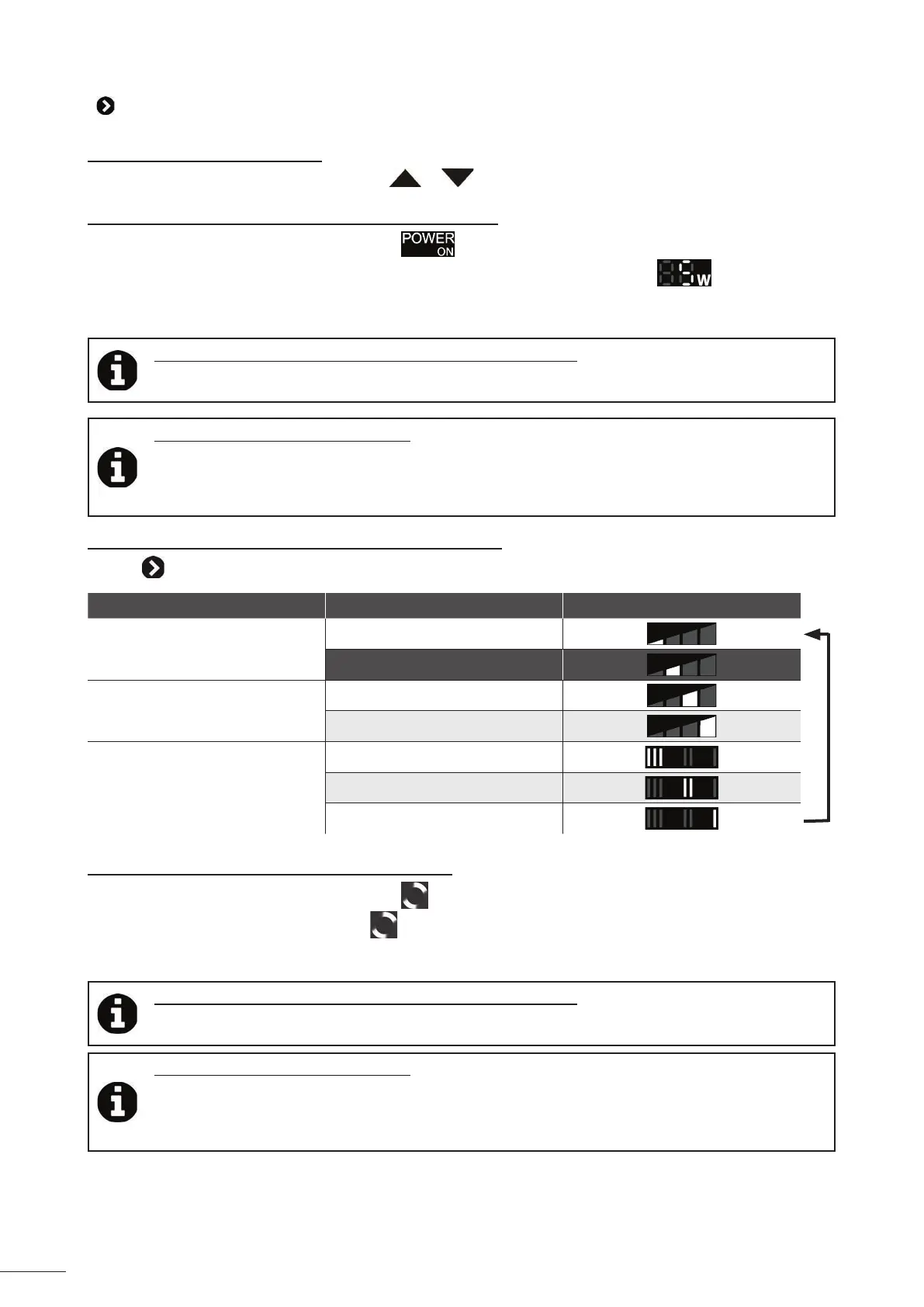
3.4.3 Circula ng pump opera ng modes on UAP 35-70-120
• Press to scroll through the opera ng modes:
Mode Speed Lights
Propor onal pressure
Speed 1
Speed 2
Constant pressure
Speed 1
Speed 2
Constant speed
Speed 3
Speed 2
Speed 1
3.4.4 Opera on of the circula ng pump on UAP 240
• When the circula ng pump is powered up, the light comes on green.
• When the circula ng pump is running the
light turns.
• The display may switch on even if the power supply is disconnected, if the circula ng pump's wheel is ac vated by
the water fi lling up, for example.
Tips: restar ng the circula ng pump a er a long shutdown period
• The circula ng pump is equipped with an self-cleaning system designed to minimise the eff ects of fouling.
• If a blockage occurs, lights appear on the circula ng pump, see § “5.2 I Error code display”.
Tips: choosing the right opera ng mode
• By default, the circula ng pump is programmed to "propor onal speed 2 pressure". We recommend that
you keep this mode, which is suitable for most installa ons.
• If, however, your appliance is close to the boiler, you may lower the speed to speed 1; if it is far away from
the boiler, you may switch it to speed 3 (see § “3.4.5 Circula ng pump opera ng modes on UAP 240”.














 To Next Page