H0360700.D - EN - 2016-028
❸ Use
• Never run the circula ng pump (depending on the model) without water. The circula ng
pump is very quiet when it starts up; you may not hear it running.
3.1 I Opera ng principle
Your heat pump uses the calories (heat) from your home's hea ng to heat up your pool's water.
The heat is exchanged through a series of pipes; the home's hea ng water circulates through the exchanger's body and
the pool water circulates through the pipes.
Tips: improve your pool's temperature rise and maintenance
• Cover the basin with a sheet (bubble canopy, canvas, etc.) to prevent heat loss. The closer the heat source
is to the exchanger, and the exchanger is to the pool, the less heat will be lost.
• An cipate the commissioning of your pool far enough in advance before you use it.
• For the temperature rise, set the fi ltra on pump to con nuous opera on (24/24).
• To maintain the temperature throughout the season, run "automa c" circula on for at least 12 hours/
day (the longer this me the longer the appliance will have enough opera ng range to heat up)
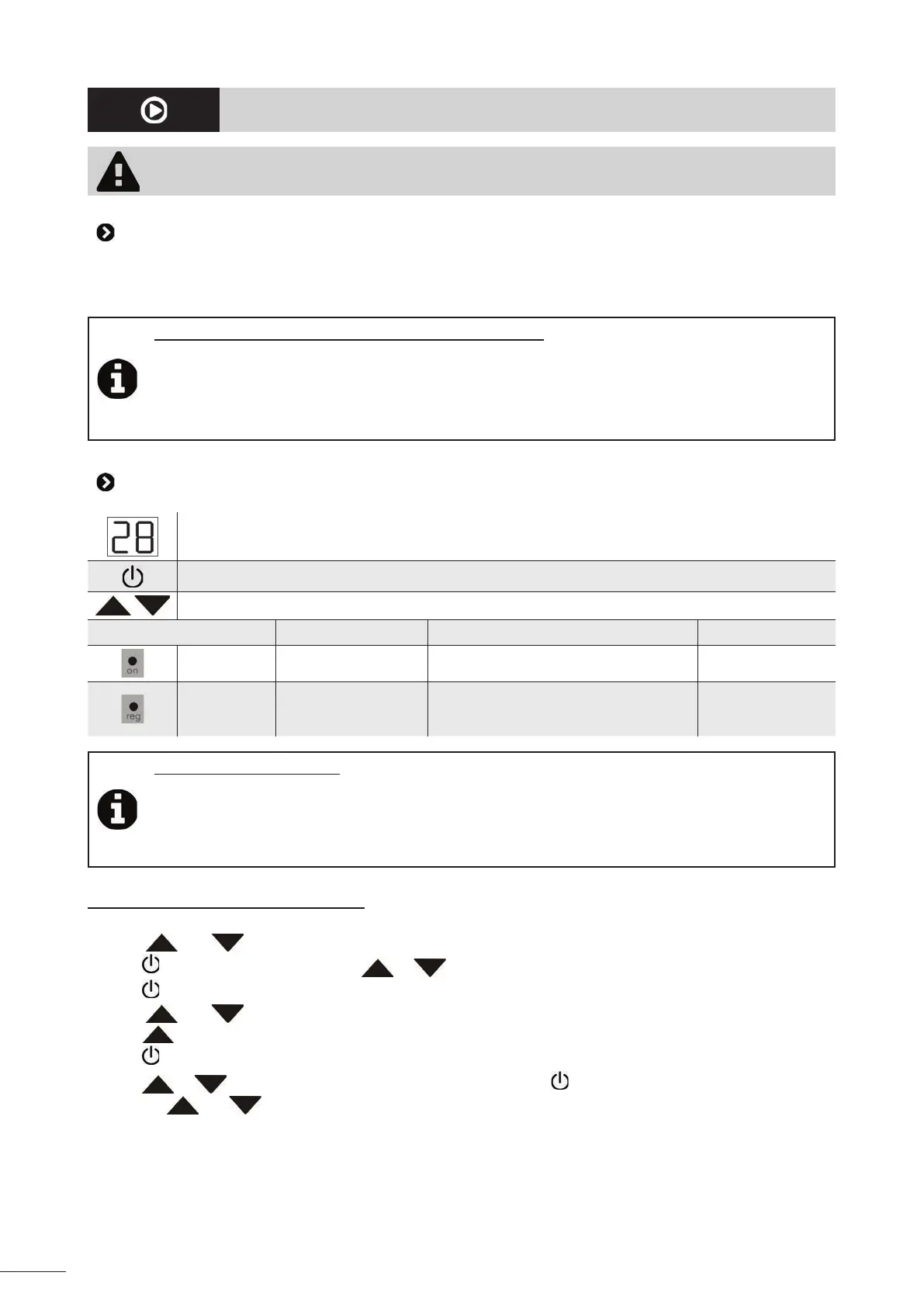
3.2 User interface presenta on (depending on the models)
Display screen (default: water temperature measured)
"On/off " bu on
Value se ng bu ons
Fixed Flashing O ff
"On/off " light Appliance powered up / No electrical supply
Hea ng light Hea ng in progress
• Timed before opera on
• No water circula on in the secondary
circuit (less than 1.1m³/h)
No need for hea ng
Tips: using the user interface
• The temperature is regulated by degrees.
• Hold down the bu ons to scroll through the values quickly.
• The setpoint adjustment range is between 2° and 40°C.
• This maximum temperature may be lowered to protect the pool liner (see § “3.2.1 Modifying the
maximum setpoint”).
3.2.1 Modifying the maximum setpoint
• Switch off the regulator (the "on" light goes off and the pool water temperature is displayed),
• Press
and simultaneously for 5 seconds: "PA" is displayed,
• Press
, then enter the value "80" with or (code to access the "parameters" menu),
• Press
to confi rm: "PA" is displayed,
• Press
and simultaneously for 5 seconds: "/1" is displayed,
• Press
to scroll through each parameter un l "r2" is displayed,
• Press
; the current "r2" parameter value is displayed,
• Press
or to modify the maximum setpoint value, then press to validate this new value,
• Press the
and keys at the same me for 5 seconds to return to the pool water temperature display.














 To Next Page