ZOOM MRS-8
32
Reference [Recorder]
This chapter explains the various audio recording and playback functions.
V-takes
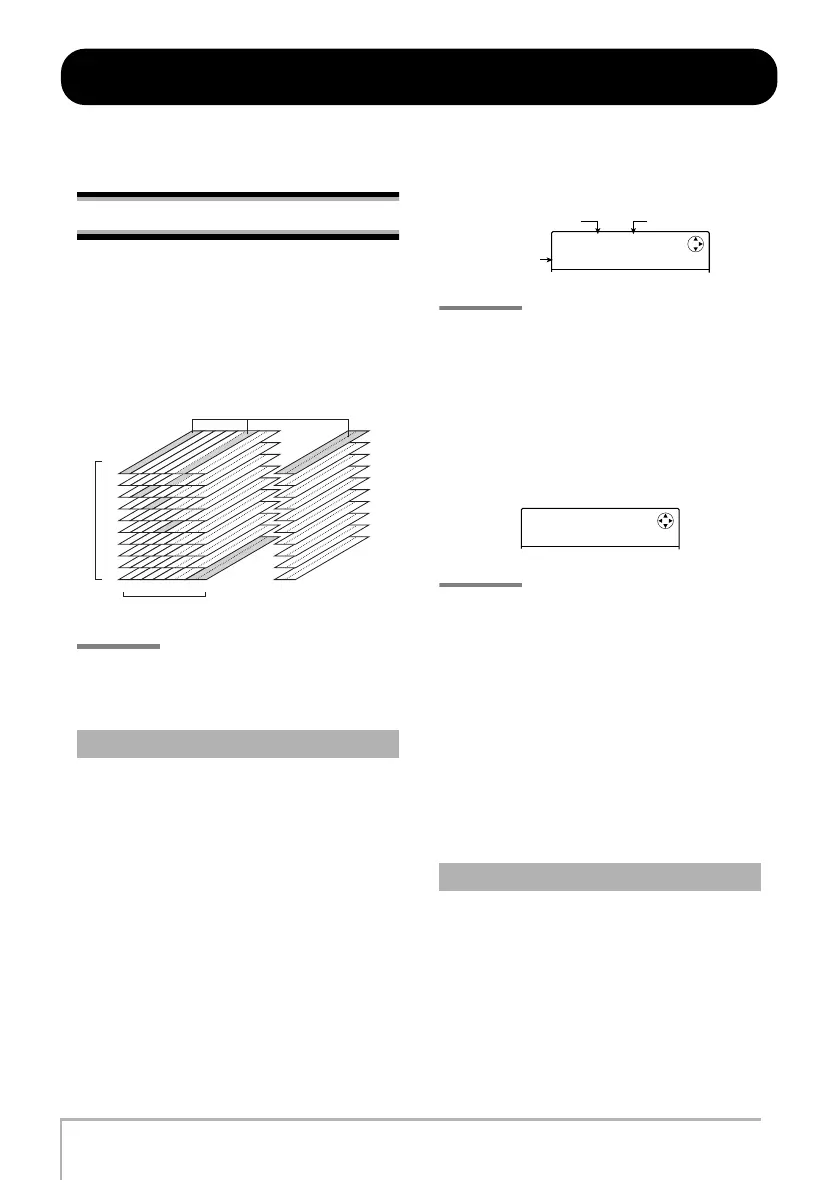
Each audio track (1 – 8) and the master track contains ten
virtual tracks, called “V-takes”. For each track, you can
select one such take, which will be used for recording and
playback. For example, you can switch V-takes as you
record multiple vocal or guitar solos on the same track,
and later compare them and select the best V-take.
HINT
For stereo tracks (tracks 5/6, 7/8), you can select a separate
V-take for the odd-numbered and even-numbered track.
Here’s how to switch the V-take used by the audio tracks
or the master track.
1.
From the main screen, press the [TRACK
PARAMETER] key in the display section.
You can now select various track parameters.
2.
Use the cursor up/down keys to bring up
the indication “TR x-yy” on the display
(where x is the track number and yy is the
V-take number).
The V-take name is shown on the second line of the
display.
HINT
• If you select a V-take on which nothing is recorded, the
indication “NO DATA” appears.
• If you select the master track, “M” is shown as the track
number.
3.
Use the cursor left/right keys or the status
keys to select the track for which to switch
the V-take.
HINT
When you select a stereo track with a status key, each push
of the key toggles between the odd-numbered track and
even-numbered track.
4.
Turn the dial to select the V-take.
5.
Repeat steps 3 – 4 as necessary, to select a
V-take for each track.
6.
To finish, press the [EXIT] key.
The main screen appears again.
A V-take that has been recorded will be automatically
assigned an 8-character name, according to the following
pattern. (x denotes the track number, and yy the V-take
number.)
• GTR x-yy
V-take recorded through CLEAN, DIST, or ACO/BS SIM
algorithm of insert effect
Switching V-takes
1
1
2
3
4
5
6
7
8
9
10
234 5/6 7/8
V-takes selected for tracks 1 - 8 and master track
-takes
Tracks
Master track
Changing the V-take name
TR 1- 1
GTR 1- 1
V-take number
Track number
-take name
TR 3- 1
GTR 3- 1
MRS-8(E).book 32 ページ 2004年7月30日 金曜日 午後5時24分



 To Next Page