EasyManua.ls Logo

Zoom PodTrak P8 - Publishing and Editing; Editing before release

Zoom PodTrak P8
16 pages
Print Icon
To Next Page IconTo Next Page
To Previous Page IconTo Previous Page
Loading...
6
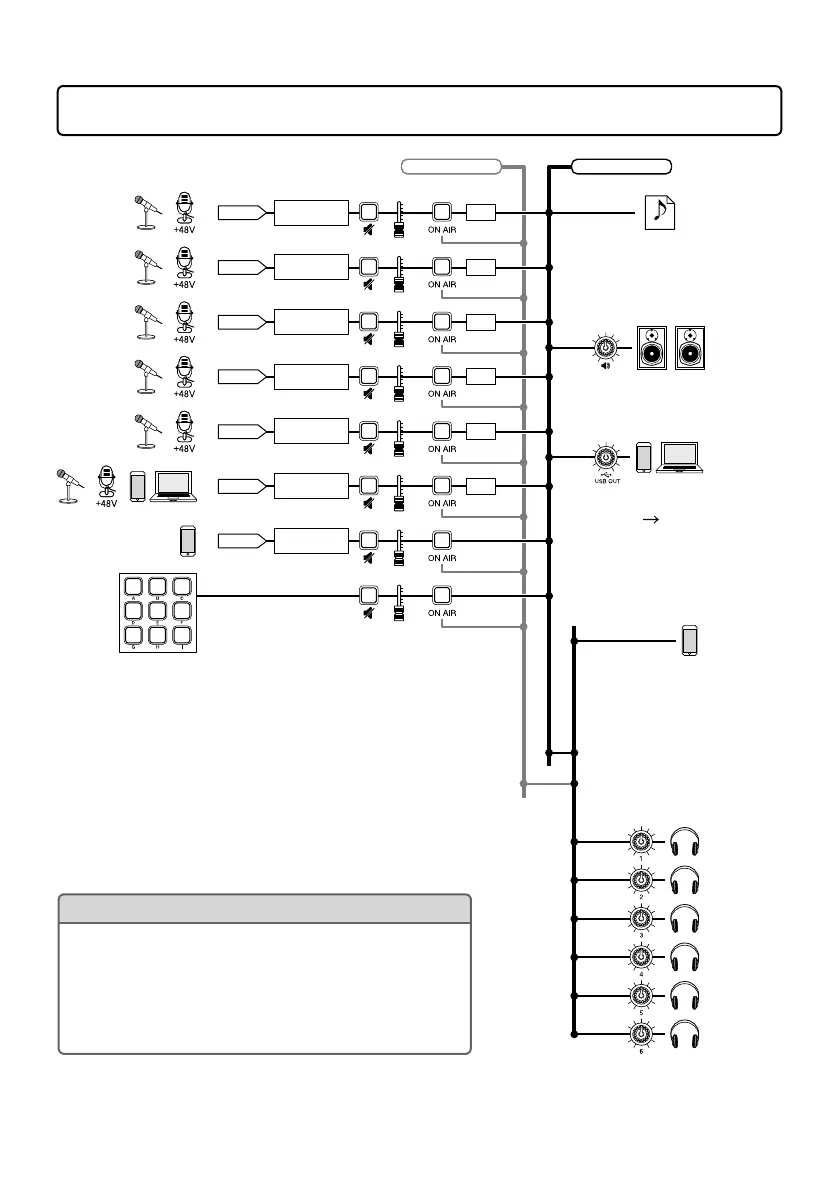
Signal ow
L/R
SOUND PAD
ON AIR button litON AIR button unlit
INPUT 1
MUTE FADER
N.R.
INPUT 2
MUTE FADER
N.R.
INPUT 3
MUTE FADER
N.R.
INPUT 4
MUTE FADER
N.R.
INPUT 5
MUTE FADER
N.R.
INPUT 6
MUTE FADER
N.R.
PHONE
MUTE FADER
MUTE FADER
Adjust volume
and audio quality
Adjust volume
and audio quality
Adjust volume
and audio quality
Adjust volume
and audio quality
Adjust volume
and audio quality
Adjust volume
and audio quality
Adjust audio
quality
Stereo le for
podcasting
The sound input through
the smartphone connector
(sound input from
smartphone) is not included.
When the USB Mix Minus
setting (
page 11)
is On, the sound input
through INPUT 6 (sound
input through USB) is not
included.
Smartphone
connection jack
USB
Speakers with
built-in ampliers
SPEAKER OUT
HINT
• WhentheONAIRbuttonisOFF(unlit),soundwillnot
be output to the podcast stereo file, SPEAKER OUT
jacks or USB port.
• IndividualfilescanalsoberecordedforINPUT1–6,
PHONE and SOUND PAD channels.
• “N.R.”isanabbreviationfor“noisereduction.
Headphones

Other manuals for Zoom PodTrak P8

Related product manuals