Aggregated Links 27
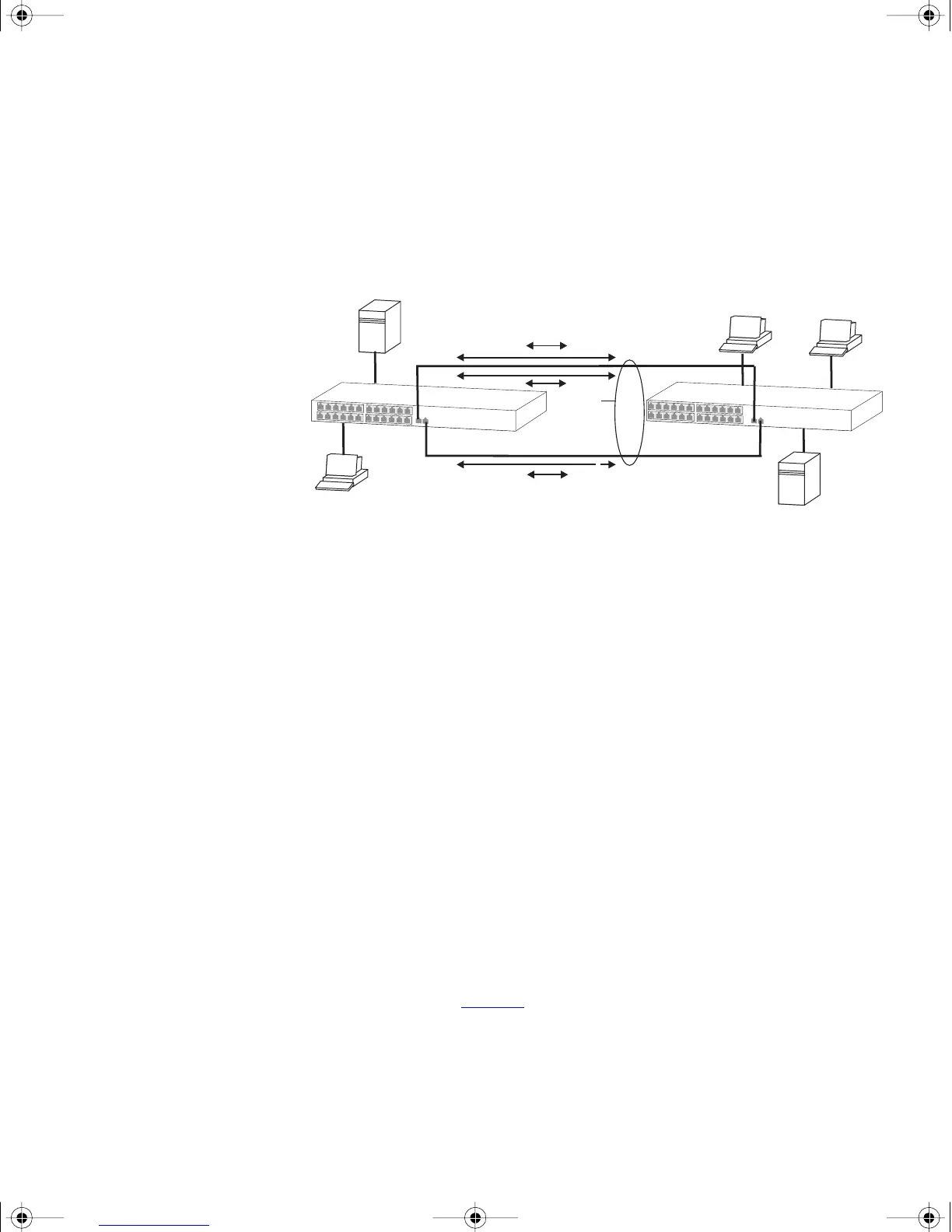
re-mapping occurs as soon as the Switch detects that a member link has
failed — almost instantaneously. As a result, aggregated link
configurations are extremely resilient and fault-tolerant.
Figure 2 Dynamic Reassignment of Traffic Flows
The key benefits of 802.3ad link aggregation are:
■ Automatic configuration — network management does not need to
be used to manually aggregate links.
■ Rapid configuration and reconfiguration.
■ Compatibility — non-802.3ad devices can interoperate with a
802.3ad enabled devices. However, you will need to manually
configure the aggregated links as LACP will not be able to
automatically detect and form an aggregation.
■ The operation of 802.3ad can be configured and managed via
network management.
Implementing
802.3ad Aggregated
Links
LACP can be enabled or disabled on a per port basis. You can implement
802.3ad aggregated links in three ways:
■ Manual Aggregations — You can manually add and remove ports to
and from an aggregated link via Web or CLI commands. However, if a
port has LACP enabled, if a more appropriate or correct automatic
membership is detected by LACP, it will override the manual
configuration.
For example, in Figure 3
, if a port on Switch C is physically connected
to Switch B, but you manually configure the port on Switch C to be a
member of an aggregated link for Switch A in error, LACP (if it is
enabled) will detect this and place the port in the aggregated link for
Switch B, thus overriding the manual configuration.
Physical Link 1
X
Aggregated Link
A
Y
Z
B
YA
B
X
XB
Physical Link 2
1
2
X
dua1730-0bAA03.book Page 27 Monday, July 11, 2005 11:14 AM









 To Next Page