What is Network Login? 81
How Network Login
Works
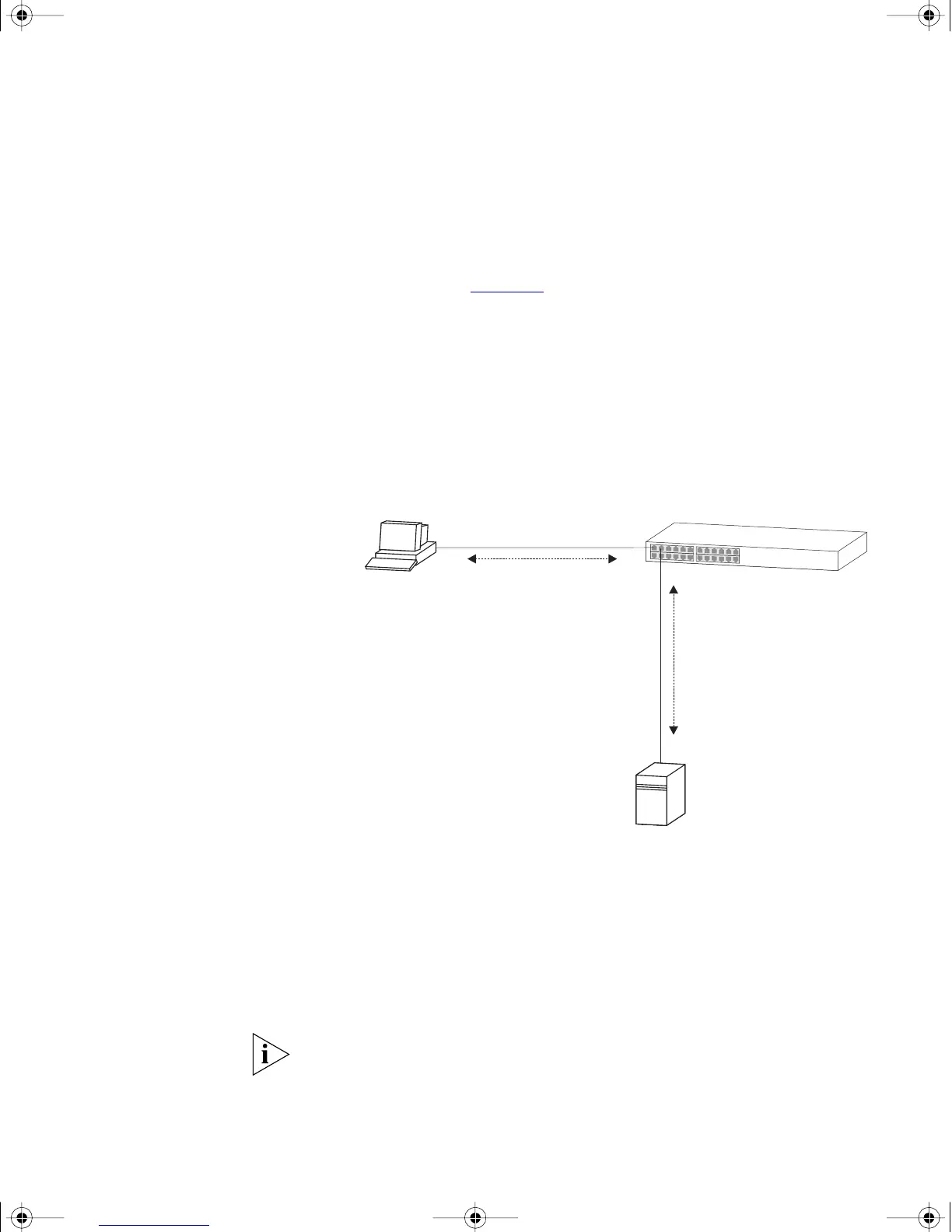
When Network Login is enabled the Switch acts as a relay agent between
the client device that is requesting access to the network and the RADIUS
server. The authentication information that is exchanged between the
client device and the RADIUS server is received and transmitted by the
Switch, as shown in Figure 19
. The Switch does not interpret or store this
information.
If the RADIUS server is unavailable, the switch may be configured to
provide default access on each port that has switch-configured VLAN and
QoS parameters. If default access has not been configured the switch
will maintain port security settings.
Figure 19 Network Login Operation
When the client device and RADIUS server have exchanged
authentication information, the Switch receives either an authentication
succeeded or failed message from the server, and then configures the
port to forward or filter traffic as appropriate. If access is granted, the
Spanning Tree Protocol places the port into the forwarding state and the
client device can obtain an IP address.
If possible, when a port is configured for Network Login, it should also be
configured to ‘Auto’ or ‘Enable’ Spanning Tree Protocol (STP) FastStart.
STP Faststart minimizes the delay before STP places the port into the
forwarding state.
Network Access Server
(Switch 4200)
Network Access Client
(Client Device)
Authentication
Information
Authentication
Information
RADIUS Server
dua1730-0bAA03.book Page 81 Monday, July 11, 2005 11:14 AM









 To Next Page