
 Need help?
Do you have a question about the 3M Dynatel 1420-iD and is the answer not in the manual?
Describes the purpose and limitations of the locator.
Instructions for installing batteries into the locator unit.
Guidelines for cleaning the locator device.
Information on obtaining service and replacement parts.
Details on buttons like On/Off, Volume, Gain, Menu, and Soft Keys.
Explanation of icons, signal strength, and connection ports.
Overview of the main menu and its options for device configuration.
Options for setting depth units, clock, language, and marker types.
Steps to perform a self-check on the locator unit.
Accessing basic on-screen information and guides.
Initial setup steps required for the 1420E model.
Enabling the electronic marker location feature for E-Model locators.
Procedure to enable or disable marker and path frequencies.
Steps for locating a single marker or path.
Procedure for locating two markers simultaneously.
How to measure the depth of an iD marker.
Procedure for measuring the depth of passive markers.
Steps for creating new data templates for iD markers.
How to modify existing data templates for iD markers.
Settings for overwrite, X-Type, marker type, and lock status.
Data preparation and confirmation before writing.
Steps to perform the actual data write operation to the marker.
Procedure to alter information within existing marker data templates.
Steps to retrieve data from an iD marker.
How retrieved marker data is saved in the locator's history.
Viewing the historical file of marker data that has been read.
Viewing the historical file of marker data that has been written.
Configuring serial port settings for GPS device communication.
Procedure for capturing GPS coordinates using NMEA mode.
Sending 3M iD marker data directly to GPS devices.
Accessing basic on-screen information and guides.
Steps to execute and interpret the locator's self-test results.
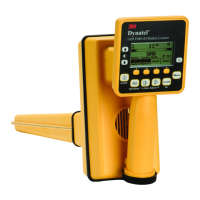
The 3M™ Dynatel™ Electronic Marking System (EMS) Marker Locator 1420-iD and 1420E-iD are advanced electronic marker locating devices designed for identifying buried utilities and structures. These locators combine the functionality of previous Dynatel models with enhanced capabilities to read from and write user information into 3M iD Markers. This allows for comprehensive resource management by reading, storing, and downloading information such as pre-programmed unique identification numbers, facility data, application types, and placement dates to a PC. The 1420-iD and 1420E-iD models can simultaneously search for two different types of utility markers, and when integrated with a hand-held GPS device, they can transmit path and marker coordinates, significantly enhancing mapping capabilities for CAD and GIS systems.
The primary function of the 3M Dynatel 1420-iD and 1420E-iD Marker Locators is to accurately locate 3M Buried Markers and read/write data to 3M iD Markers. The device operates by detecting specific frequencies emitted by these markers. The 1420E-iD model requires an initial configuration to enable the electronic marker location feature, which involves selecting the country of operation to comply with local regulations regarding marker operating frequencies. The locator supports both single marker and dual marker locate modes, allowing users to pinpoint individual markers or simultaneously search for two different utility marker types.
The locator features a user-friendly interface with a keypad and display for easy operation.
The locator allows users to create and modify templates for writing to iD markers. This can be done directly on the unit or more easily using the 3M™ Dynatel™ PC Tool Kit software on a PC. Templates can include various fields such as date, depth, and description, with options for UserEdit, selecting common compressed terms, or deleting rows.
The Write Mode enables users to write information into 3M iD markers.
The operator can retrieve data from iD markers by pressing the Read [SK] button. The locator tip should be lowered to the ground for maximum read depth. If multiple markers are detected, the "Read Next" key can be used to extract data from other markers. All retrieved information, including date, time, and GPS coordinates (if connected), is saved in the 'Read History' file.
The 'Data/Template' menu provides access to Read History (100 memory locations for read iD Markers) and Write History (100 memory locations for written iD Markers). Users can view marker data, details, and return to the main display.
The locator can communicate with GPS devices through its Serial Port [14].
The Help Mode [10] provides basic on-screen instructions and serves as a quick reference guide, with sections navigable via double up/down arrows and line-by-line scrolling via single up/down arrows.
 General
| Model | 1420-iD |
|---|---|
| Type | Cable/Pipe Locator |
| Display Type | LCD |
| Protection Class | IP54 |
| IP Rating | IP54 |
| Application | Locating underground cables and pipes |

 To Next Page