10385 Westmoor Drive, Suite 210, Westminster, CO 80021 | www.3xlogic.com | (877) 3XLOGIC
4.6 Picture
Click Picture to enter the picture searching interface. The user can search, view, and download
pictures/snapshots stored in the local or network storage.
NOTES:
► Make sure an HDD, NAS or memory card are properly configured before you initiate the picture
search.
► Make sure the capture schedule is configured. Go to Configuration > Storage > Schedule Settings >
Capture to set the capture schedule.
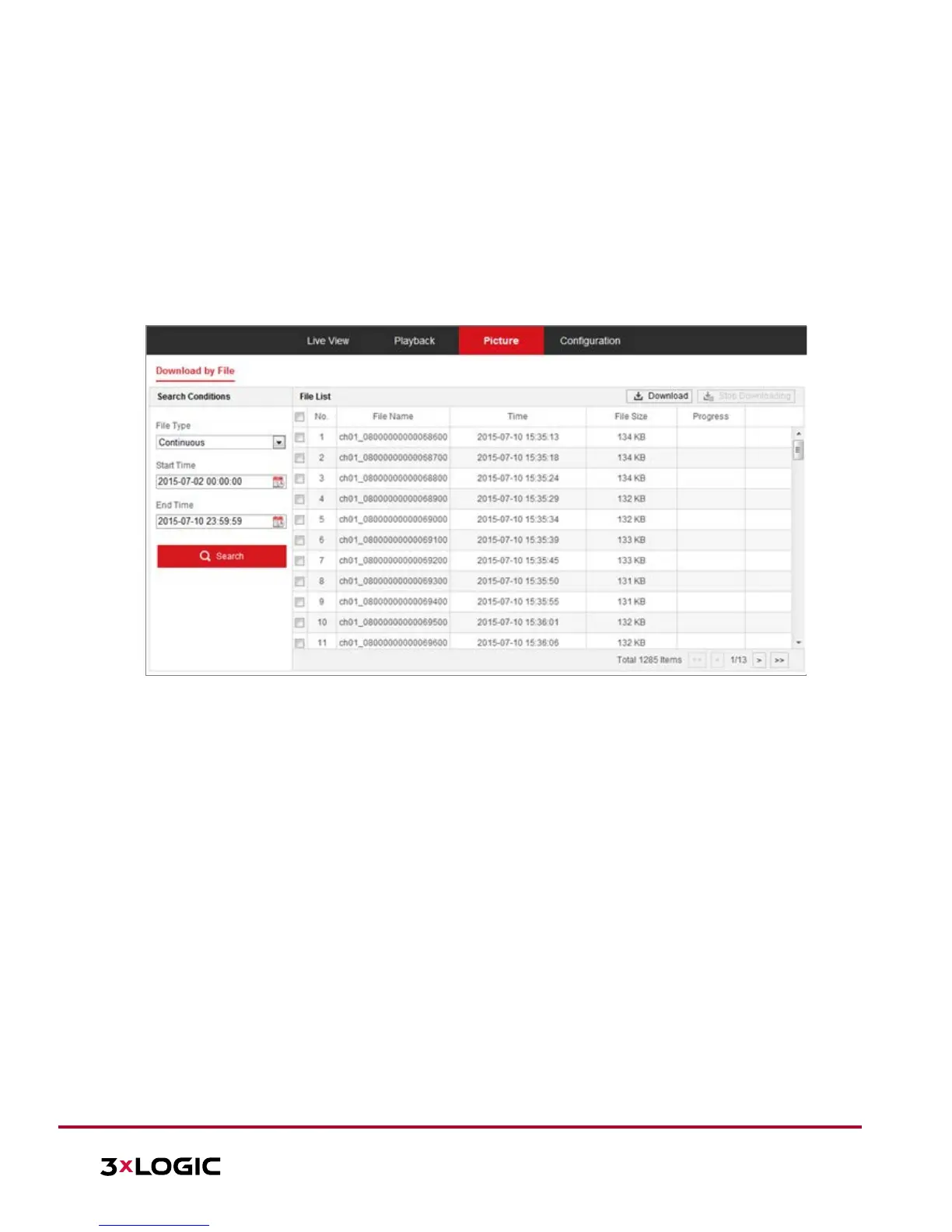
Figure 4-16 Picture Search Interface
Steps:
1. Select the file type from the dropdown list. Continuous, Motion, Alarm, Motion | Alarm, Motion &
Alarm, Line Crossing, Intrusion Detection, and Scene Change Detection are selectable.
2. Select the start time and end time.
3. Click Search to display a list of results.
4. Check off desired snapshots and click Download to download the selected images.
NOTE: Up to 4000 images can be available in the search index simultaneously.


 To Next Page
 Loading...