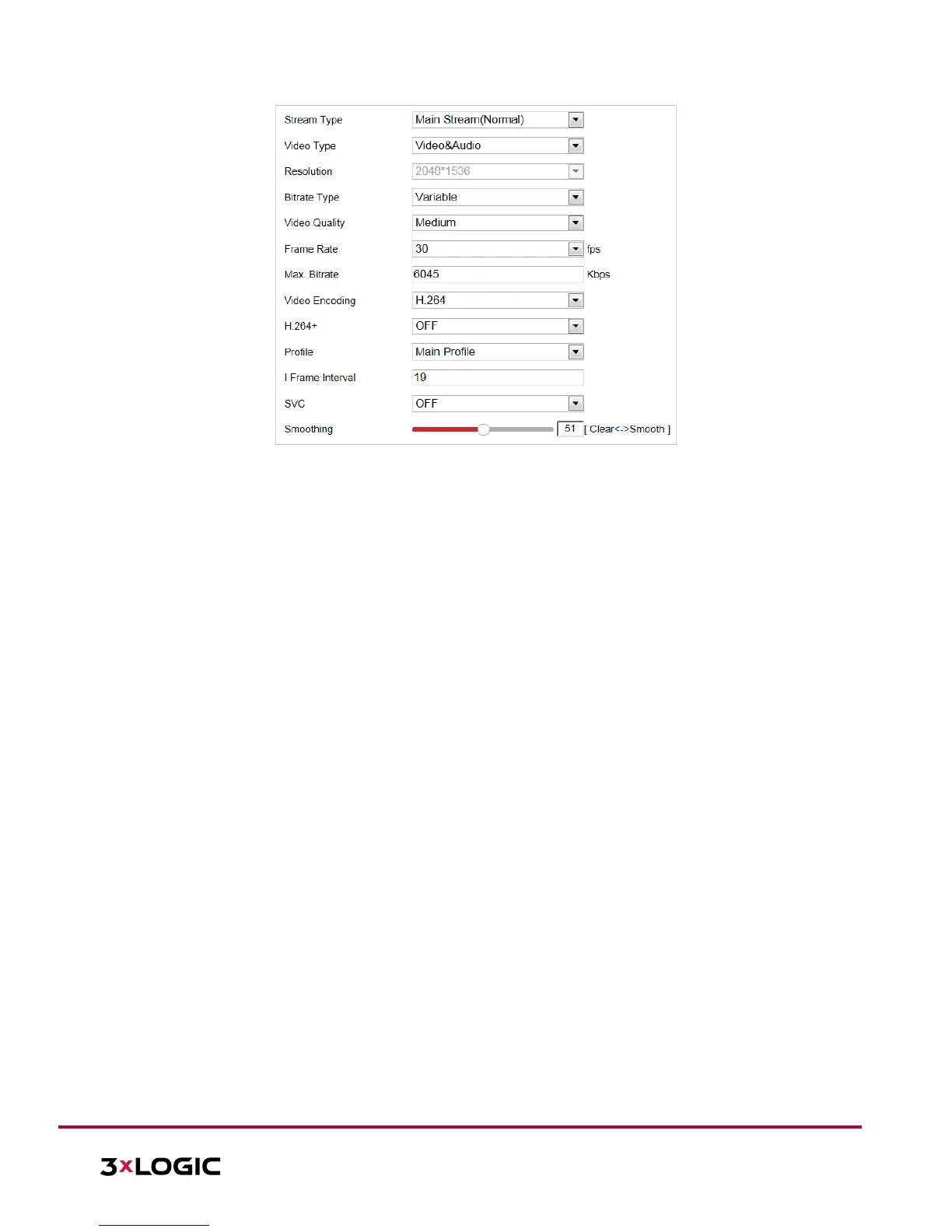
Figure 6-19 Configure Video Settings
2. Set the Stream Type of the camera to main stream (normal), sub-stream or third stream. The main stream
is usually for recording and live viewing in environments with ample bandwidth. Sub-stream can be used
for live viewing when bandwidth is limited. Refer to the Section 4.1 Error! Reference source not found. for
info on switching between main stream and sub-stream for live viewing.
3. The user can customize the following parameters for the selected stream.
NOTE: Parametetrs and related functionality vary depending on different camera models.
Video Type: Select the stream type: video stream, or video & audio composite stream. The audio
signal will be recorded only when the Video Type is Video & Audio.
Resolution: Select the resolution of the video output.
Bitrate Type: Select the bitrate type to constant or variable.
Video Quality: When bitrate type is selected as Variable, 6 levels of video quality are selectable.
Frame Rate: The frame rate describes the frequency at which the video stream is updated and it
is measured by frames per second (fps). A higher frame rate is advantageous when there is
movement in the video stream, as it maintains image quality throughout.
Max. Bitrate: Set the Max. bitrate. The higher value corresponds to the higher video quality,
however, higher bandwidth is required.
Video Encoding: Select Video Encoding from the dropdown list for different stream type.
H.264+/H.265+: Set the compression type to ON or OFF.
H.264+: If you set the main stream as the stream type, and H.264 as the video encoding, H.264+
will be available. H.264+ is an improved compression coding technology based on H.264. By
enabling H.264+, users can estimate the HDD consumption by its maximum average bitrate.
Compared to H.264, H.264+ reduces storage by up to 50% with the same maximum bitrate in
most scenes.
H.265+: If you set the main stream as the stream type, and H.265 as the video encoding, H.265+
will be available. H.265+ is an improved compression coding technology based on H.265. By
enabling H.265+, users can estimate the HDD consumption by its maximum average bitrate.
Compared to H.265, H.265+ reduces storage by up to 50% with the same maximum bitrate in
most scenes.
NOTE: ► H.265+/H.265 functionality varies depending on different speed dome models.



 To Next Page
 Loading...