4s3™ Semi-Automatic Sheet Heat Sealer
4s3™ Semi-Automatic Sheet Heat Sealer, Operation Manual V1.0
2.2 Voltage Check
Be sure that the equipment is not connected to the mains power.
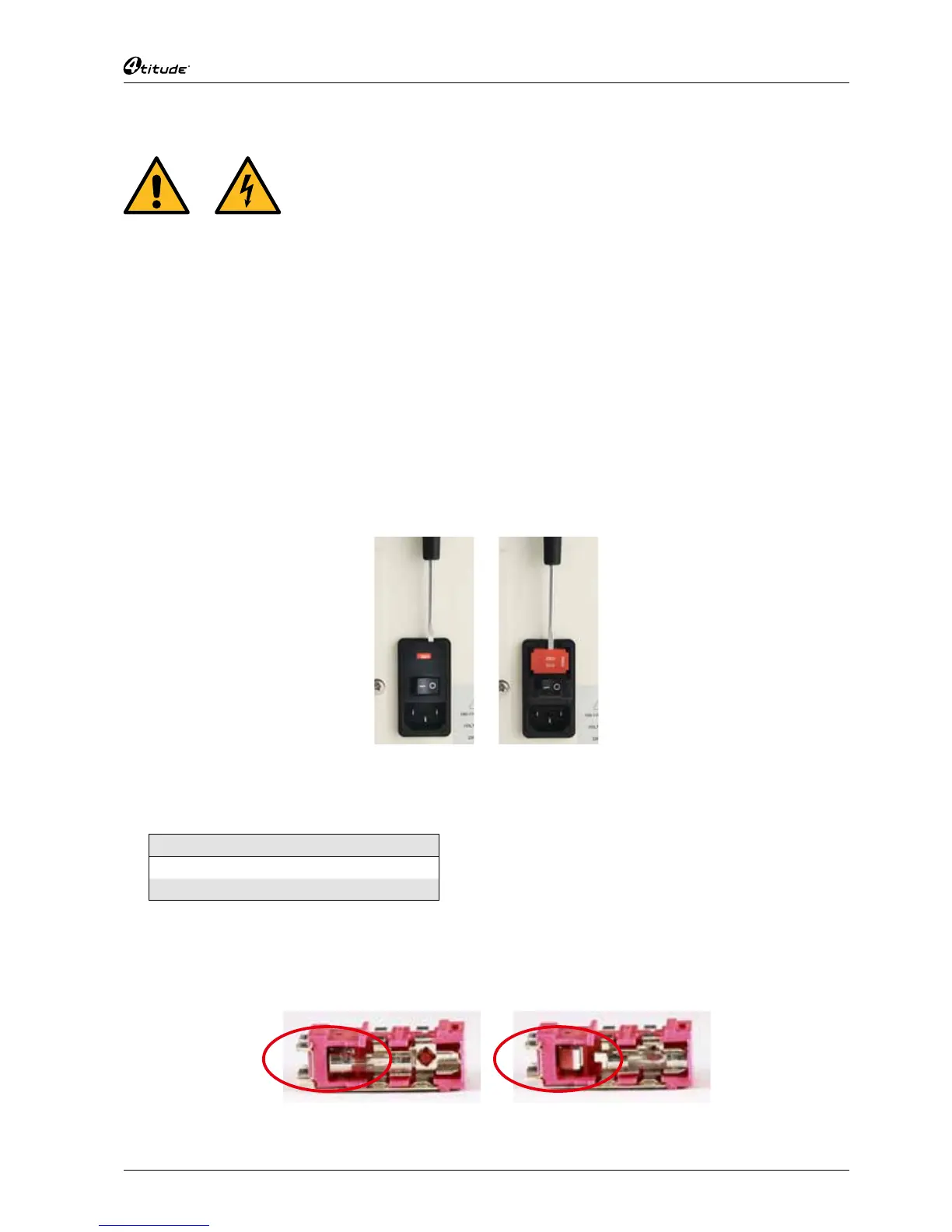
At the rear of the 4s3™ is the connection panel with:
• Power setting 115/230 Vac and Fuse Holder
• I/O Power Switch
• Mains Power Plug
The set voltage is displayed in white on a red background
on the power setting and fuse holder.
Changing the Voltage Setting
1. Open fuse holder compartment with a screwdriver.
2. With the screwdriver lever out the fuse holder.
Opening fuse holder
compartment
Levering out
fuse holder
3. Replace the two fuses according to the table below:
Power Voltage (EN 60127)
115 V 3.15 A (T)
230 V 2 A (T)
4. Insert the fuse holder keeping the set voltage label at the top.
5. Close the fuse compartment by pressing gently.
6. If the fuse holder is inserted correctly you can read the voltage selected
Correct fuse location Incorrect fuse location


 To Next Page