17
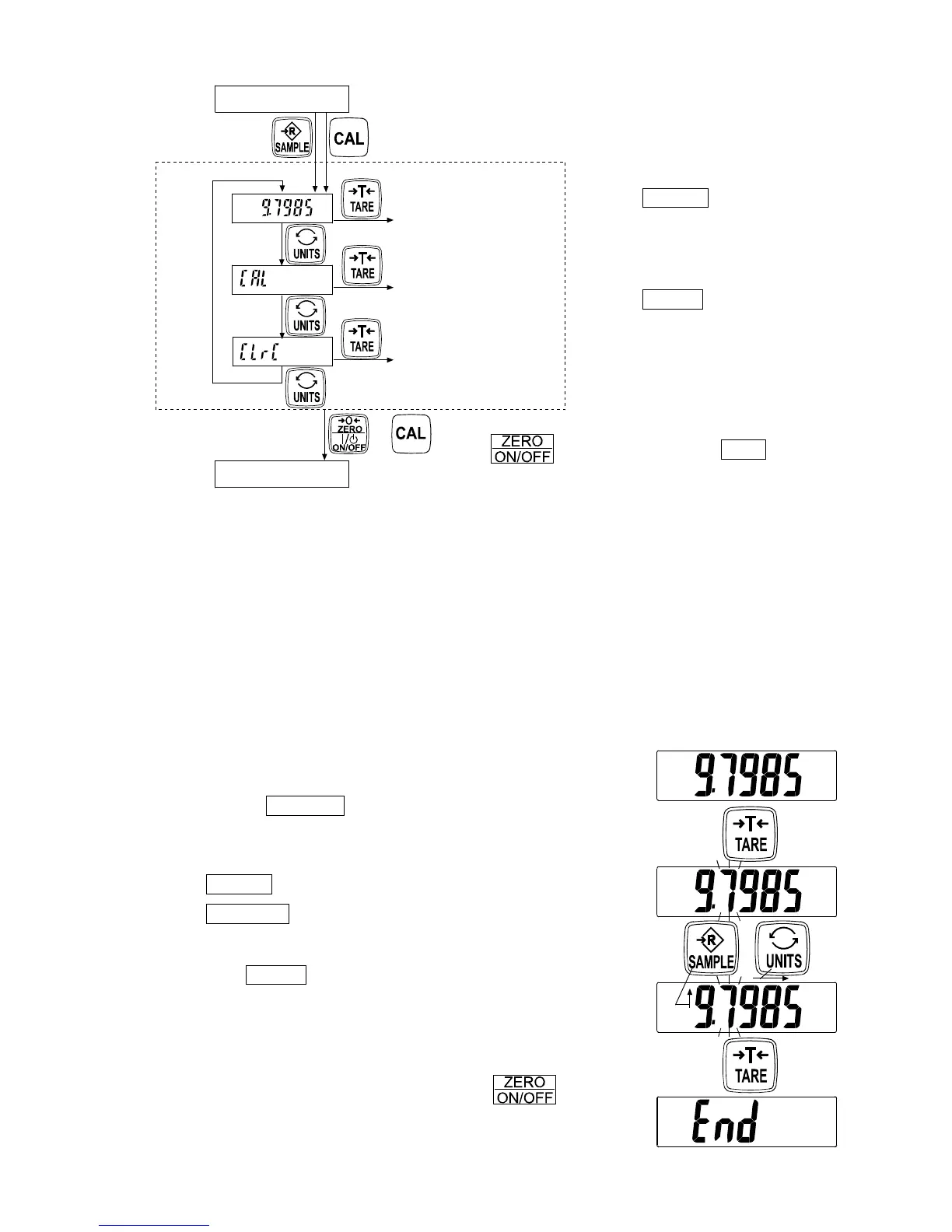
Tap the UNITS switch
to select an item
and
Tap the TARE switch
to execute it.
To exit from the calibration mode, touch
the switch or Press the CAL
switch. The scale turns the power OFF.
10.2. Gravity acceleration correction
When the scale is first used or has been moved to another location, it should be
calibrated using a calibration weight.
But if a calibration weight is not available, the gravity acceleration correction will
compensate the scale. Change the gravity acceleration value stored in the scale to the
value of the area where the scale will be used. Refer to the gravity acceleration map at
the end of this manual.
Note: Gravity acceleration correction is not required when the scale will be
calibrated using a calibration weight at the place where it is to be used.
1. Refer to “10.1. Calibration mode” to enter the calibration
mode. The gravity acceleration value is displayed.
2. Tap the TARE switch to enter the gravity
acceleration value setting mode.
3. Change the displayed value using the following switches.
UNITS To shift the blinking digit to the right.
SAMPLE To increase the value of the blinking
digit by one.
4. Tap the TARE switch. The display shows “end” and
returns to the newly stored gravity acceleration value.
5. When calibration using a calibration weight is to be
performed, go to step 3 of “10.3. Calibration using a
weight”.
To finish the setting procedure, touch the switch
or the CAL switch. The scale returns to the weighing mode.
Weighing mode
Power OFF
Gravity acceleration
correction
Calibration using
a weight
Restoring the factory
set values
or
Method 1
Touch & hold
Calibration mode
Method 2
Press
Tap
Tap
Tap


 To Next Page