19
10.4. Restoring the calibration data to the factory set values
If the gravity acceleration value or calibration data is changed unintentionally, restore
those values to the factory set values, as follows.
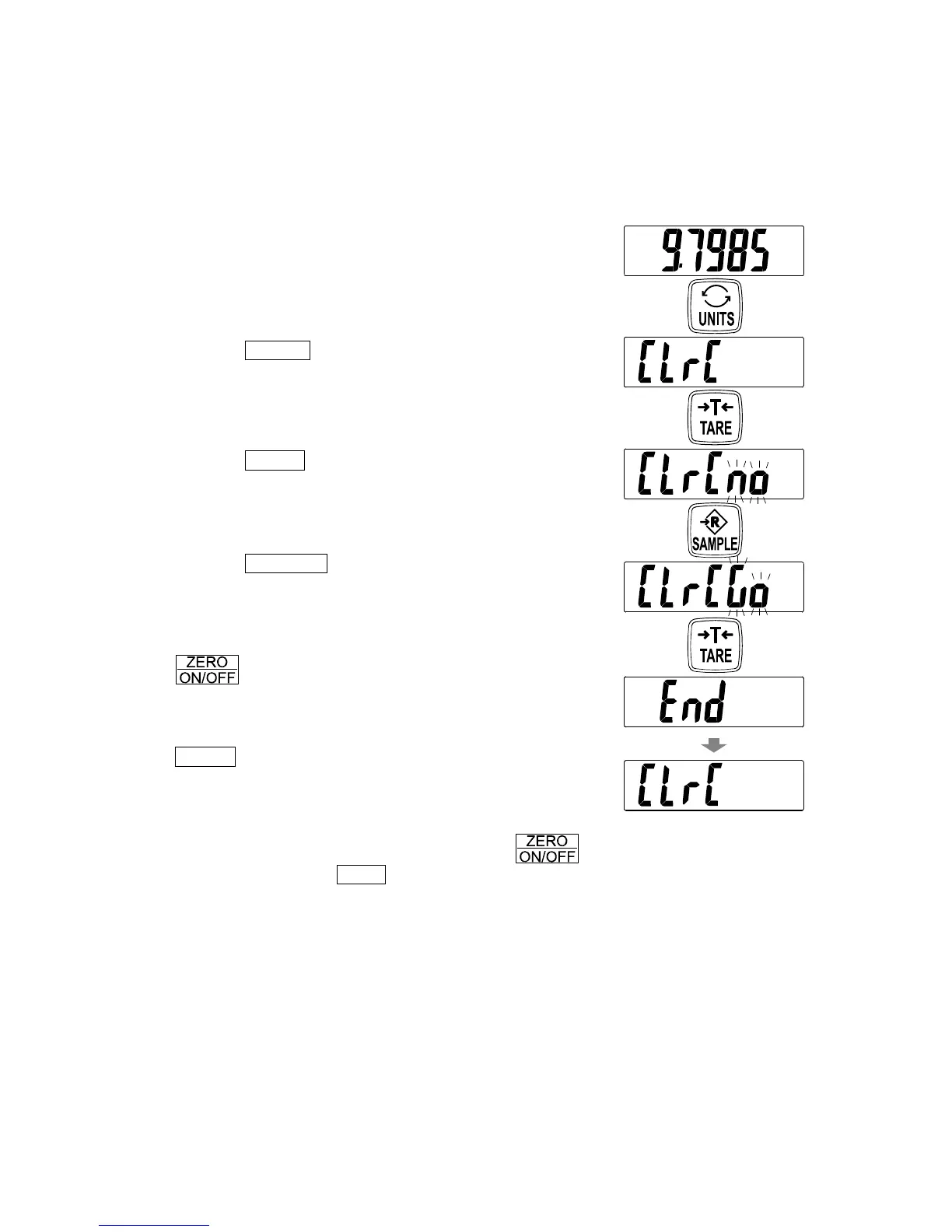
1. Refer to “10.1. Calibration mode” to enter the
calibration mode. The gravity acceleration value is
displayed.
2. Tap the UNITS switch twice to display “
ClrC
”.
3. Tap the TARE switch to display “
ClrC no
” with
“
no
” blinking.
4. Tap the SAMPLE switch.
“
ClrC no
” changes to “
ClrC go
” with “
go
”
blinking.
To cancel the restoring procedure, tap the
switch. The display returns to step 2.
5. When “
ClrC go
” is displayed, tap the
TARE switch. The factory set values are restored
and “
end
” is displayed.
Then, the display returns to “
ClrC
”
To finish the setting procedure, touch the
switch or press the CAL switch. The scale turns
the power OFF.
Tap
Tap
Tap
Tap
twice


 To Next Page