EasyManua.ls Logo

Abaxis i-STAT Alinity v - Page 25

Abaxis i-STAT Alinity v
77 pages
Print Icon
To Next Page IconTo Next Page
To Previous Page IconTo Previous Page
Loading...
Home
16FEB2025 09:45
Home
16FEB2025 09:45
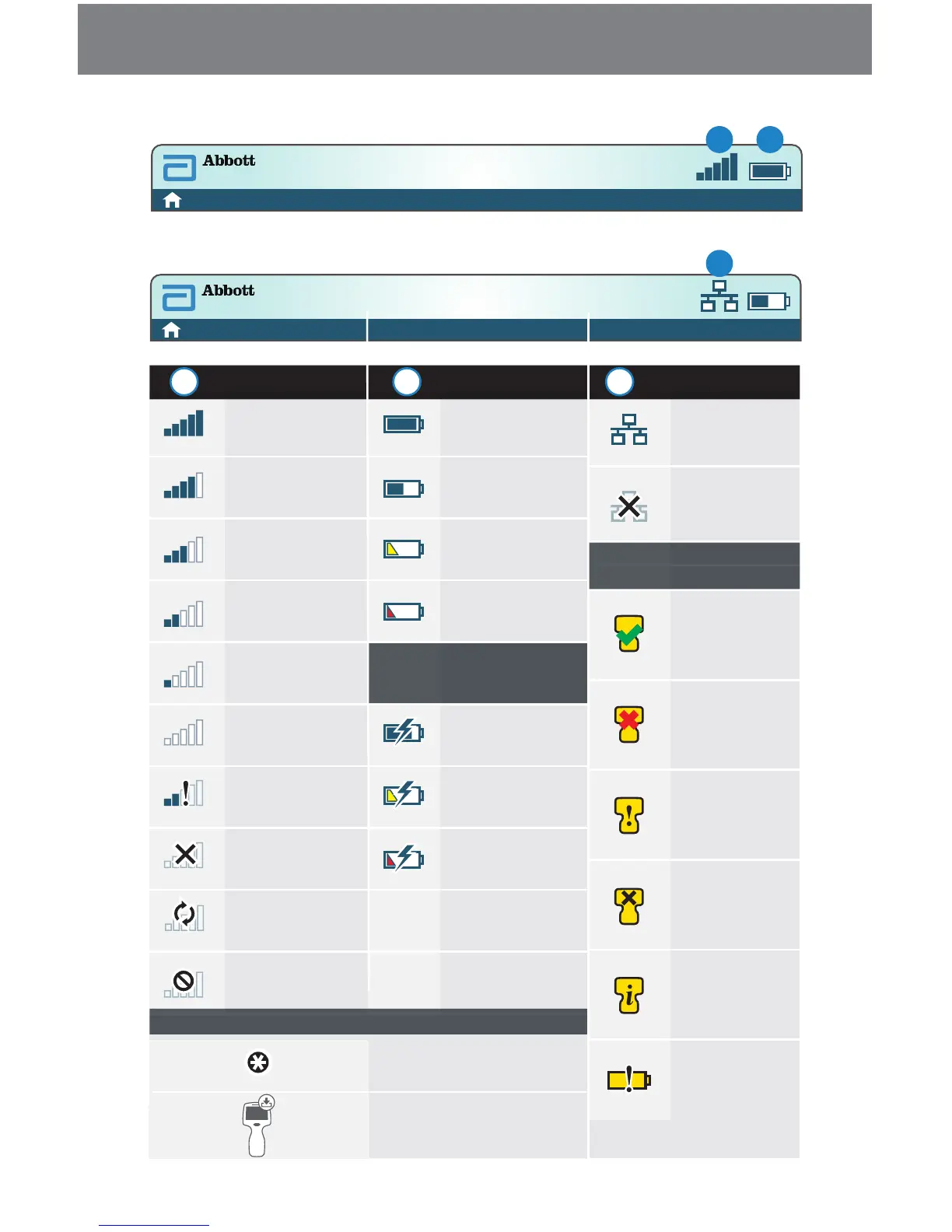
Best
Very Good
Good
Fair
Poor
No Signal
No Connection
Wireless
Disabled
Wireless
Connecting
Wireless Not
Allowed
Fully Charged
Approximately
1/2 Charged
Charge Needed
Soon
Charge
Immediately
Bolt Indicates
Actively Charging
Bolt Indicates
Actively Charging
Bolt Indicates
Actively Charging
Mandatory
Connected
Disabled
Pass
Fail
Warning
Analyzer
Locked
Information
Low Battery
Screen Components and Their Meanings (Continued)
Software Pending
Installation
i-STAT Alinity v — User Manual 650-7100 Rev. A23
A B
C
A
Wireless Status Battery Status Network Status
Battery Charging
Instructional Icons
Alert Icons
B C

Table of Contents

Related product manuals