14
3ADW000191R0500 DCS800 Quick guide edisf e
DCS800 terminal alloc.dsf
X4X3 X5 X6 X7
1 1 1 1 1
2
S5
1
15
6 9
S3
S2
1
X1
X2
X17
2
25
26
1
2
25
26
S4
1
2
1
2
1
2
1
2
H2500
1
2
D2100
1
D2001
D2001
D1000
1 30
1
2
1
2
1
2
1
26
S1
1
42
1
2
3
10
11
12
1
82
1
42
1
2
3
7
8
9
Jumpers shown in default position
1 2 3 4 5 6 7 8 9 10 1 2 3 4 5 6 7 8 9 10 1 2 3 4 5 6 7 8 9 10 1 2 3 4 5 6 7 8 9 10 1 2 3 4 5 6 7 8
X8
1
42
S2
S1
1
2
3
X51 X52 X53 X54
24V
DCS Link
24V
0V
GND B
CANL
CANH
GND B
CANL
CANH
grey
grey
grey
grey
dark
grey
dark
grey
d
ark
grey
blue
blue
RxD
CH 1
TxD
RxD
CH 2
TxD
RxD
CH 3
TxD
RxD
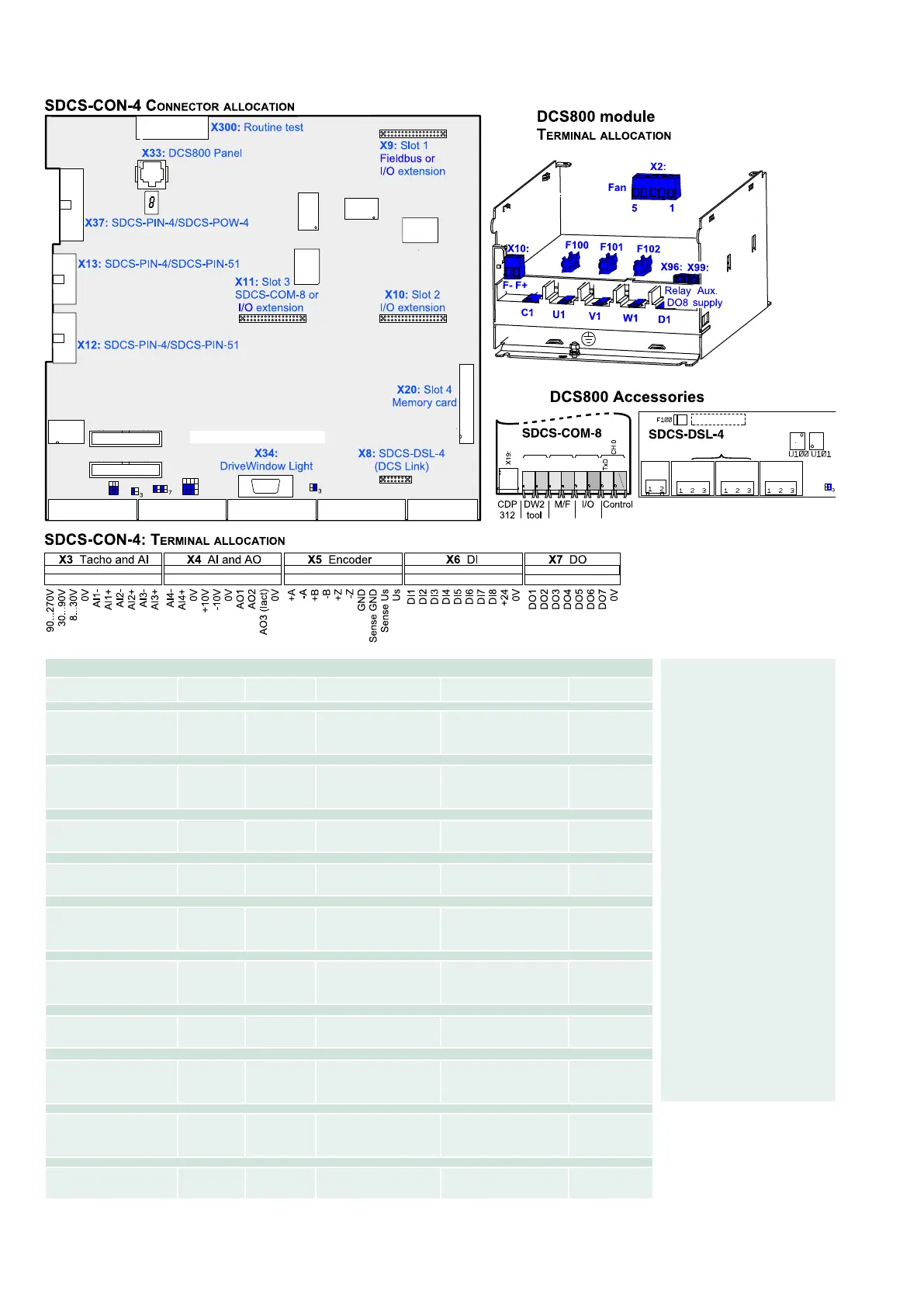
Terminal locations on the converter
Macro finder
Macro name
Main
Contactor
ON / OFF
Start/Stop
DI function
Comment DI5 --> ESTOP
DI6 --> Reset
Standard
AC Static
Jog1 --> DI1
Jog2 --> DI2
Ext Fault --> DI 3
Ext Alarm --> DI4
Hardware I/O control x
2-wire DC cont. US
DC Static
Jog1 --> DI1
Jog2 --> DI2
Ext Fault --> DI 3
Main Cont Ack --> DI4
Hardware I/O control x
3-wire DC cont. US
DC Pulse
Fix speed1 --> DI1
Ext Fault --> DI 3
Main Cont Ack --> DI4
Hardware I/O control x
3-wire Standard
AC Pulse
Fix speed1 --> DI1
Ext Fault --> DI 3
Ext Alarm --> DI4
Hardware I/O control x
Torque limit
AC Static
Jog1 --> DI1
Jog2 --> DI2
Ext Fault --> DI 3
Ext Alarm --> DI4
Hardware I/O control
+ Torque limit
x
Manual / Const
AC Pulse
Jog1 --> DI1
Jog2 --> DI2
Direction --> DI 3
SpC - KP, KI --> DI4
Hardware I/O control
select gain
x
Hand / Auto
AC Static
Control select --> DI2
Reference select --> DI2
Direction select --> DI 3
Hardware I/O control
or field bus control
x
Hand / Mot Pot
AC Pulse
Motor pot up --> DI1
Motor pot down --> DI2
Direction select --> DI 3
Reference select --> DI4
Hardware I/O control
Reference hardware or Motor
potentiometer
x
Motor Pot
AC Static
Direction select --> DI 1
Motor pot up --> DI2
Motor pot down --> DI3
Motor pot minimum --> DI4
Hardware I/O control
Reference Motor potentiometer
x
Torque Ctrl
AC Static
OFF2 (coast stop) --> DI1
Torque select --> DI2
Ext Fault --> DI 3
Hardware I/O control
Speed control or Torque
reference
x
Enabling a macro
Use the
[DCS800Wizard] 2. Macro
assistant of DriveWindow
Light or
Parameter browser, either
through the control panel,
DriveWindow, or DriveWindow
Light.
Use the following parameters:
ApplMacro (99.08) =
Macro selection
Applrestore (99.07) =
YES = execute selection
MacroSel (8.10) =
double check
NOTE
Functions and inputs defined
by macro can be changed la-
ter on without restrictions.
NOTE
Macro diagrams see page
93 ...



 To Next Page