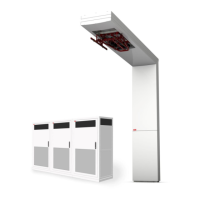
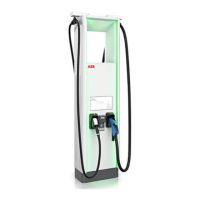
The ABB HVC 100C / HVC 150C with Depot Charge box is a high-power DC charging solution designed for electric buses and trucks, offering sequential charging capabilities for up to three vehicles per charger. This system is part of the HVC-C product line, which facilitates overnight charging for heavy vehicles with power outputs of 100kW or 150kW.
Function Description:
The core function of the HVC-C product line is to provide efficient and reliable DC charging for electric buses and trucks. The system operates on a "first come, first serve" principle for sequential charging. When multiple buses are connected, the charger prioritizes the first connected bus for bulk charging, then moves to the next, and so on, until all connected buses have completed their bulk charge. After bulk charging (typically when the State of Charge (SOC) is > 95% or initiated by the bus), the system transitions to a preconditioning phase, cycling through connected buses in 20-minute intervals. This ensures that vehicles are ready for operation by morning. The charger is a stand-alone unit, and its outlets are exclusively for electric vehicles compatible with the supported charging standards (CCS-1 or CCS-2).
Important Technical Specifications:
The charger configurations include:
- HVC-100C CE: 100kW charge cabinet with 1-3 Depot charge boxes, supporting CCS-2 with CE certification.
- HVC-150C CE: 150kW charge cabinet with 1-3 Depot charge boxes, supporting CCS-2 with CE certification.
- HVC-100C UL: 100kW charge cabinet with 1-3 Depot charge boxes, supporting CCS-1 with UL certification.
- HVC-150C UL: 150kW charge cabinet with 1-3 Depot charge boxes, supporting CCS-1 with UL certification.
Each product configuration can connect 1 to 3 Depot Charge boxes. The system supports the Open Charge Point Protocol (OCPP) for communication with charge stations. Authorization to charge can be based on Vehicle ID and requires a subscription to a back office; the product does not support an RFID reader.
Usage Features:
The system is designed for ease of use by site operators and EV drivers.
- Charging Process (1 Depot Charge Box):
- Park the EV with the charge inlet within reach of the connector.
- Turn off the EV.
- Connect the charger's connector to the vehicle's charge inlet.
- Charging starts automatically after a preparation phase, with progress indicated by the LED state on the Depot charge box.
- Charging Process (2 or 3 Depot Charge Boxes - Sequential Charging):
- Park the EV and turn it off.
- Connect the charger's connector to the vehicle's charge inlet.
- If no other bus requires bulk charging, charging starts automatically.
- If another bus is already charging, the LED state will blink green, indicating a waiting period until other sessions are complete. Charging will then commence automatically.
- After bulk charge, preconditioning starts in a 20-minute loop per bus.
- Stopping Charging:
- Charging stops when the charge session is complete (EV indicates completion or charger completes bulk charge).
- Manual stop via the stop button on the Depot charge box or the bus (if available).
- In sequential charging, if another bus requires bulk charging, preconditioning will stop, and the charger will switch to the next bus. If the stop button is pressed during a multi-bus session, the charger switches to the next bus in line.
- The connector unlocks for CCS when the Depot box beacon turns green.
- Emergency Stop:
- Pushing the emergency stop button immediately halts charging. The LED beacon on all connected Depot Charge Boxes turns red.
- To reset an accidentally pressed emergency stop, verify safety, then pull the button out. The charger reactivates after a few seconds.
- LED Indicators on Depot Charge Box:
- Green (steady): Ready to charge.
- Orange (flashing): Initializing.
- Blue (flashing): Charging.
- Green (flashing): Charge complete.
- Red (steady): Error.
- Safety Notices:
- Warnings are provided for hazardous voltage, rotating parts, pinch hazards, and general safety.
- Instructions for handling damaged charge outlets and emergency procedures are clearly outlined.
- Users are advised to handle cables and connectors with care and never use excessive force.
- The DC connector locks during charging to prevent accidental disconnection.
Maintenance Features:
- Cleaning:
- The cabinet and Depot charge box are made of powder-coated stainless steel.
- Clean three times a year: rinse with low-pressure tap water, apply neutral/weak alkaline cleaning solution, scrub with a non-woven nylon hand pad, rinse thoroughly, and optionally apply wax.
- Avoid high-pressure water jets, abrasive cleaning agents, or tools.
- Address superficial rust on welding points by cleaning and priming.
- Preventive Maintenance:
- Yearly inspection and service by a certified technician are required.
- Regular checks include internal RCDs and RCBOs for correct functioning.
- Inspect powder coating for damage, cracks, or ruptures.
- Emergency Stop Inspection:
- Test the emergency button at least once a year.
- Press the button (beacon turns red), then reset by turning the knob clockwise (charger returns to idle).
- Special Inspections:
- If the charger is struck by lightning, damaged in an accident or fire, or flooded, it must be checked by ABB service personnel before further use.
- Problem Resolution:
- Site operators or helpdesks are the first point of contact for customer calls.
- Internal component overviews (Power Cabinet and Depot Charge Box) are provided for ABB support to guide site operators in reporting status.
- Switching On/Off:
- Charger System: Turn the main switch (A) in the Power Cabinet counterclockwise to "0" (horizontal) to switch off. Turn clockwise to "1" (vertical) to switch on.
- Depot Box: Open the front door, locate the MCB switch (B), and move it down to the OFF position (green visible). Each depot box has its own power supply and must be powered off individually.
- Safety Warning: Do not open the Power Cabinet or Depot charge box doors if unfamiliar with high voltage and current.
The document emphasizes owner responsibilities, including ensuring protective devices are installed, creating an emergency plan, preparing the site, ensuring maintenance space, and appointing a trained person for safe operation. Unauthorized modifications are cautioned against, as they may void the warranty.

 Need help?
 General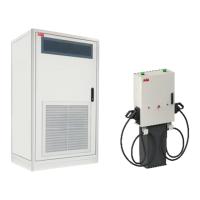

 To Next Page